Spyware/Adware Infection Precaution Advisory
-
You can keep the winspool.drv file. It's OK.
-
Logfile of Trend Micro HijackThis v2.0.2
Scan saved at 4:00:42 PM, on 8/15/2007
Platform: Windows XP SP2 (WinNT 5.01.2600)
MSIE: Internet Explorer v7.00 (7.00.6000.16473)
Boot mode: Normal
Running processes:
C:\WINDOWS\System32\smss.exe
C:\WINDOWS\system32\winlogon.exe
C:\WINDOWS\system32\services.exe
C:\WINDOWS\system32\lsass.exe
C:\WINDOWS\system32\svchost.exe
C:\WINDOWS\System32\svchost.exe
C:\Program Files\Alwil Software\Avast4\aswUpdSv.exe
C:\Program Files\Alwil Software\Avast4\ashServ.exe
C:\Program Files\Bonjour\mDNSResponder.exe
C:\Program Files\Network Associates\Common Framework\FrameworkService.exe
C:\Program Files\Network Associates\VirusScan\Mcshield.exe
C:\Program Files\Network Associates\VirusScan\VsTskMgr.exe
C:\WINDOWS\system32\svchost.exe
C:\Program Files\Alwil Software\Avast4\ashMaiSv.exe
C:\Program Files\Alwil Software\Avast4\ashWebSv.exe
C:\WINDOWS\Explorer.EXE
C:\PROGRA~1\TVAV~1\TVAV~1\TVTray.exe
C:\Program Files\Java\jre1.6.0_02\bin\jusched.exe
C:\Program Files\Common Files\Real\Update_OB\realsched.exe
C:\Program Files\K-Lite Codec Pack\QuickTime\qttask.exe
C:\Program Files\Network Associates\VirusScan\SHSTAT.EXE
C:\Program Files\Network Associates\Common Framework\UpdaterUI.exe
C:\Program Files\Common Files\Network Associates\TalkBack\TBMon.exe
C:\WINDOWS\system32\RUNDLL32.EXE
C:\WINDOWS\RTHDCPL.EXE
C:\PROGRA~1\ALWILS~1\Avast4\ashDisp.exe
C:\Program Files\MSN Messenger\msnmsgr.exe
C:\WINDOWS\system32\ctfmon.exe
C:\Program Files\Common Files\Ahead\Lib\NMBgMonitor.exe
C:\Program Files\MSN Messenger\usnsvc.exe
C:\Program Files\Mozilla Firefox\firefox.exe
C:\Program Files\K-Lite Codec Pack\Media Player Classic\mplayerc.exe
C:\Program Files\Trend Micro\HijackThis\dumb.exe
R0 - HKCU\Software\Microsoft\Internet Explorer\Main,Start Page = http://neopets.com/randomfriend.phtml?user=arataka777
R1 - HKLM\Software\Microsoft\Internet Explorer\Main,Default_Page_URL = http://go.microsoft.com/fwlink/?LinkId=69157
R1 - HKLM\Software\Microsoft\Internet Explorer\Main,Default_Search_URL = http://go.microsoft.com/fwlink/?LinkId=54896
R1 - HKLM\Software\Microsoft\Internet Explorer\Main,Search Page = http://go.microsoft.com/fwlink/?LinkId=54896
R0 - HKLM\Software\Microsoft\Internet Explorer\Main,Start Page = about:blank
R1 - HKCU\Software\Microsoft\Windows\CurrentVersion\Internet Settings,ProxyOverride = *.local
R3 - URLSearchHook: Yahoo! Toolbar - {EF99BD32-C1FB-11D2-892F-0090271D4F88} - C:\Program Files\Yahoo!\Companion\Installs\cpn\yt.dll
O2 - BHO: Yahoo! Toolbar Helper - {02478D38-C3F9-4EFB-9B51-7695ECA05670} - C:\Program Files\Yahoo!\Companion\Installs\cpn\yt.dll
O2 - BHO: Adobe PDF Reader Link Helper - {06849E9F-C8D7-4D59-B87D-784B7D6BE0B3} - C:\Program Files\Adobe\Acrobat 7.0\ActiveX\AcroIEHelper.dll
O2 - BHO: Megaupload Toolbar - {4E7BD74F-2B8D-469E-CCB0-B130EEDBE97C} - C:\PROGRA~1\MEGAUP~1\MEGAUP~1.DLL
O2 - BHO: (no name) - {53707962-6F74-2D53-2644-206D7942484F} - C:\PROGRA~1\SPYBOT~1\SDHelper.dll
O2 - BHO: SSVHelper Class - {761497BB-D6F0-462C-B6EB-D4DAF1D92D43} - C:\Program Files\Java\jre1.6.0_02\bin\ssv.dll
O2 - BHO: Windows Live Sign-in Helper - {9030D464-4C02-4ABF-8ECC-5164760863C6} - C:\Program Files\Common Files\Microsoft Shared\Windows Live\WindowsLiveLogin.dll
O3 - Toolbar: Megaupload Toolbar - {4E7BD74F-2B8D-469E-CCB0-B130EEDBE97C} - C:\PROGRA~1\MEGAUP~1\MEGAUP~1.DLL
O3 - Toolbar: Yahoo! Toolbar - {EF99BD32-C1FB-11D2-892F-0090271D4F88} - C:\Program Files\Yahoo!\Companion\Installs\cpn\yt.dll
O4 - HKLM\..\Run: [NvCplDaemon] "RUNDLL32.EXE" C:\WINDOWS\system32\NvCpl.dll,NvStartup
O4 - HKLM\..\Run: [nwiz] "nwiz.exe" /install
O4 - HKLM\..\Run: [TVTray] C:\PROGRA~1\TVAV~1\TVAV~1\TVTray.exe
O4 - HKLM\..\Run: [SunJavaUpdateSched] "C:\Program Files\Java\jre1.6.0_02\bin\jusched.exe"
O4 - HKLM\..\Run: [NeroFilterCheck] "C:\Program Files\Common Files\Ahead\Lib\NeroCheck.exe"
O4 - HKLM\..\Run: [TkBellExe] "C:\Program Files\Common Files\Real\Update_OB\realsched.exe" -osboot
O4 - HKLM\..\Run: [QuickTime Task] "C:\Program Files\K-Lite Codec Pack\QuickTime\qttask.exe" -atboottime
O4 - HKLM\..\Run: [ShStatEXE] "C:\Program Files\Network Associates\VirusScan\SHSTAT.EXE" /STANDALONE
O4 - HKLM\..\Run: [McAfeeUpdaterUI] "C:\Program Files\Network Associates\Common Framework\UpdaterUI.exe" /StartedFromRunKey
O4 - HKLM\..\Run: [Network Associates Error Reporting Service] "C:\Program Files\Common Files\Network Associates\TalkBack\TBMon.exe"
O4 - HKLM\..\Run: [NvMediaCenter] "RUNDLL32.EXE" C:\WINDOWS\system32\NvMcTray.dll,NvTaskbarInit
O4 - HKLM\..\Run: [RTHDCPL] RTHDCPL.EXE
O4 - HKLM\..\Run: [SkyTel] SkyTel.EXE
O4 - HKLM\..\Run: [IgfxTray] C:\WINDOWS\system32\igfxtray.exe
O4 - HKLM\..\Run: [HotKeysCmds] C:\WINDOWS\system32\hkcmd.exe
O4 - HKLM\..\Run: [Persistence] C:\WINDOWS\system32\igfxpers.exe
O4 - HKLM\..\Run: [avast!] C:\PROGRA~1\ALWILS~1\Avast4\ashDisp.exe
O4 - HKCU\..\Run: [msnmsgr] "C:\Program Files\MSN Messenger\msnmsgr.exe" /background
O4 - HKCU\..\Run: [ctfmon.exe] C:\WINDOWS\system32\ctfmon.exe
O4 - HKCU\..\Run: [BgMonitor_{79662E04-7C6C-4d9f-84C7-88D8A56B10AA}] "C:\Program Files\Common Files\Ahead\Lib\NMBgMonitor.exe"
O4 - Global Startup: Adobe Reader Speed Launch.lnk = C:\Program Files\Adobe\Acrobat 7.0\Reader\reader_sl.exe
O8 - Extra context menu item: E&xport to Microsoft Excel - res://C:\PROGRA~1\MICROS~2\OFFICE11\EXCEL.EXE/3000
O9 - Extra button: (no name) - {08B0E5C0-4FCB-11CF-AAA5-00401C608501} - C:\Program Files\Java\jre1.6.0_02\bin\ssv.dll
O9 - Extra 'Tools' menuitem: Sun Java Console - {08B0E5C0-4FCB-11CF-AAA5-00401C608501} - C:\Program Files\Java\jre1.6.0_02\bin\ssv.dll
O9 - Extra button: Research - {92780B25-18CC-41C8-B9BE-3C9C571A8263} - C:\PROGRA~1\MICROS~2\OFFICE11\REFIEBAR.DLL
O9 - Extra button: (no name) - {e2e2dd38-d088-4134-82b7-f2ba38496583} - C:\WINDOWS\Network Diagnostic\xpnetdiag.exe
O9 - Extra 'Tools' menuitem: @xpsp3res.dll,-20001 - {e2e2dd38-d088-4134-82b7-f2ba38496583} - C:\WINDOWS\Network Diagnostic\xpnetdiag.exe
O9 - Extra button: PartyPoker.net - {F4430FE8-2638-42e5-B849-800749B94EED} - C:\Program Files\PartyGaming.Net\PartyPokerNet\RunPF.exe (file missing)
O9 - Extra 'Tools' menuitem: PartyPoker.net - {F4430FE8-2638-42e5-B849-800749B94EED} - C:\Program Files\PartyGaming.Net\PartyPokerNet\RunPF.exe (file missing)
O9 - Extra button: Messenger - {FB5F1910-F110-11d2-BB9E-00C04F795683} - C:\Program Files\Messenger\msmsgs.exe
O9 - Extra 'Tools' menuitem: Windows Messenger - {FB5F1910-F110-11d2-BB9E-00C04F795683} - C:\Program Files\Messenger\msmsgs.exe
O16 - DPF: {02ECD07A-22D0-4AF0-BA0A-3F6B06086D08} (GamesCampus Control) - http://www.gamescampus.com/xiah/luncher/GamesCampus.cab
O16 - DPF: {17492023-C23A-453E-A040-C7C580BBF700} (Windows Genuine Advantage Validation Tool) - http://go.microsoft.com/fwlink/?linkid=39204
O16 - DPF: {2917297F-F02B-4B9D-81DF-494B6333150B} - http://messenger.zone.msn.com/binary/MineSweeper.cab31267.cab
O16 - DPF: {30528230-99f7-4bb4-88d8-fa1d4f56a2ab} (YInstStarter Class) - C:\Program Files\Yahoo!\Common\yinsthelper.dll
O16 - DPF: {48884C41-EFAC-433D-958A-9FADAC41408E} (EGamesPlugin Class) - https://www.e-games.com.my/com/EGamesPlugin.cab
O16 - DPF: {8E0D4DE5-3180-4024-A327-4DFAD1796A8D} - http://messenger.zone.msn.com/binary/MessengerStatsClient.cab31267.cab
O16 - DPF: {C3F79A2B-B9B4-4A66-B012-3EE46475B072} (MessengerStatsClient Class) - http://messenger.zone.msn.com/binary/MessengerStatsPAClient.cab56907.cab
O20 - Winlogon Notify: Antiwpa - C:\WINDOWS\SYSTEM32\antiwpa.dll
O23 - Service: Adobe LM Service - Adobe Systems - C:\Program Files\Common Files\Adobe Systems Shared\Service\Adobelmsvc.exe
O23 - Service: avast! iAVS4 Control Service (aswUpdSv) - ALWIL Software - C:\Program Files\Alwil Software\Avast4\aswUpdSv.exe
O23 - Service: avast! Antivirus - ALWIL Software - C:\Program Files\Alwil Software\Avast4\ashServ.exe
O23 - Service: avast! Mail Scanner - ALWIL Software - C:\Program Files\Alwil Software\Avast4\ashMaiSv.exe
O23 - Service: avast! Web Scanner - ALWIL Software - C:\Program Files\Alwil Software\Avast4\ashWebSv.exe
O23 - Service: ##Id_String1.6844F930_1628_4223_B5CC_5BB94B879762## (Bonjour Service) - Apple Computer, Inc. - C:\Program Files\Bonjour\mDNSResponder.exe
O23 - Service: FLEXnet Licensing Service - Macrovision Europe Ltd. - C:\Program Files\Common Files\Macrovision Shared\FLEXnet Publisher\FNPLicensingService.exe
O23 - Service: Google Updater Service (gusvc) - Google - C:\Program Files\Google\Common\Google Updater\GoogleUpdaterService.exe
O23 - Service: InstallDriver Table Manager (IDriverT) - Macrovision Corporation - C:\Program Files\Common Files\InstallShield\Driver\11\Intel 32\IDriverT.exe
O23 - Service: iPod Service - Unknown owner - C:\Program Files\iPod\bin\iPodService.exe (file missing)
O23 - Service: McAfee Framework Service (McAfeeFramework) - Network Associates, Inc. - C:\Program Files\Network Associates\Common Framework\FrameworkService.exe
O23 - Service: Network Associates McShield (McShield) - Network Associates, Inc. - C:\Program Files\Network Associates\VirusScan\Mcshield.exe
O23 - Service: Network Associates Task Manager (McTaskManager) - Network Associates, Inc. - C:\Program Files\Network Associates\VirusScan\VsTskMgr.exe
O23 - Service: NBService - Nero AG - C:\Program Files\Nero\Nero 7\Nero BackItUp\NBService.exe
O23 - Service: NVIDIA Display Driver Service (NVSvc) - NVIDIA Corporation - C:\WINDOWS\system32\nvsvc32.exe
O23 - Service: Windows User Mode Driver Frameworkre (Serviceikankan4) - Unknown owner - c:\windows\system32\SP00LSV.EXE (file missing)
O23 - Service: ServiceLayer - Nokia. - C:\Program Files\Common Files\PCSuite\Services\ServiceLayer.exe
O23 - Service: Print Spooler (Spooler) - Unknown owner - C:\WINDOWS\system32\spoolsv.exe (file missing)
O23 - Service: StarWind iSCSI Service (StarWindService) - Unknown owner - C:\Program Files\Alcohol Soft\Alcohol 120\StarWind\StarWindService.exe (file missing)
--
End of file - 10043 bytes -
Any more problems?
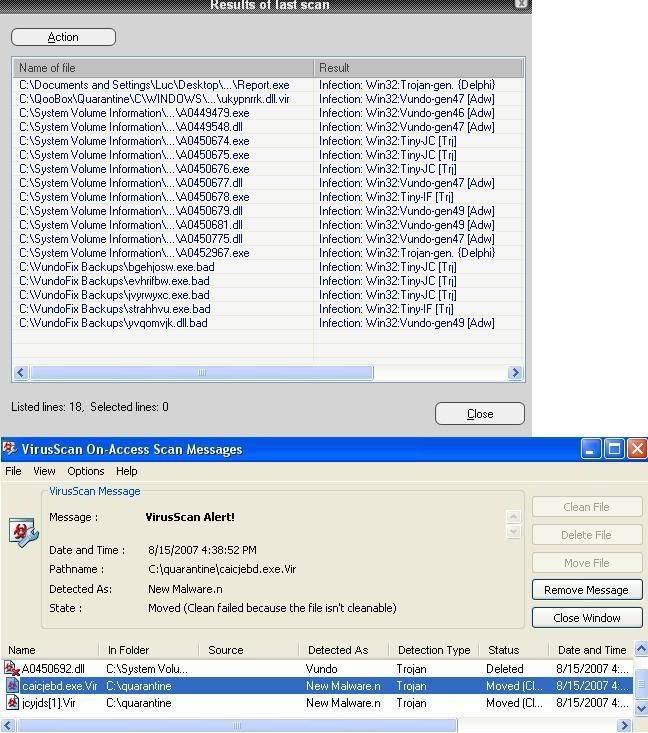
Can you please scan with your antivirus to see if there any more problems left behind. -
-
Doesn't look too bad.Originally posted by _n00b_:
You need to delete these folders:
1. C:\Qoobox
2. C:\VundoFix Backups
These folders are created by the fix tools.
And also reset your System Restore as they are infected.- [*]Right click on My Computer and select Properties.
[*]Select the System Restore tab.
[*]Check (tick) Turn off system restore on all drives box.
[*]Click OK.
[*]Restart your computer.
After restarting your computer, follow these steps:- [*]Right click on My Computer and select Properties.
[*]Select the System Restore tab.
[*]Uncheck (untick) Turn off system restore on all drives box.
[*]Click OK.
[*]Restart your computer.
Note: Do this only ONCE, don't flush it regularly. -
thanks mayi for helping me out the whole day...
-


hey need help here, i have run kaspersky scan as suggested n took me whole afternoon to scan finish...it seems my lappie is screwed up, any adivces wad should i do? i wouldnt want to reformat cause i dont have backup disk n programs. -
1. Empty your Spybot Search & Destroy infected files.
2. You need to delete all your temporary files. They are infected.
3. You need to create a new system restore point, they are infected. -
Free and uninfected web browsers
Internet Explorer 6 SP1
Internet Explorer 7 for Windows XP SP2
Internet Exploer 7 for 64-bit Windows XP SP2
Internet Explorer 7 for 64-bit Windows Server 2003
Internet Explorer 7 for Windows Server 2003 SP1 and SP2
Internet Explorer 7 for Windows Server 2003 IA64
Mozilla Seamonkey
Camino (for Mac only)
Firefox
Epiphany (for Linux only)
Netscape
Nautilus (for Linux only)
Galeon (for Linux only)
Opera
Safari (for Windows and Mac only)
Maxthon
Avant
Konqueror (for Linux only)
K-Meleon
K-Ninja (for Windows and Linux only, need to join Google group to get the download link, too lazy, PM me)
Slimbrowser -
for 1) how should i delete it? cant seem to find the infected filesOriginally posted by ndmmxiaomayi:1. Empty your Spybot Search & Destroy infected files.
2. You need to delete all your temporary files. They are infected.
3. You need to create a new system restore point, they are infected.
for 2)how do i do that? go to temp file n manually delete? any problem arising?
for 3) done as instructed -
1. You need to show hidden files first.Originally posted by borntolive:for 1) how should i delete it? cant seem to find the infected files
for 2)how do i do that? go to temp file n manually delete? any problem arising?
for 3) done as instructed
a) Open My Computer. Go to Tools > Options
b) Select the View tab
c) Under Hidden Files and Folders, select Show Hidden Files and Folders
d) Untick these boxes: i) Hide extensions for known file types
ii) Hide protected operating system files (Recommended)
e) Click Yes when prompted.
f) Click OK.
Go to this folder: C:\Documents and Settings\All Users\Application Data\Spybot S&D\Recovery
You will see a lot of files there. Delete the files detected by Kaspersky as infected (see your report, I can't see the names, they are cut off).
2. There's no side effect... unless you clear your cache and cookies as well...
Clearing cache will slow down your connection a bit as it will now need to download everything again from the internet, rather than using data from your own hard disk.
Clearing cookies will clear all your login information...
To do that, you can use ATF Cleaner or CCleaner... see the Speed up your computer sticky first page. You can set either to retain your cache and cookies so as not to affect you. -
Ok my mum's laptop is infected.Damn those pops up virus installer.
Later i'll show u the logs.
http://s18.photobucket.com/albums/b140/rocky_509/?action=view¤t=dasd.png
The background thing.Plus the task bar manager??? -
Logfile of HijackThis v1.99.1
Scan saved at 6:18:36 PM, on 8/21/2007
Platform: Windows XP SP2 (WinNT 5.01.2600)
MSIE: Internet Explorer v6.00 SP2 (6.00.2900.2180)
Running processes:
C:\WINDOWS\System32\smss.exe
C:\WINDOWS\system32\csrss.exe
C:\WINDOWS\system32\winlogon.exe
C:\WINDOWS\system32\services.exe
C:\WINDOWS\system32\lsass.exe
C:\WINDOWS\system32\svchost.exe
C:\WINDOWS\system32\svchost.exe
C:\WINDOWS\System32\svchost.exe
C:\WINDOWS\system32\svchost.exe
C:\Program Files\Common Files\Symantec Shared\CCPD-LC\symlcsvc.exe
C:\WINDOWS\system32\spoolsv.exe
C:\Program Files\Common Files\LightScribe\LSSrvc.exe
C:\Program Files\Common Files\McAfee\HackerWatch\HWAPI.exe
C:\PROGRA~1\McAfee\MSC\mclogsrv.exe
C:\PROGRA~1\McAfee\MSC\mcupdmgr.exe
c:\program files\common files\mcafee\mna\mcnasvc.exe
C:\PROGRA~1\McAfee\MSC\mcpromgr.exe
C:\PROGRA~1\McAfee\MSC\mctskshd.exe
C:\PROGRA~1\McAfee\MSC\mcusrmgr.exe
C:\Program Files\McAfee\MPF\MPFSrv.exe
C:\Program Files\Mcafee\MWL\MwlSvc.exe
C:\Program Files\Eset\nod32krn.exe
C:\Program Files\Spyware Doctor\sdhelp.exe
C:\WINDOWS\system32\svchost.exe
C:\Program Files\Hewlett-Packard\Shared\hpqwmiex.exe
C:\WINDOWS\system32\wbem\wmiprvse.exe
C:\WINDOWS\system32\HPZipm12.exe
C:\Program Files\iPod\bin\iPodService.exe
C:\WINDOWS\Explorer.EXE
c:\PROGRA~1\mcafee.com\agent\mcagent.exe
C:\Program Files\ATI Technologies\ATI Control Panel\atiptaxx.exe
C:\Program Files\Synaptics\SynTP\SynTPLpr.exe
C:\Program Files\Synaptics\SynTP\SynTPEnh.exe
C:\Program Files\hpq\HP Wireless Assistant\HP Wireless Assistant.exe
C:\Program Files\Hp\HP Software Update\HPWuSchd2.exe
C:\Program Files\HP\QuickPlay\QPService.exe
C:\Program Files\HPQ\Quick Launch Buttons\EabServr.exe
C:\Program Files\Java\jre1.6.0_01\bin\jusched.exe
C:\WINDOWS\system32\spool\drivers\w32x86\3\hpztsb11.exe
C:\Program Files\HP\hpcoretech\hpcmpmgr.exe
C:\WINDOWS\system32\hphmon06.exe
C:\Program Files\Eset\nod32kui.exe
C:\Program Files\Common Files\Real\Update_OB\realsched.exe
C:\Program Files\Mcafee\MWL\MWLGui.exe
C:\Program Files\QuickTime\qttask.exe
C:\Program Files\iTunes\iTunesHelper.exe
C:\Program Files\Spyware Doctor\swdoctor.exe
C:\Program Files\TechSmith\SnagIt 8\SnagIt32.exe
C:\Program Files\WinZip\WZQKPICK.EXE
C:\PROGRA~1\HPQ\SHARED\HPQTOA~1.EXE
C:\Program Files\TechSmith\SnagIt 8\TSCHelp.exe
C:\Program Files\HP\Digital Imaging\bin\hpqimzone.exe
C:\Program Files\TechSmith\SnagIt 8\SnagPriv.exe
C:\Program Files\Real\RealPlayer\RealPlay.exe
C:\Program Files\Java\jre1.6.0_01\bin\jucheck.exe
C:\Program Files\Real\RealPlayer\RealPlay.exe
C:\Documents and Settings\Zarinah\Application Data\U3\00001615117078B1\LaunchPad.exe
C:\Program Files\Mozilla Firefox\firefox.exe
C:\WINDOWS\Explorer.EXE
C:\Documents and Settings\Zarinah\Application Data\U3\00001615117078B1\1F30627F-0195-44d4-8C24-1999F3C02C50\Exec\AvU3_Upd.exe
C:\Documents and Settings\Zarinah\Application Data\U3\00001615117078B1\1F30627F-0195-44d4-8C24-1999F3C02C50\Exec\AvU3Launcher.exe
C:\Documents and Settings\Zarinah\Application Data\U3\00001615117078B1\1F30627F-0195-44d4-8C24-1999F3C02C50\Exec\AvastU3.exe
G:\HijackThis.exe
R0 - HKCU\Software\Microsoft\Internet Explorer\Main,Start Page = http://softwarereferral.com/jump.php?wmid=6010&mid=MjI6Ojg5&lid=2
R1 - HKLM\Software\Microsoft\Internet Explorer\Main,Default_Page_URL = http://ie.redirect.hp.com/svs/rdr?TYPE=3&tp=iehome&locale=EN_SG&c=Q106&bd=presario&pf=laptop
R1 - HKCU\Software\Microsoft\Windows\CurrentVersion\Internet Settings,ProxyServer = fol.singnet.com.sg:8080
R1 - HKCU\Software\Microsoft\Windows\CurrentVersion\Internet Settings,ProxyOverride = 192.168.1.254;
O2 - BHO: SnagIt Toolbar Loader - {00C6482D-C502-44C8-8409-FCE54AD9C208} - C:\Program Files\TechSmith\SnagIt 8\SnagItBHO.dll
O2 - BHO: Yahoo! Toolbar Helper - {02478D38-C3F9-4EFB-9B51-7695ECA05670} - C:\Program Files\Yahoo!\Companion\Installs\cpn\yt.dll
O2 - BHO: AcroIEHlprObj Class - {06849E9F-C8D7-4D59-B87D-784B7D6BE0B3} - C:\Program Files\Adobe\Acrobat 7.0\ActiveX\AcroIEHelper.dll
O2 - BHO: (no name) - {089FD14D-132B-48FC-8861-0048AE113215} - C:\Program Files\SiteAdvisor\SiteAdv.dll
O2 - BHO: (no name) - {184746EC-9E9D-4C7D-B9E7-9039EBD801A9} - C:\Program Files\Image ActiveX Access\iesplg.dll (file missing)
O2 - BHO: MSVPS System - {283A0EE3-2CC1-45AB-8207-B1D7B69C7F83} - C:\WINDOWS\duocore.dll
O2 - BHO: Big Fish Games Toolbar - {4E7BD74F-2B8D-469E-86BD-FD60BB9AAE3A} - C:\PROGRA~1\BFGTOO~1\BFGTOO~1.DLL
O2 - BHO: PCTools Site Guard - {5C8B2A36-3DB1-42A4-A3CB-D426709BBFEB} - C:\PROGRA~1\SPYWAR~1\tools\iesdsg.dll
O2 - BHO: SSVHelper Class - {761497BB-D6F0-462C-B6EB-D4DAF1D92D43} - C:\Program Files\Java\jre1.6.0_01\bin\ssv.dll
O2 - BHO: Windows Live Sign-in Helper - {9030D464-4C02-4ABF-8ECC-5164760863C6} - C:\Program Files\Common Files\Microsoft Shared\Windows Live\WindowsLiveLogin.dll
O2 - BHO: Google Toolbar Helper - {AA58ED58-01DD-4d91-8333-CF10577473F7} - c:\program files\google\googletoolbar3.dll
O2 - BHO: PCTools Browser Monitor - {B56A7D7D-6927-48C8-A975-17DF180C71AC} - C:\PROGRA~1\SPYWAR~1\tools\iesdpb.dll
O3 - Toolbar: (no name) - {E0E899AB-F487-11D5-8D29-0050BA6940E3} - (no file)
O3 - Toolbar: Yahoo! Toolbar - {EF99BD32-C1FB-11D2-892F-0090271D4F88} - C:\Program Files\Yahoo!\Companion\Installs\cpn\yt.dll
O3 - Toolbar: McAfee SiteAdvisor - {0BF43445-2F28-4351-9252-17FE6E806AA0} - C:\Program Files\SiteAdvisor\SiteAdv.dll
O3 - Toolbar: &Google - {2318C2B1-4965-11d4-9B18-009027A5CD4F} - c:\program files\google\googletoolbar3.dll
O3 - Toolbar: SnagIt - {8FF5E183-ABDE-46EB-B09E-D2AAB95CABE3} - C:\Program Files\TechSmith\SnagIt 8\SnagItIEAddin.dll
O3 - Toolbar: Big Fish Games Toolbar - {4E7BD74F-2B8D-469E-86BD-FD60BB9AAE3A} - C:\PROGRA~1\BFGTOO~1\BFGTOO~1.DLL
O3 - Toolbar: Protection Bar - {29C5A3B6-9A8D-4FA0-B5AD-3E20F4AA5C00} - C:\Program Files\Image ActiveX Access\iesbpl.dll (file missing)
O4 - HKLM\..\Run: [ATIPTA] "C:\Program Files\ATI Technologies\ATI Control Panel\atiptaxx.exe"
O4 - HKLM\..\Run: [SynTPLpr] "C:\Program Files\Synaptics\SynTP\SynTPLpr.exe"
O4 - HKLM\..\Run: [SynTPEnh] "C:\Program Files\Synaptics\SynTP\SynTPEnh.exe"
O4 - HKLM\..\Run: [hpWirelessAssistant] "C:\Program Files\hpq\HP Wireless Assistant\HP Wireless Assistant.exe"
O4 - HKLM\..\Run: [HP Software Update] "C:\Program Files\Hp\HP Software Update\HPWuSchd2.exe"
O4 - HKLM\..\Run: [QPService] "C:\Program Files\HP\QuickPlay\QPService.exe"
O4 - HKLM\..\Run: [eabconfg.cpl] "C:\Program Files\HPQ\Quick Launch Buttons\EabServr.exe" /Start
O4 - HKLM\..\Run: [Cpqset] C:\Program Files\HPQ\Default Settings\cpqset.exe
O4 - HKLM\..\Run: [RecGuard] C:\Windows\SMINST\RecGuard.exe
O4 - HKLM\..\Run: [SunJavaUpdateSched] "C:\Program Files\Java\jre1.6.0_01\bin\jusched.exe"
O4 - HKLM\..\Run: [IMJPMIG8.1] "C:\WINDOWS\IME\imjp8_1\IMJPMIG.EXE" /Spoil /RemAdvDef /Migration32
O4 - HKLM\..\Run: [IMEKRMIG6.1] C:\WINDOWS\ime\imkr6_1\IMEKRMIG.EXE
O4 - HKLM\..\Run: [MSPY2002] "C:\WINDOWS\system32\IME\PINTLGNT\ImScInst.exe" /SYNC
O4 - HKLM\..\Run: [PHIME2002ASync] "C:\WINDOWS\system32\IME\TINTLGNT\TINTSETP.EXE" /SYNC
O4 - HKLM\..\Run: [PHIME2002A] "C:\WINDOWS\system32\IME\TINTLGNT\TINTSETP.EXE" /IMEName
O4 - HKLM\..\Run: [HPDJ Taskbar Utility] C:\WINDOWS\system32\spool\drivers\w32x86\3\hpztsb11.exe
O4 - HKLM\..\Run: [HPHUPD06] "C:\Program Files\HP\{AAC4FC36-8F89-4587-8DD3-EBC57C83374D}\hphupd06.exe"
O4 - HKLM\..\Run: [HP Component Manager] "C:\Program Files\HP\hpcoretech\hpcmpmgr.exe"
O4 - HKLM\..\Run: [HPHmon06] C:\WINDOWS\system32\hphmon06.exe
O4 - HKLM\..\Run: [PCPerf] "C:\PROGRA~1\PCACCE~1\pcperf.exe"
O4 - HKLM\..\Run: [KernelFaultCheck] %systemroot%\system32\dumprep 0 -k
O4 - HKLM\..\Run: [nod32kui] "C:\Program Files\Eset\nod32kui.exe" /WAITSERVICE
O4 - HKLM\..\Run: [Intel Driver] csrs.exe
O4 - HKLM\..\Run: [TkBellExe] "C:\Program Files\Common Files\Real\Update_OB\realsched.exe" -osboot
O4 - HKLM\..\Run: [Rapget] C:\Documents and Settings\Zarinah\Desktop\Unused Desktop Shortcuts\rapget126\rapget.exe
O4 - HKLM\..\Run: [0301491169222970mcinstcleanup] C:\DOCUME~1\Zarinah\LOCALS~1\Temp\030149~1.EXE C:\PROGRA~1\COMMON~1\McAfee\INSTAL~1\cleanup.ini -cleanup -nolog
O4 - HKLM\..\Run: [MWLExe] C:\Program Files\Mcafee\MWL\MWLGui.exe /Start
O4 - HKLM\..\Run: [QuickTime Task] "C:\Program Files\QuickTime\qttask.exe" -atboottime
O4 - HKLM\..\Run: [iTunesHelper] "C:\Program Files\iTunes\iTunesHelper.exe"
O4 - HKLM\..\RunServices: [Intel Driver] csrs.exe
O4 - HKCU\..\Run: [CMS_RSChecker] "C:\Documents and Settings\Zarinah\Desktop\RG_RSFAN\1\Rapidshare Free Account Notifier v1.0\RSFAN.exe" -m
O4 - HKCU\..\Run: [Spyware Doctor] "C:\Program Files\Spyware Doctor\swdoctor.exe" /Q
O4 - HKCU\..\Run: [SecurePCCleaner] C:\Program Files\SecurePCCleaner\GDC.exe
O4 - Global Startup: Adobe Reader Speed Launch.lnk = C:\Program Files\Adobe\Acrobat 7.0\Reader\reader_sl.exe
O4 - Global Startup: HP Digital Imaging Monitor.lnk = C:\Program Files\HP\Digital Imaging\bin\hpqtra08.exe
O4 - Global Startup: HP Photosmart Premier Fast Start.lnk = C:\Program Files\HP\Digital Imaging\bin\hpqthb08.exe
O4 - Global Startup: SnagIt 8.lnk = C:\Program Files\TechSmith\SnagIt 8\SnagIt32.exe
O4 - Global Startup: WinZip Quick Pick.lnk = C:\Program Files\WinZip\WZQKPICK.EXE
O8 - Extra context menu item: E&xport to Microsoft Excel - res://C:\PROGRA~1\MICROS~4\OFFICE11\EXCEL.EXE/3000
O9 - Extra button: (no name) - {08B0E5C0-4FCB-11CF-AAA5-00401C608501} - C:\Program Files\Java\jre1.6.0_01\bin\ssv.dll
O9 - Extra 'Tools' menuitem: Sun Java Console - {08B0E5C0-4FCB-11CF-AAA5-00401C608501} - C:\Program Files\Java\jre1.6.0_01\bin\ssv.dll
O9 - Extra button: Spyware Doctor - {2D663D1A-8670-49D9-A1A5-4C56B4E14E84} - C:\PROGRA~1\SPYWAR~1\tools\iesdpb.dll
O9 - Extra button: Research - {92780B25-18CC-41C8-B9BE-3C9C571A8263} - C:\PROGRA~1\MICROS~4\OFFICE11\REFIEBAR.DLL
O9 - Extra button: Messenger - {FB5F1910-F110-11d2-BB9E-00C04F795683} - C:\Program Files\Messenger\msmsgs.exe
O9 - Extra 'Tools' menuitem: Windows Messenger - {FB5F1910-F110-11d2-BB9E-00C04F795683} - C:\Program Files\Messenger\msmsgs.exe
O14 - IERESET.INF: START_PAGE_URL=http://ie.redirect.hp.com/svs/rdr?TYPE=3&tp=iehome&locale=EN_SG&c=Q106&bd=presario&pf=laptop
O18 - Protocol: livecall - {828030A1-22C1-4009-854F-8E305202313F} - C:\PROGRA~1\MSNMES~1\MSGRAP~1.DLL
O18 - Protocol: msnim - {828030A1-22C1-4009-854F-8E305202313F} - C:\PROGRA~1\MSNMES~1\MSGRAP~1.DLL
O20 - Winlogon Notify: WRNotifier - WRLogonNTF.dll (file missing)
O21 - SSODL: featherweed - {ab340860-fd81-4a65-b345-82eb77a66b5e} - C:\WINDOWS\system32\jbtazy.dll (file missing)
O21 - SSODL: WPDShServiceObj - {AAA288BA-9A4C-45B0-95D7-94D524869DB5} - C:\WINDOWS\system32\WPDShServiceObj.dll
O21 - SSODL: wmpenv - {0BEEA59A-05C4-40F4-90FE-FC3E2511A6D7} - C:\WINDOWS\wmpenv.dll
O21 - SSODL: wmpconf - {ACD30D80-2CB9-445B-BCE7-8994AA701C68} - C:\WINDOWS\wmpconf.dll
O23 - Service: Ati HotKey Poller - ATI Technologies Inc. - C:\WINDOWS\system32\Ati2evxx.exe
O23 - Service: Google Updater Service (gusvc) - Google - C:\Program Files\Google\Common\Google Updater\GoogleUpdaterService.exe
O23 - Service: HP WMI Interface (hpqwmi) - Hewlett-Packard Development Company, L.P. - C:\Program Files\HPQ\Shared\hpqwmi.exe
O23 - Service: hpqwmiex - Hewlett-Packard Development Company, L.P. - C:\Program Files\Hewlett-Packard\Shared\hpqwmiex.exe
O23 - Service: InstallDriver Table Manager (IDriverT) - Macrovision Corporation - C:\Program Files\Common Files\InstallShield\Driver\1050\Intel 32\IDriverT.exe
O23 - Service: iPod Service - Apple Inc. - C:\Program Files\iPod\bin\iPodService.exe
O23 - Service: LightScribeService Direct Disc Labeling Service (LightScribeService) - Hewlett-Packard Company - C:\Program Files\Common Files\LightScribe\LSSrvc.exe
O23 - Service: MBackMonitor - - C:\Program Files\McAfee\MBK\MBackMonitor.exe
O23 - Service: McAfee HackerWatch Service - McAfee, Inc. - C:\Program Files\Common Files\McAfee\HackerWatch\HWAPI.exe
O23 - Service: McAfee Log Manager (McLogManagerService) - McAfee, Inc. - C:\PROGRA~1\McAfee\MSC\mclogsrv.exe
O23 - Service: McAfee Update Manager (mcmispupdmgr) - McAfee, Inc. - C:\PROGRA~1\McAfee\MSC\mcupdmgr.exe
O23 - Service: McAfee Network Agent (McNASvc) - McAfee, Inc. - c:\program files\common files\mcafee\mna\mcnasvc.exe
O23 - Service: McAfee Protection Manager (mcpromgr) - McAfee, Inc. - C:\PROGRA~1\McAfee\MSC\mcpromgr.exe
O23 - Service: McAfee Task Scheduler (mctskshd.exe) - McAfee, Inc. - C:\PROGRA~1\McAfee\MSC\mctskshd.exe
O23 - Service: McAfee User Manager (mcusrmgr) - McAfee, Inc. - C:\PROGRA~1\McAfee\MSC\mcusrmgr.exe
O23 - Service: McAfee Personal Firewall Service (MpfService) - McAfee, Inc. - C:\Program Files\McAfee\MPF\MPFSrv.exe
O23 - Service: McAfee Wireless Network Security Service (MWLSvc) - McAfee, Inc. - C:\Program Files\Mcafee\MWL\MwlSvc.exe
O23 - Service: NOD32 Kernel Service (NOD32krn) - Eset - C:\Program Files\Eset\nod32krn.exe
O23 - Service: Pml Driver HPZ12 - HP - C:\WINDOWS\system32\HPZipm12.exe
O23 - Service: PC Tools Spyware Doctor (SDhelper) - PC Tools Research Pty Ltd - C:\Program Files\Spyware Doctor\sdhelp.exe
O23 - Service: Symantec Core LC - Symantec Corporation - C:\Program Files\Common Files\Symantec Shared\CCPD-LC\symlcsvc.exe -
Note: Smitfraudfix is updated regularly. Delete the current copy if you have one.
Please download SmitFraudFix.exe by S!Ri and save it to the desktop.- [*]Double click on SmitfraudFix.exe.
[*]Press 1 then hit the Enter key.
[*]It will create a report named rapport.txt, usually at C drive.
[*]Please post back this log in your next reply.
Note: process.exe is detected by some antivirus programs (AntiVir, Dr.Web, Kaspersky) as a "RiskTool"; it is not a virus, but a program used to stop system processes. Antivirus programs cannot distinguish between "good" and "malicious" use of such programs, therefore they may alert the user. Read more here
