Annoying
-
Every now and then, this webpage, http://www.9991.com/, will become my homepage automatically and I don't want this to happen. Really irritating! Don't know why it happens. Can anyone tell me how to solve this problem?
Thanks., -
You got a browser hijacking problem. Like Gordonator's problem, please do a spyware scan and provide us a screenshot of your system processes (if you are using Windows 2000 and above) as well as affected browsers.Originally posted by askxyz:Every now and then, this webpage, http://www.9991.com/, will become my homepage automatically and I don't want this to happen. Really irritating! Don't know why it happens. Can anyone tell me how to solve this problem?
Thanks.,
Spyware Advisory
Gordonator's problem -
Does cnsmin belong to microsoft?
-
cnsmin does not belong to Microsoft. It is an adware.Originally posted by askxyz:Does cnsmin belong to microsoft?
http://www.spywareguide.com/product_show.php?id=469
http://www3.cai.com/securityadvisor/pest/pest.aspx?id=453072511
http://www.pandasoftware.com/virus_info/encyclopedia/overview.aspx?idvirus=42873
You can remove cnsmin by using Spybot S&D alone.
http://www.safer-networking.org/en/news/2003-06-30.html -
Originally posted by ndmmxiaomayi:cnsmin does not belong to Microsoft. It is an adware.
http://www.spywareguide.com/product_show.php?id=469
http://www3.cai.com/securityadvisor/pest/pest.aspx?id=453072511
http://www.pandasoftware.com/virus_info/encyclopedia/overview.aspx?idvirus=42873
You can remove cnsmin by using Spybot S&D alone.
http://www.safer-networking.org/en/news/2003-06-30.html Good good.
But then I think it keeps coming back.

-
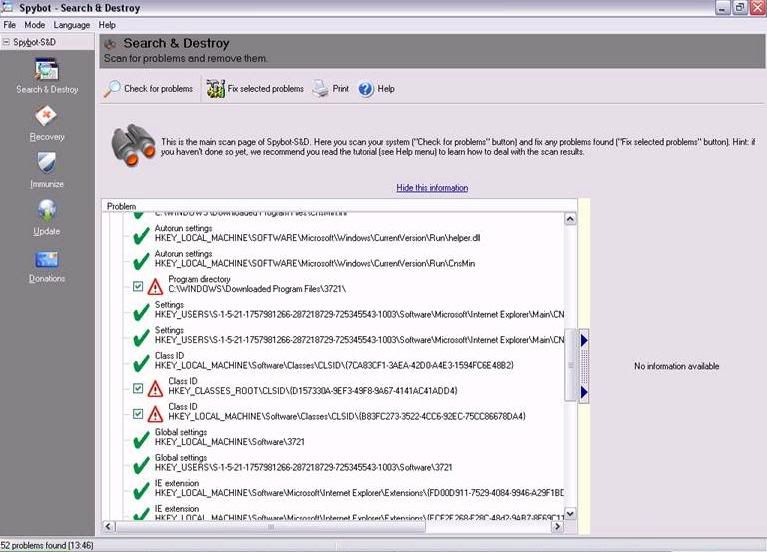
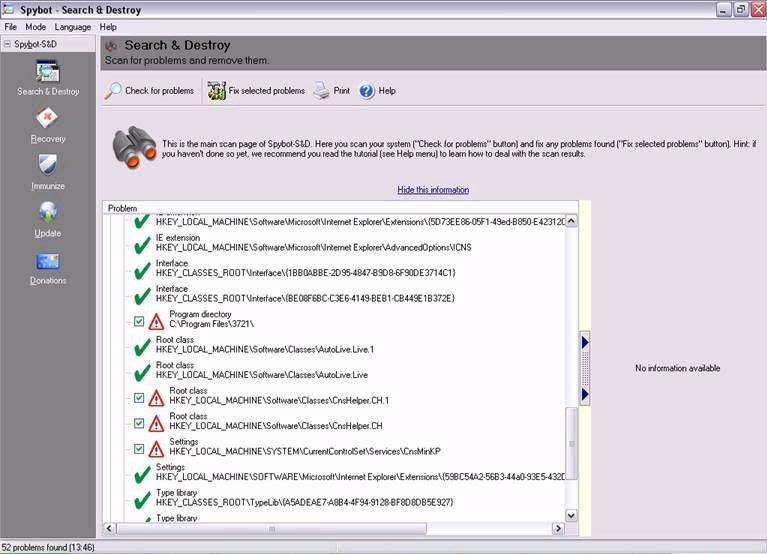
Take a look at the files/registry that cannot be deleted. I even went to safe mode to delete the unwanted registry but they cannot be deleted. Help.....Originally posted by ndmmxiaomayi:cnsmin does not belong to Microsoft. It is an adware.
http://www.spywareguide.com/product_show.php?id=469
http://www3.cai.com/securityadvisor/pest/pest.aspx?id=453072511
http://www.pandasoftware.com/virus_info/encyclopedia/overview.aspx?idvirus=42873
You can remove cnsmin by using Spybot S&D alone.
http://www.safer-networking.org/en/news/2003-06-30.html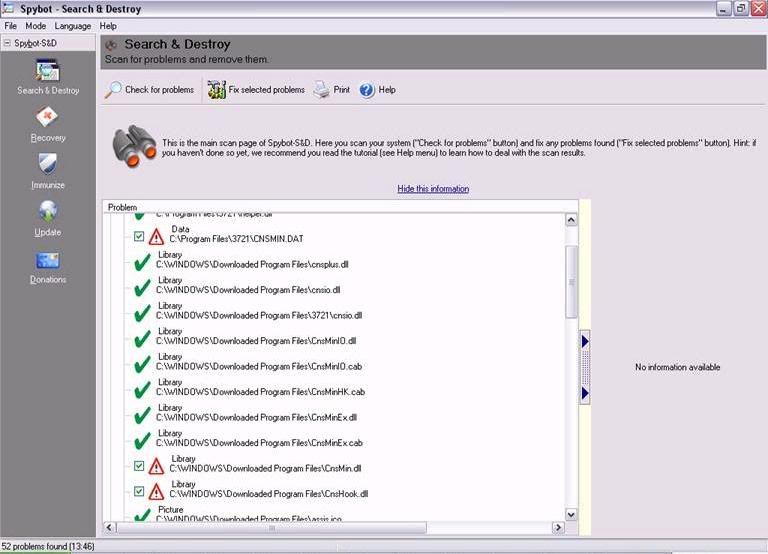
-
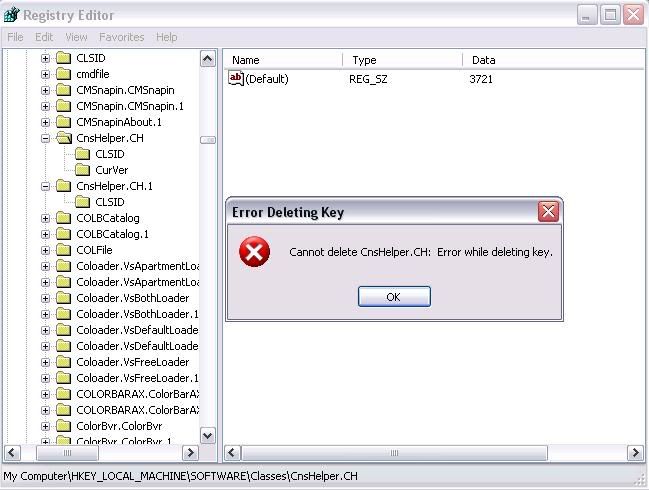
Below is the error message when I try to delete the stupid registry (even when I switch to safe mode):
-
-
Delete the folders instead of the key in the registry editor.Originally posted by askxyz:Below is the error message when I try to delete the stupid registry (even when I switch to safe mode):
-
Maybe you got a variant of this cnsmin. The original cnsmin can be removed easily by Spybot. The variant is irritating.Originally posted by askxyz:Take a look at the files/registry that cannot be deleted. I even went to safe mode to delete the unwanted registry but they cannot be deleted. Help..... -
Ya, I tried to delete the folders but cannot. Do you have any ideas how I can solve this annoying problems?Originally posted by ndmmxiaomayi:Delete the folders instead of the key in the registry editor. -
I went to this site before and try thier method. Cannot be solved too. How?Originally posted by lpx88:
-
Originally posted by askxyz:Ya, I tried to delete the folders but cannot. Do you have any ideas how I can solve this annoying problems?

Cannot?
How about trying other anti-spywares? -
TRying. But none helps.Originally posted by ndmmxiaomayi:
Cannot?
How about trying other anti-spywares? -
I run out of solutions already. Registry editor is usually the last resort to solve all problems, and it doesn't work.Originally posted by askxyz:TRying. But none helps.
Looks like reformatting is the only way. -
Can I delete this: rundll32.exe?Originally posted by ndmmxiaomayi:I run out of solutions already. Registry editor is usually the last resort to solve all problems, and it doesn't work.
Looks like reformatting is the only way.
This spyware uses Rundll32.exe to self-create when the files are deleted. So, it is sort of a loopholes now. What can I do now besides reformat? -
Although it seems that I have managed to get rid of the stupid malware, whenever I open IE 6.0, there is always some nonsense sites in the address bar, e.g. www.51.com, www.7mp3.com/index/html, www.9991.com/index.htm....
And also when I have open "My Computer" the icons are not arranged in the usual format.
It seems that there is still some malware hidden which anti-spyware program cannot detect them.
What should I do? -
Try another SPYWARE detecter. EG trendmicro.Originally posted by askxyz:Although it seems that I have managed to get rid of the stupid malware, whenever I open IE 6.0, there is always some nonsense sites in the address bar, e.g. www.51.com, www.7mp3.com/index/html, www.9991.com/index.htm....
And also when I have open "My Computer" the icons are not arranged in the usual format.
It seems that there is still some malware hidden which anti-spyware program cannot detect them.
What should I do? -
Can I download it for free? What is the website?Originally posted by SBS1985C:Try another SPYWARE detecter. EG trendmicro. -
-turn off your system restore 1st.
-den boot into safe mode.
-using all above anti spyware remove as much as you can.
-den go to regedit and remove all relevant entries. becareful on this, deleting wrong entries can give you alot of problems so export your registry 1st.
if everything seems fine after some time u can turn system restore back on.
if not download hijackthis and give us your logfile @ http://www.majorgeeks.com/download3155.html -
rundll32.exe is a process part of Microsoft Windows. Terminating it will cause your computer to be unstable.Originally posted by askxyz:Can I delete this: rundll32.exe?
This spyware uses Rundll32.exe to self-create when the files are deleted. So, it is sort of a loopholes now. What can I do now besides reformat?
As you said it has become like a loophole now, I suggest you do an antivirus scan as rundll32 has been linked to a trojan by the name of W32.Miroot.Worm Remember to update your antivirus before scanning.
After the scan, if this virus is detected, go to this website and print out the instructions on how to remove the virus.
http://securityresponse.symantec.com/avcenter/venc/data/w32.miroot.worm.html
After removing, update Windows.
http://update.microsoft.com/ -
It's probably some persistant spyware/adware.Originally posted by askxyz:Although it seems that I have managed to get rid of the stupid malware, whenever I open IE 6.0, there is always some nonsense sites in the address bar, e.g. www.51.com, www.7mp3.com/index/html, www.9991.com/index.htm....
And also when I have open "My Computer" the icons are not arranged in the usual format.
It seems that there is still some malware hidden which anti-spyware program cannot detect them.
What should I do?
What do you mean by your My Computer icons are not arranged in the usual format?
For the malware, try using other anti-spyware programs stated in the Spyware Advisory thread. If all have been used and no spywares are detected, you have probably got some virus. -
Like this lo:Originally posted by ndmmxiaomayi:It's probably some persistant spyware/adware.
What do you mean by your My Computer icons are not arranged in the usual format?
For the malware, try using other anti-spyware programs stated in the Spyware Advisory thread. If all have been used and no spywares are detected, you have probably got some virus.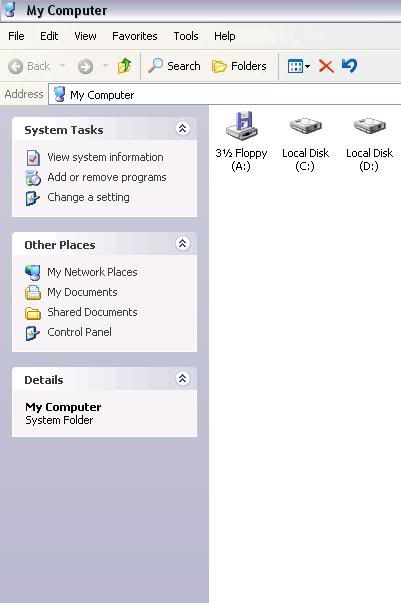
Compare the way it is arrange to the arrangement in your PC. Click the "My Computer" icon. -
Actually I have update and scan norton anti-virus many times. No virus detected leh.Originally posted by ndmmxiaomayi:rundll32.exe is a process part of Microsoft Windows. Terminating it will cause your computer to be unstable.
As you said it has become like a loophole now, I suggest you do an antivirus scan as rundll32 has been linked to a trojan by the name of W32.Miroot.Worm Remember to update your antivirus before scanning.
After the scan, if this virus is detected, go to this website and print out the instructions on how to remove the virus.
http://securityresponse.symantec.com/avcenter/venc/data/w32.miroot.worm.html
After removing, update Windows.
http://update.microsoft.com/ -
It's the same as mine.Originally posted by askxyz:Like this lo:
Compare the way it is arrange to the arrangement in your PC. Click the "My Computer" icon.
Do you mean this?
If yes, do this:
Right click, Arrange Icons, Show in Groups.
