Help! My PC is serious infected by spyware!
-
Originally posted by joeacid:
so far..the 3 of them are viruses but i can't find the one in red...
Yup~ Here's my HiJack List:
Logfile of HijackThis v1.99.1
Scan saved at ‰ºŒß 10:36:49, on 2006/6/12
Platform: Windows XP SP1 (WinNT 5.01.2600)
MSIE: Internet Explorer v6.00 SP1 (6.00.2800.1106)
Running processes:
C:\WINDOWS\Sm9lbGluZw\command.exe
C:\WINDOWS\System32\Kerne0110.exe
C:\WINDOWS\System32\dcomcfg.exe
C:\defender23a.exe
-
can't find
C:\WINDOWS\System32\f7c9fd9a.exe
C:\defender23a.exe
anyone else got luck? -
dunno~ i think when i clear off the file~ it gt delete together with my win.sys file i think~ sys/dll file i thinkOriginally posted by lpx88:er...why will ur PC crash when u clear spyware? -
I got a few pic here for display~ Here's a few of my problem~
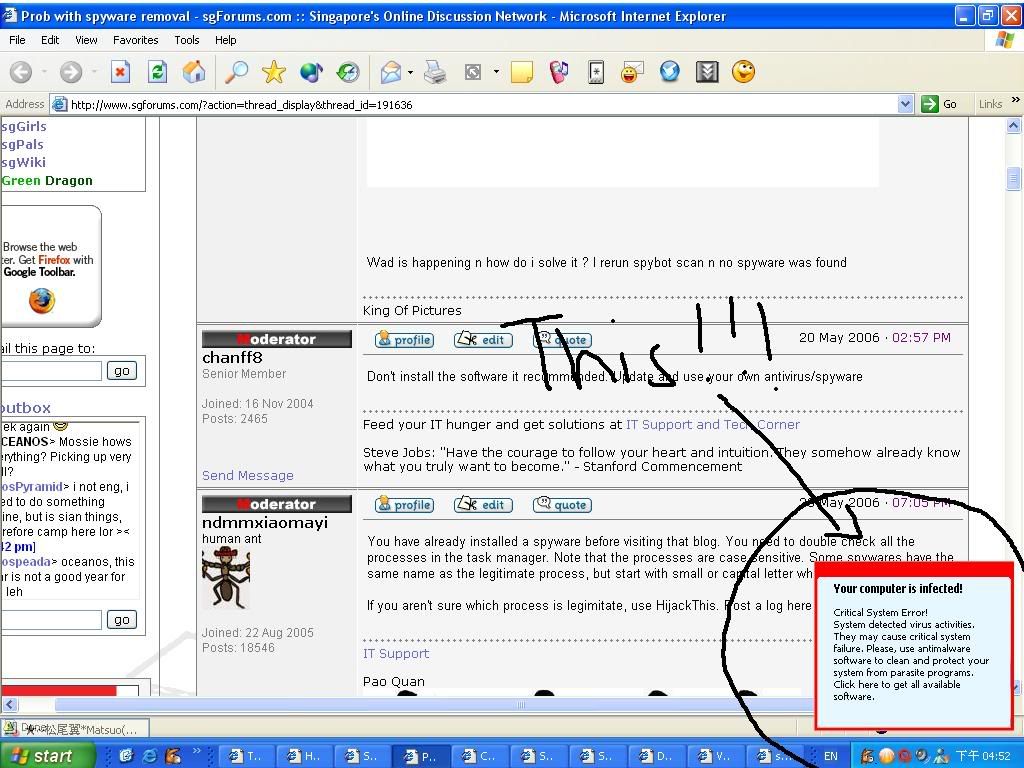
The above is what i always see after there's this Trayicon i mentioned earlier~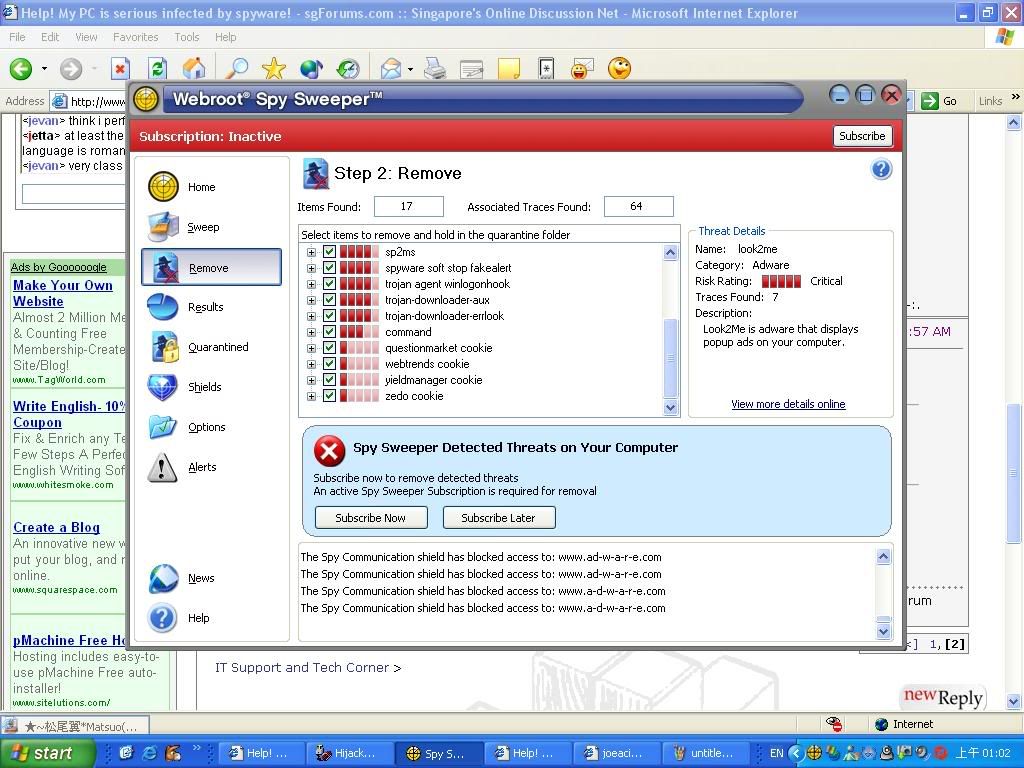
I scanned my PC using Spysweeper~ hav to buy to delete off the found Hijackers~ so dunno how to delete them~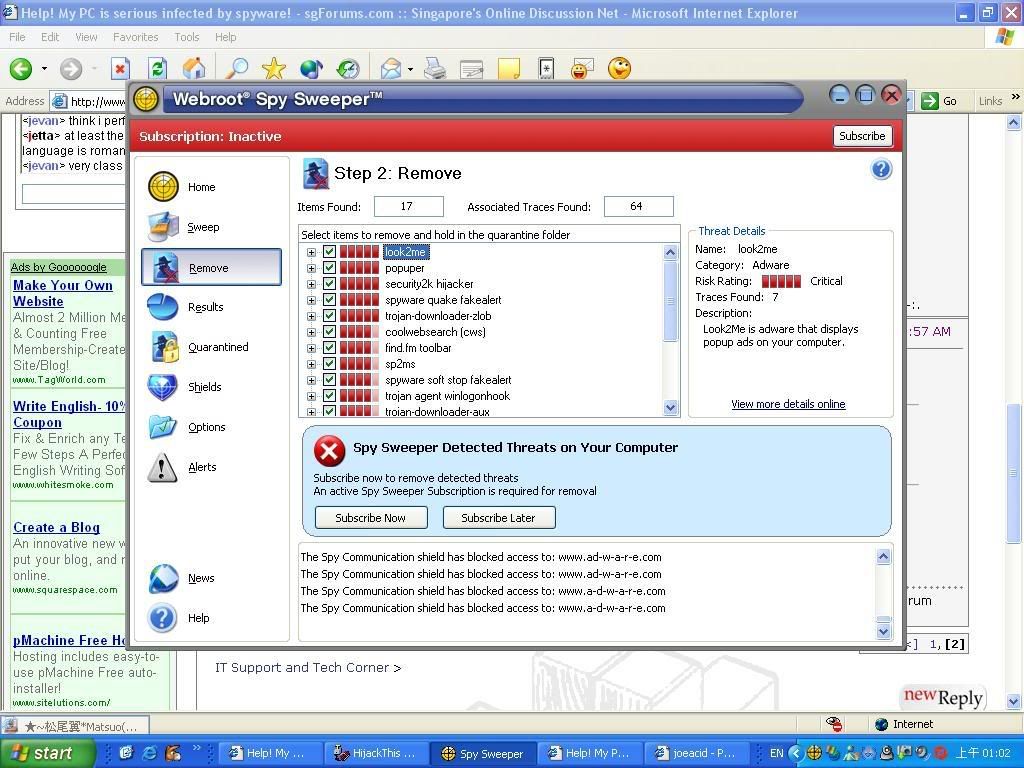
This is the 2nd part of the Spysweeper~ coz cannot show everything~ -
The free webroot you showed cannot clean. You'll have to get the older versions or a paid version to clean your computer.
Ad aware has a good cleaning function. You can install a lateset copy of it and go into safe mode to scan and clean.
If pop ups, search page and home page are still hijacked, there has been various softwares reccommended in this thread and the sticky to help you suppress it until you can fix the problem.
When all else fails, get hijack this and use it to scan, then find out all the names of the spyware and use the internet to find out how to clean it. -
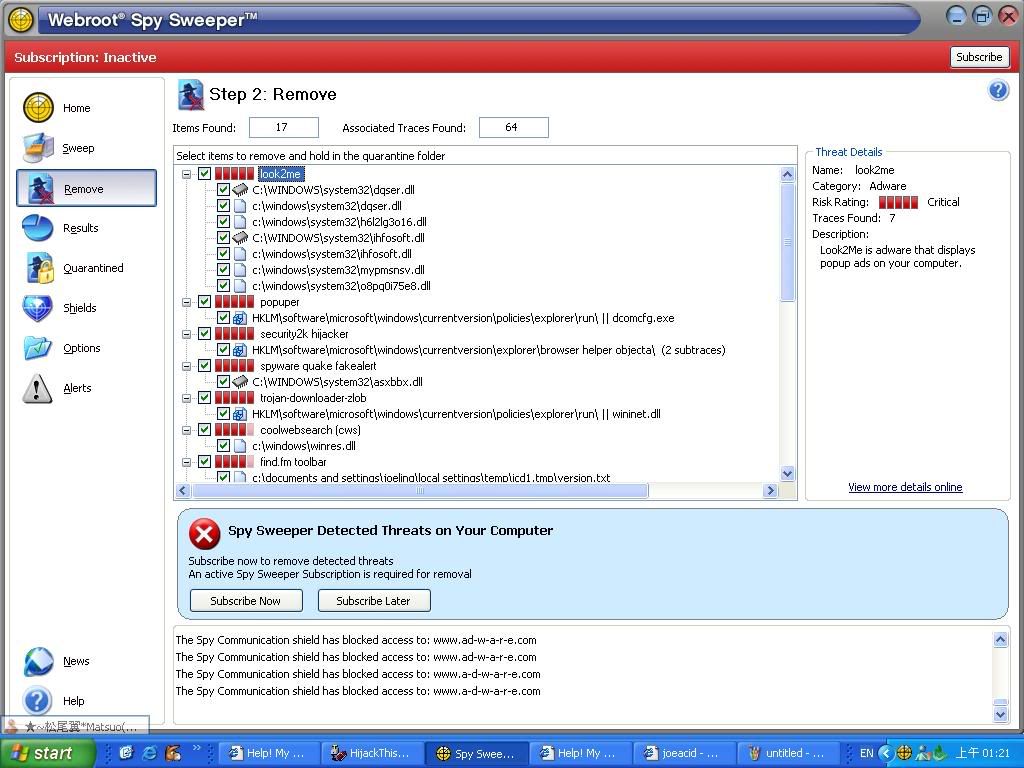
The following 3 is the extend of the found files in the spysweeper:
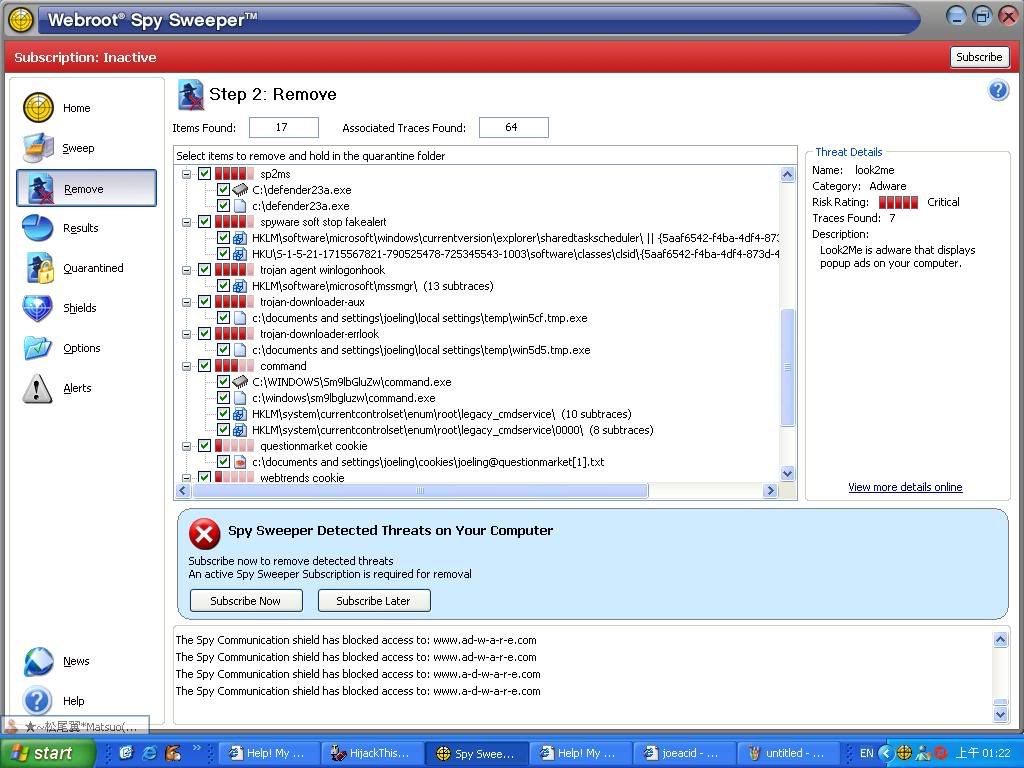
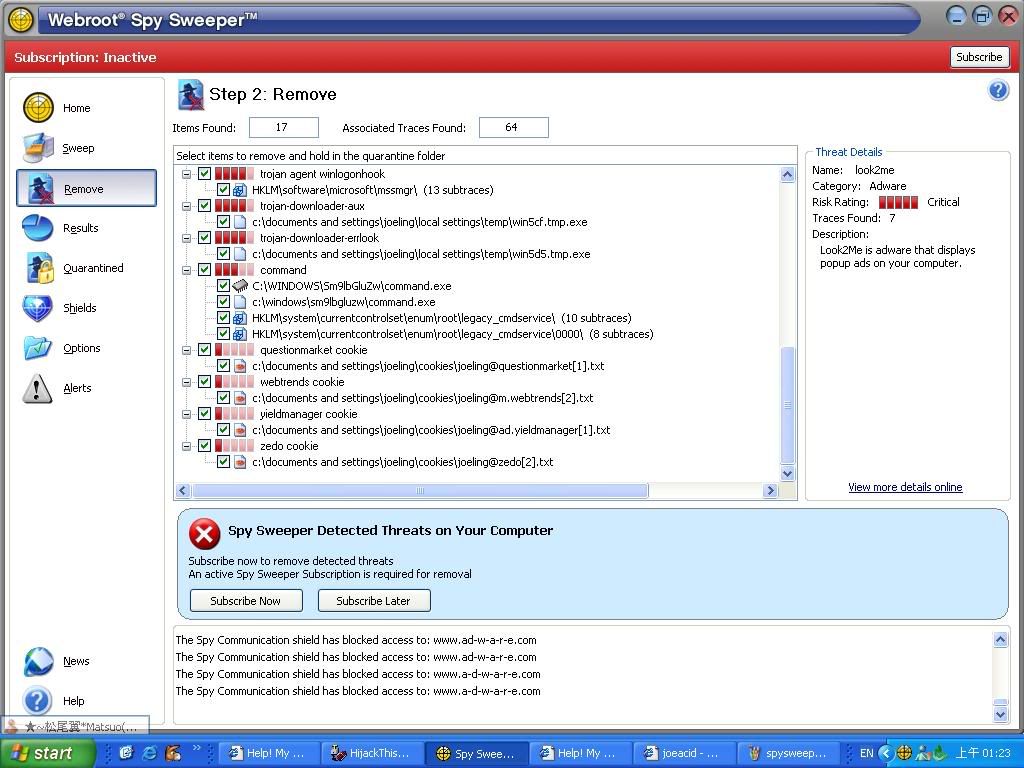
-
-
hi thanks for the thread link~ i've read it~ it seems similar but different i think~ i'm not too gd in this kinda thing~ dunno how to do itOriginally posted by R3SsH|n:
-
ideally you shld be able to delete the trojan by deleting the registry of it...if you are unsure...think your best bet is to backup everything...and then do a reformat...Originally posted by joeacid:hi thanks for the thread link~ i've read it~ it seems similar but different i think~ i'm not too gd in this kinda thing~ dunno how to do it -
wads yr version of spysweeper?i can..ahem unlock it so you can clear
-
personally i prefer adaware and spyware doctor though

-
Right click on the HijackThis link and click Save Target As if you are using IE, or Save link as if you are using Mozilla Firefox. Save to Desktop, extract, and open it. If you are still unable to open, download this removal tool first, and remove one variant of the CoolWebSearch spyware.Originally posted by joeacid:i'm not able to use the Hijack-log u gave me... after it dled~ there's this prompting saying: "Cannot open C:/Documents and Settings\joeling\Local Settings\Temporary Internet Files\Contents.IE5\8RSVUNCB\hijackthis[1].zip
After this, try running HijackThis again.
Remove most variants of CoolWebSearch
Remove Look2me
Trend Micro's CoolWebSearch Removal tool -
Nope. Diagnostic will still some necessary services and start up applications to test the computer. Safe mode practically don't load anything unneccessary, unless you use Safe mode with networking option, which allows you to go to the Internet to check for updates.Originally posted by StarPuppy:just wondering
Diagonstic(typo) mode is the same with safe mode? -
C:\WINDOWS\System32\dcomcfg.exe
Please do not remove this. It's part of Windows. -
Close any programs running.
Run HijackThis again. Select None of the above, just start the program.
Click scan. After it finishes scanning, put a tick against these entries and click Fix checked:
C:\WINDOWS\Sm9lbGluZw\command.exe
C:\WINDOWS\System32\Kerne0110.exe
C:\WINDOWS\System32\f7c9fd9a.exe
C:\WINDOWS\System32\conime.exe
O2 - BHO: Nothing - {686a161d-5bd1-4999-8832-6393f41e564c} - C:\WINDOWS\System32\hp100.tmp
O4 - HKLM\..\Run: [f7c9fd9a.exe] C:\WINDOWS\System32\f7c9fd9a.exe
O4 - HKCU\..\Run: [f7c9fd9a.exe] C:\Documents and Settings\joeling\Local Settings\Application Data\f7c9fd9a.exe
O16 - DPF: {00000000-0000-0000-0000-100000000003} - http://code.jcash.biz/l/c16d96011938750a7556d6b3b02a7eba_13.exe
O9 - Extra button: Related - {c95fe080-8f5d-11d2-a20b-00aa003c157a} - C:\WINDOWS\web\related.htm
O9 - Extra 'Tools' menuitem: Show &Related Links - {c95fe080-8f5d-11d2-a20b-00aa003c157a} - C:\WINDOWS\web\related.htm
O9 - Extra button: Yahoo 1G mail - {507F9113-CD77-4866-BA92-0E86DA3D0B97} - http://cn.mail.yahoo.com/promo/rd1 (file missing)
Do you use Alexa search engine? If you do, don't remove the entries in blue.
For this entry (F3 - REG:win.ini: load=C:\WINDOWS\System32\Kerne0110.exe), I can't help, because I can't find much info about it, and it's too risky to edit win.ini files. -
I can only find these~ and i've fixed these:Originally posted by ndmmxiaomayi:Close any programs running.
Run HijackThis again. Select None of the above, just start the program.
Click scan. After it finishes scanning, put a tick against these entries and click Fix checked:
C:\WINDOWS\Sm9lbGluZw\command.exe
C:\WINDOWS\System32\Kerne0110.exe
C:\WINDOWS\System32\f7c9fd9a.exe
C:\WINDOWS\System32\conime.exe
O2 - BHO: Nothing - {686a161d-5bd1-4999-8832-6393f41e564c} - C:\WINDOWS\System32\hp100.tmp
O4 - HKLM\..\Run: [f7c9fd9a.exe] C:\WINDOWS\System32\f7c9fd9a.exe
O4 - HKCU\..\Run: [f7c9fd9a.exe] C:\Documents and Settings\joeling\Local Settings\Application Data\f7c9fd9a.exe
O16 - DPF: {00000000-0000-0000-0000-100000000003} - http://code.jcash.biz/l/c16d96011938750a7556d6b3b02a7eba_13.exe
O9 - Extra button: Related - {c95fe080-8f5d-11d2-a20b-00aa003c157a} - C:\WINDOWS\web\related.htm
O9 - Extra 'Tools' menuitem: Show &Related Links - {c95fe080-8f5d-11d2-a20b-00aa003c157a} - C:\WINDOWS\web\related.htm
O9 - Extra button: Yahoo 1G mail - {507F9113-CD77-4866-BA92-0E86DA3D0B97} - http://cn.mail.yahoo.com/promo/rd1 (file missing)
Do you use Alexa search engine? If you do, don't remove the entries in blue.
For this entry (F3 - REG:win.ini: load=C:\WINDOWS\System32\Kerne0110.exe), I can't help, because I can't find much info about it, and it's too risky to edit win.ini files.
O2 - BHO: Nothing - {686a161d-5bd1-4999-8832-6393f41e564c} - C:\WINDOWS\System32\hp100.tmp
O4 - HKLM\..\Run: [f7c9fd9a.exe] C:\WINDOWS\System32\f7c9fd9a.exe
O4 - HKCU\..\Run: [f7c9fd9a.exe] C:\Documents and Settings\joeling\Local Settings\Application Data\f7c9fd9a.exe
O16 - DPF: {00000000-0000-0000-0000-100000000003} - http://code.jcash.biz/l/c16d96011938750a7556d6b3b02a7eba_13.exe
O9 - Extra button: Related - {c95fe080-8f5d-11d2-a20b-00aa003c157a} - C:\WINDOWS\web\related.htm
O9 - Extra 'Tools' menuitem: Show &Related Links - {c95fe080-8f5d-11d2-a20b-00aa003c157a} - C:\WINDOWS\web\related.htm
O9 - Extra button: Yahoo 1G mail - {507F9113-CD77-4866-BA92-0E86DA3D0B97} - http://cn.mail.yahoo.com/promo/rd1 (file missing)
I can find these with "C:/" only:
C:\WINDOWS\Sm9lbGluZw\command.exe
C:\WINDOWS\System32\Kerne0110.exe
C:\WINDOWS\System32\f7c9fd9a.exe
C:\WINDOWS\System32\conime.exe -
This is my New Hijackthis log file:
Logfile of HijackThis v1.99.1
Running processes:
C:\WINDOWS\System32\smss.exe
C:\WINDOWS\system32\winlogon.exe
C:\WINDOWS\system32\services.exe
C:\WINDOWS\system32\lsass.exe
C:\WINDOWS\system32\svchost.exe
C:\WINDOWS\System32\svchost.exe
C:\WINDOWS\system32\spoolsv.exe
C:\WINDOWS\system32\rundll32.exe
C:\WINDOWS\System32\devldr32.exe
C:\WINDOWS\Explorer.EXE
C:\Program Files\Adobe\Photoshop Elements 4.0\PhotoshopElementsFileAgent.exe
C:\WINDOWS\System32\CTSvcCDA.exe
C:\Program Files\Common Files\Microsoft Shared\VS7Debug\mdm.exe
C:\WINDOWS\System32\svchost.exe
C:\Program Files\Webroot\Spy Sweeper\WRSSSDK.exe
C:\WINDOWS\System32\Kerne0110.exe
C:\WINDOWS\System32\dcomcfg.exe
C:\Program Files\Creative\SBLive2k\AudioHQ\AHQTB.EXE
C:\Program Files\iTunes\iTunesHelper.exe
C:\Program Files\Java\jre1.5.0_04\bin\jusched.exe
C:\Program Files\Java\jre1.5.0_04\bin\jucheck.exe
C:\Program Files\HP\HP Software Update\HPWuSchd.exe
C:\WINDOWS\System32\LVCOMSX.EXE
C:\Program Files\Logitech\Video\LogiTray.exe
C:\Program Files\MessengerPlus! 3\MsgPlus.exe
C:\Program Files\Adobe\Photoshop Elements 4.0\apdproxy.exe
C:\WINDOWS\System32\ctfmon.exe
C:\Program Files\Microsoft ActiveSync\WCESCOMM.EXE
C:\Program Files\Creative\MediaSource\Detector\CTDetect.exe
C:\Program Files\Logitech\Desktop Messenger\8876480\Program\BackWeb-8876480.exe
C:\Program Files\Logitech\Video\FxSvr2.exe
C:\Program Files\MSN Messenger\msnmsgr.exe
C:\Program Files\iPod\bin\iPodService.exe
C:\WINDOWS\System32\wuauclt.exe
C:\Program Files\eMule\eMule.exe
C:\Program Files\Webroot\Spy Sweeper\SpySweeper.exe
C:\Documents and Settings\joeling\Desktop\HijackThis.exe
F3 - REG:win.ini: load=C:\WINDOWS\System32\Kerne0110.exe
O2 - BHO: (no name) - {686a161d-5bd1-4999-8832-6393f41e564c} - C:\WINDOWS\System32\hp100.tmp (file missing)
O3 - Toolbar: MSN - {BDAD1DAD-C946-4A17-ADC1-64B5B4FF55D0} - C:\Program Files\MSN Apps\MSN Toolbar\MSN Toolbar\01.02.5000.1021\en-us\msntb.dll
O3 - Toolbar: &Radio - {8E718888-423F-11D2-876E-00A0C9082467} - C:\WINDOWS\System32\msdxm.ocx
O4 - HKLM\..\Run: [IMJPMIG8.1] "C:\WINDOWS\IME\imjp8_1\IMJPMIG.EXE" /Spoil /RemAdvDef /Migration32
O4 - HKLM\..\Run: [PHIME2002ASync] C:\WINDOWS\System32\IME\TINTLGNT\TINTSETP.EXE /SYNC
O4 - HKLM\..\Run: [PHIME2002A] C:\WINDOWS\System32\IME\TINTLGNT\TINTSETP.EXE /IMEName
O4 - HKLM\..\Run: [UpdReg] C:\WINDOWS\Updreg.exe
O4 - HKLM\..\Run: [AudioHQ] C:\Program Files\Creative\SBLive2k\AudioHQ\AHQTB.EXE
O4 - HKLM\..\Run: [NeroFilterCheck] C:\WINDOWS\system32\NeroCheck.exe
O4 - HKLM\..\Run: [QuickTime Task] "C:\Program Files\QuickTime\qttask.exe" -atboottime
O4 - HKLM\..\Run: [iTunesHelper] "C:\Program Files\iTunes\iTunesHelper.exe"
O4 - HKLM\..\Run: [SunJavaUpdateSched] C:\Program Files\Java\jre1.5.0_04\bin\jusched.exe
O4 - HKLM\..\Run: [HP Software Update] "C:\Program Files\HP\HP Software Update\HPWuSchd.exe"
O4 - HKLM\..\Run: [LVCOMSX] C:\WINDOWS\System32\LVCOMSX.EXE
O4 - HKLM\..\Run: [LogitechVideoRepair] C:\Program Files\Logitech\Video\ISStart.exe
O4 - HKLM\..\Run: [LogitechVideoTray] C:\Program Files\Logitech\Video\LogiTray.exe
O4 - HKLM\..\Run: [MessengerPlus3] "C:\Program Files\MessengerPlus! 3\MsgPlus.exe"
O4 - HKLM\..\Run: [Adobe Photo Downloader] "C:\Program Files\Adobe\Photoshop Elements 4.0\apdproxy.exe"
O4 - HKLM\..\Run: [SpySweeper] "C:\Program Files\Webroot\Spy Sweeper\SpySweeper.exe" /startintray
O4 - HKCU\..\Run: [CTFMON.EXE] C:\WINDOWS\System32\ctfmon.exe
O4 - HKCU\..\Run: [H/PC Connection Agent] "C:\Program Files\Microsoft ActiveSync\WCESCOMM.EXE"
O4 - HKCU\..\Run: [Creative Detector] C:\Program Files\Creative\MediaSource\Detector\CTDetect.exe /R
O4 - HKCU\..\Run: [MSMSGS] "C:\Program Files\Messenger\msmsgs.exe" /background
O4 - HKCU\..\Run: [LogitechSoftwareUpdate] "C:\Program Files\Logitech\Video\ManifestEngine.exe" boot
O4 - HKCU\..\Run: [LDM] C:\Program Files\Logitech\Desktop Messenger\8876480\Program\BackWeb-8876480.exe
O4 - HKCU\..\Run: [MessengerPlus3] "C:\Program Files\MessengerPlus! 3\MsgPlus.exe" /WinStart
O4 - HKCU\..\Run: [msnmsgr] "C:\Program Files\MSN Messenger\msnmsgr.exe" /background
O4 - Global Startup: Adobe Reader Speed Launch.lnk = C:\Program Files\Adobe\Acrobat 7.0\Reader\reader_sl.exe
O4 - Global Startup: HP Digital Imaging Monitor.lnk = C:\Program Files\HP\Digital Imaging\bin\hpqtra08.exe
O4 - Global Startup: Logitech Desktop Messenger.lnk = C:\Program Files\Logitech\Desktop Messenger\8876480\Program\LDMConf.exe
O4 - Global Startup: Microsoft Office.lnk = C:\Program Files\Microsoft Office\Office10\OSA.EXE
O4 - Global Startup: NevoMedia Server.lnk = C:\Program Files\Nevo\NevoMedia Server\NevoMediaServer.exe
O8 - Extra context menu item: E&xport to Microsoft Excel - res://C:\PROGRA~1\MICROS~2\Office10\EXCEL.EXE/3000
O8 - Extra context menu item: Žg—p FlashGet ‰º�Ú - C:\PROGRA~1\FlashGet\jc_link.htm
O8 - Extra context menu item: ‘S•”Žg—p FlashGet ‰º�Ú - C:\PROGRA~1\FlashGet\jc_all.htm
O9 - Extra button: (no name) - {08B0E5C0-4FCB-11CF-AAA5-00401C608501} - C:\Program Files\Java\jre1.5.0_04\bin\npjpi150_04.dll
O9 - Extra 'Tools' menuitem: Sun Java Console - {08B0E5C0-4FCB-11CF-AAA5-00401C608501} - C:\Program Files\Java\jre1.5.0_04\bin\npjpi150_04.dll
O9 - Extra button: Create Mobile Favorite - {2EAF5BB1-070F-11D3-9307-00C04FAE2D4F} - C:\Program Files\Microsoft ActiveSync\INETREPL.DLL
O9 - Extra button: (no name) - {2EAF5BB2-070F-11D3-9307-00C04FAE2D4F} - C:\Program Files\Microsoft ActiveSync\INETREPL.DLL
O9 - Extra 'Tools' menuitem: Create Mobile Favorite... - {2EAF5BB2-070F-11D3-9307-00C04FAE2D4F} - C:\Program Files\Microsoft ActiveSync\INETREPL.DLL
O9 - Extra button: FlashGet - {D6E814A0-E0C5-11d4-8D29-0050BA6940E3} - C:\PROGRA~1\FlashGet\flashget.exe
O9 - Extra 'Tools' menuitem: &FlashGet - {D6E814A0-E0C5-11d4-8D29-0050BA6940E3} - C:\PROGRA~1\FlashGet\flashget.exe
O9 - Extra button: Instant Messenger - {E5D12C4E-7B4F-11D3-B5C9-0050045C3C96} - http://cn.rd.yahoo.com/home/messenger/bjk/clientbtn/?http://cn.messenger.yahoo.com/ (file missing)
O16 - DPF: WebControlDeploy - https://grouper.com/v1/GrouperSetup.cab
O18 - Protocol: about - {3050F406-98B5-11CF-BB82-00AA00BDCE0B} - C:\WINDOWS\System32\mshtml.dll
O18 - Protocol: cdl - {3DD53D40-7B8B-11D0-B013-00AA0059CE02} - C:\WINDOWS\System32\urlmon.dll
O18 - Protocol: cdo - {CD00020A-8B95-11D1-82DB-00C04FB1625D} - C:\Program Files\Common Files\Microsoft Shared\Web Folders\PKMCDO.DLL
O18 - Protocol: dvd - {12D51199-0DB5-46FE-A120-47A3D7D937CC} - C:\WINDOWS\System32\msvidctl.dll
O18 - Protocol: file - {79EAC9E7-BAF9-11CE-8C82-00AA004BA90B} - C:\WINDOWS\System32\urlmon.dll
O18 - Protocol: ftp - {79EAC9E3-BAF9-11CE-8C82-00AA004BA90B} - C:\WINDOWS\System32\urlmon.dll
O18 - Protocol: gopher - {79EAC9E4-BAF9-11CE-8C82-00AA004BA90B} - C:\WINDOWS\System32\urlmon.dll
O18 - Protocol: http - {79EAC9E2-BAF9-11CE-8C82-00AA004BA90B} - C:\WINDOWS\System32\urlmon.dll
O18 - Protocol: https - {79EAC9E5-BAF9-11CE-8C82-00AA004BA90B} - C:\WINDOWS\System32\urlmon.dll
O18 - Protocol: ipp - (no CLSID) - (no file)
O18 - Protocol: its - {9D148291-B9C8-11D0-A4CC-0000F80149F6} - C:\WINDOWS\System32\itss.dll
O18 - Protocol: javascript - {3050F3B2-98B5-11CF-BB82-00AA00BDCE0B} - C:\WINDOWS\System32\mshtml.dll
O18 - Protocol: local - {79EAC9E7-BAF9-11CE-8C82-00AA004BA90B} - C:\WINDOWS\System32\urlmon.dll
O18 - Protocol: mailto - {3050F3DA-98B5-11CF-BB82-00AA00BDCE0B} - C:\WINDOWS\System32\mshtml.dll
O18 - Protocol: mctp - {D7B95390-B1C5-11D0-B111-0080C712FE82} - C:\Program Files\Microsoft ActiveSync\aatp.dll
O18 - Protocol: mhtml - {05300401-BCBC-11D0-85E3-00C04FD85AB4} - C:\WINDOWS\System32\inetcomm.dll
O18 - Protocol: mk - {79EAC9E6-BAF9-11CE-8C82-00AA004BA90B} - C:\WINDOWS\System32\urlmon.dll
O18 - Protocol: ms-its - {9D148291-B9C8-11D0-A4CC-0000F80149F6} - C:\WINDOWS\System32\itss.dll
O18 - Protocol: ms-itss - {0A9007C0-4076-11D3-8789-0000F8105754} - C:\Program Files\Common Files\Microsoft Shared\Information Retrieval\MSITSS.DLL
O18 - Protocol: msdaipp - (no CLSID) - (no file)
O18 - Protocol: msnim - {828030A1-22C1-4009-854F-8E305202313F} - "C:\PROGRA~1\MSNMES~1\msgrapp.dll" (file missing)
O18 - Protocol: mso-offdap - {3D9F03FA-7A94-11D3-BE81-0050048385D1} - C:\PROGRA~1\COMMON~1\MICROS~1\WEBCOM~1\10\OWC10.DLL
O18 - Protocol: res - {3050F3BC-98B5-11CF-BB82-00AA00BDCE0B} - C:\WINDOWS\System32\mshtml.dll
O18 - Protocol: sysimage - {76E67A63-06E9-11D2-A840-006008059382} - C:\WINDOWS\System32\mshtml.dll
O18 - Protocol: tv - {CBD30858-AF45-11D2-B6D6-00C04FBBDE6E} - C:\WINDOWS\System32\msvidctl.dll
O18 - Protocol: vbscript - {3050F3B2-98B5-11CF-BB82-00AA00BDCE0B} - C:\WINDOWS\System32\mshtml.dll
O18 - Protocol: vnd.ms.radio - {3DA2AA3B-3D96-11D2-9BD2-204C4F4F5020} - C:\WINDOWS\System32\msdxm.ocx
O18 - Protocol: wia - {13F3EA8B-91D7-4F0A-AD76-D2853AC8BECE} - C:\WINDOWS\System32\wiascr.dll
O20 - Winlogon Notify: IPConfTSP - C:\WINDOWS\system32\h6l2lg3o16.dll
O20 - Winlogon Notify: winjrs32 - C:\WINDOWS\SYSTEM32\winjrs32.dll
O20 - Winlogon Notify: WRNotifier - C:\WINDOWS\SYSTEM32\WRLogonNTF.dll
O23 - Service: Adobe LM Service - Adobe Systems - C:\Program Files\Common Files\Adobe Systems Shared\Service\Adobelmsvc.exe
O23 - Service: Adobe Active File Monitor V4 (AdobeActiveFileMonitor4.0) - Unknown owner - C:\Program Files\Adobe\Photoshop Elements 4.0\PhotoshopElementsFileAgent.exe
O23 - Service: Creative Service for CDROM Access - Creative Technology Ltd - C:\WINDOWS\System32\CTSvcCDA.exe
O23 - Service: iPod Service (iPodService) - Apple Computer, Inc. - C:\Program Files\iPod\bin\iPodService.exe
O23 - Service: Webroot Spy Sweeper Engine (svcWRSSSDK) - Webroot Software, Inc. - C:\Program Files\Webroot\Spy Sweeper\WRSSSDK.exe -
I've dled and used CWshredder~ and it says coolwebsearch is not found on ur system~Originally posted by ndmmxiaomayi:Right click on the HijackThis link and click Save Target As if you are using IE, or Save link as if you are using Mozilla Firefox. Save to Desktop, extract, and open it. If you are still unable to open, download this removal tool first, and remove one variant of the CoolWebSearch spyware.
After this, try running HijackThis again.
Remove most variants of CoolWebSearch
Remove Look2me
Trend Micro's CoolWebSearch Removal tool
and i hav already used kill2me, it says that look2me is not found but i've chosen try to remove it anyway~ -
You will need to enable hidden files in your computer. Go to My Computer, Tools, Folder Options.Originally posted by joeacid:I can find these with "C:/" only:
C:\WINDOWS\Sm9lbGluZw\command.exe
C:\WINDOWS\System32\Kerne0110.exe
C:\WINDOWS\System32\f7c9fd9a.exe
C:\WINDOWS\System32\conime.exe
Select the View tab. Under Hidden files and folders, click Show hidden files and folders. Press OK. Close My Computer and open it again. Navigate to these folders and delete them manually. After this, empty the Recycle Bin. Restart the computer.
Your new log seems to have more stuff, will need some time to go through again. -
My version is 4.5.9(Build 711) and spyware Definitions is 696Originally posted by lpx88:wads yr version of spysweeper?i can..ahem unlock it so you can clear -
Tried the other links to remove CoolWebSearch? Because from the pictures you gave us, it says that you are infected by it. If not, you have to wait for lpx88 to help you unlock the software to remove CoolWebSearch.Originally posted by joeacid:I've dled and used CWshredder~ and it says coolwebsearch is not found on ur system~
and i hav already used kill2me, it says that look2me is not found but i've chosen try to remove it anyway~ -
yup~Originally posted by ndmmxiaomayi:Tried the other links to remove CoolWebSearch? Because from the pictures you gave us, it says that you are infected by it. If not, you have to wait for lpx88 to help you unlock the software to remove CoolWebSearch. -
last time i downloaded this tool called CWShredderOriginally posted by joeacid:yup~
This tool removes cool web search spyware only -
Finished going through your new log.
C:\WINDOWS\System32\Kerne0110.exe
O2 - BHO: (no name) - {686a161d-5bd1-4999-8832-6393f41e564c} - C:\WINDOWS\System32\hp100.tmp (file missing)
O20 - Winlogon Notify: IPConfTSP - C:\WINDOWS\system32\h6l2lg3o16.dll
O20 - Winlogon Notify: winjrs32 - C:\WINDOWS\SYSTEM32\winjrs32.dll
These four entries need to be fixed. -
Thanks hehe~ Hmm.... for the C:\WINDOWS\System32\hp100.tmp (file missing), i dunno why but no matter how many times i fix it, it'll still be there~Originally posted by ndmmxiaomayi:Finished going through your new log.
C:\WINDOWS\System32\Kerne0110.exe
O2 - BHO: (no name) - {686a161d-5bd1-4999-8832-6393f41e564c} - C:\WINDOWS\System32\hp100.tmp (file missing)
O20 - Winlogon Notify: IPConfTSP - C:\WINDOWS\system32\h6l2lg3o16.dll
O20 - Winlogon Notify: winjrs32 - C:\WINDOWS\SYSTEM32\winjrs32.dll
These four entries need to be fixed.
Hmm... b4 i carry on to fixing C:\WINDOWS\System32\Kerne0110.exe, i wanna confirm it with u~ do i hav to fix this? Coz the last time u told me u're unsure of it~ so its okay to fix it?