What is this??
-
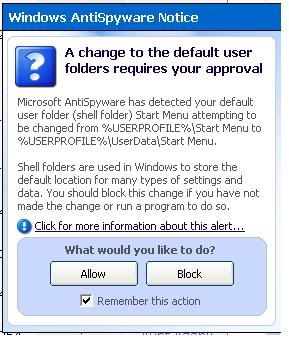
This warning pop up just like that. I blocked it. What is it ar?
I can't make out what kind of infection is this...
-
block.
-
This is Windows Defender, also known as Microsoft Anti-spyware.
This picture shows that you have probably installed something and that it will boot on startup or you have just changed some settings.
One question for you: Did you install anything just now or did you change any settings? -
I know that is Microsoft Anti Spyware.Originally posted by ndmmxiaomayi:This is Windows Defender, also known as Microsoft Anti-spyware.
This picture shows that you have probably installed something and that it will boot on startup or you have just changed some settings.
One question for you: Did you install anything just now or did you change any settings?
This was what I did.
I used the Ad Adware SE program to do a scan.
Found 4 critical objects. So I deleted it.
After deleting it, then the Mircosoft Anti-spyware as above. So I blocked it.
I did not change or install anything prior to it. -
After deleting the 4 critical objects, Microsoft Anti-spyware warning pop up? Or you did a scan with Microsoft Anti-spyware?Originally posted by mhcampboy:I know that is Microsoft Anti Spyware.
This was what I did.
I used the Ad Adware SE program to do a scan.
Found 4 critical objects. So I deleted it.
After deleting it, then the Mircosoft Anti-spyware as above. So I blocked it.
I did not change or install anything prior to it. -
Nope. I didnt use MAs to scan. Used the Ad Adware. After deleting the 4 criticial objects and close Ad Adware, immediately the MAs warning as above pop up.Originally posted by ndmmxiaomayi:After deleting the 4 critical objects, Microsoft Anti-spyware warning pop up? Or you did a scan with Microsoft Anti-spyware?
My MAs has real time protection enabled though. I am not even sure what does words in the pop up means.... -
You can just allow it. If you block it, the spywares would be back.Originally posted by mhcampboy:Nope. I didnt use MAs to scan. Used the Ad Adware. After deleting the 4 criticial objects and close Ad Adware, immediately the MAs warning as above pop up.
My MAs has real time protection enabled though. I am not even sure what does words in the pop up means.... -
ALLOW!?Originally posted by ndmmxiaomayi:You can just allow it. If you block it, the spywares would be back.
What is tat actually...? -
There are spywares/adwares on your computer, and that user is you.Originally posted by mhcampboy:ALLOW!?
What is tat actually...?
Ad-Aware removed it, and Windows feel that it is dangerous, so it warns you. If you block it, those adwares/spywares would be there again, as good as not deleting anything. -
Then if I allow it.. will it disrupt my system?Originally posted by ndmmxiaomayi:There are spywares/adwares on your computer, and that user is you.
Ad-Aware removed it, and Windows feel that it is dangerous, so it warns you. If you block it, those adwares/spywares would be there again, as good as not deleting anything. -
whoa.
-
see, watch porn somemore.
-
Nope.Originally posted by mhcampboy:Then if I allow it.. will it disrupt my system? -
i take ur word for it....Originally posted by ndmmxiaomayi:Nope. -
i might see u post another thread in IT support and Tech corner later...Originally posted by mhcampboy:i take ur word for it.... -
Originally posted by GHoST_18:i might see u post another thread in IT support and Tech corner later...

i trust mayi advise... i think.. -
Originally posted by mhcampboy:
i trust mayi advise... i think.. -
Originally posted by mhcampboy:i take ur word for it....
-
Microsoft Antispyware, is useless...
It's like using a water pistol to put out a fire. -
I'm confused, are you saying that the pop up alert is informing the user of the changes made by the ad-aware?Originally posted by ndmmxiaomayi:There are spywares/adwares on your computer, and that user is you.
Ad-Aware removed it, and Windows feel that it is dangerous, so it warns you. If you block it, those adwares/spywares would be there again, as good as not deleting anything. -
Yup.Originally posted by SilverPal:I'm confused, are you saying that the pop up alert is informing the user of the changes made by the ad-aware? -
tis is a warning to warn u stop surfing the porn sites!Originally posted by mhcampboy:This warning pop up just like that. I blocked it. What is it ar?
I can't make out what kind of infection is this...