Burning image (.iso) files
-
As requested by forumers.
I don't know what burning software you guys have, but this is what I have. Nero Express 6.
For Windows XP and 2000- [*]Go to Start > All Programs > Nero > Nero StartSmart.
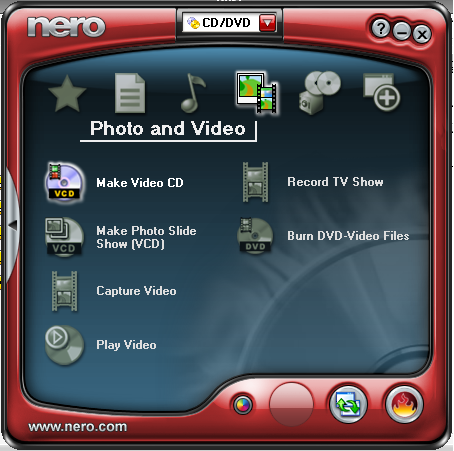
[*]Insert a blank CD into the CD drive. Make sure that the CD drive supports burning of CDs.
[*]Select Copy and Backup > Burn image to disk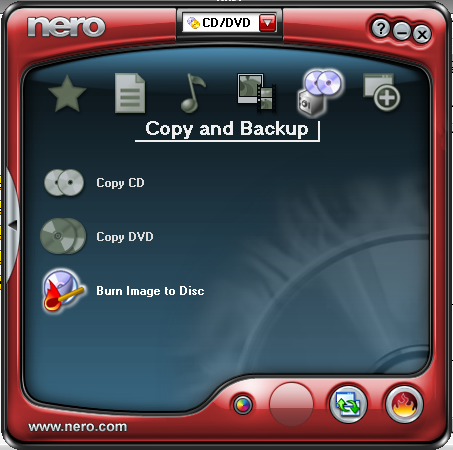
[*]Another window will pop up, asking you to choose where you saved the .iso file. Locate it and click Open.
[*]It will now be added to the list of files.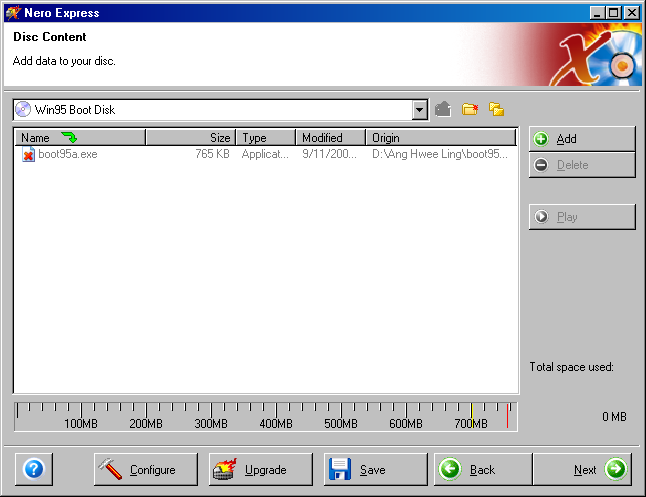
[*]Click Next.
[*]Select the CD drive that you have. Click Burn. -
http://www.petri.co.il/how_to_write_iso_files_to_cd.htm
For those who don't have Nero.
Anybody who creates another thread about burning .iso files, thread will be closed and deleted immediately.
Edit: Any questions in this thread please.
If you are using other burning softwares and would like to contribute, add in this thread too.
Thank you for the cooperation.
-
Why no Alcohol one!!!
Boo boo!! Close and delete!
-
You do? I don't use Alcohol de.
Or wait till I've installed them to put up the tutorial. High chance I might not do that.
-
Alcohol is most popular way leh!
-
To run ISO Image without burning to the disc
http://www.sqlservercentral.com/columnists/awarren/useisoimageswithoutburningtodisk.asp -
i am using daemon tools, ez and free =)
-
Originally posted by lpx88:
 Download Daemon Tools Install it(Duh ) Once you have installed and started DAEMON tools, you should now see a "lightning bolt" icon (green) next to your PC clock Go ahead and right click that icon and then left click "VIRTUAL CD/DVD-ROM" , then left click "Set number of devices...", then decide on how many virtual drives you wish to have. 1 drive is enough for you. After that, go ahead and right click that "lightning bolt" icon again, left click "VIRTUAL CD/DVD-ROM" again. Then left click "Device 0: [*Letter*] No media", then left click "Mount image". Then on the screen that pops up, navigate to where your ISO file is to mount it to the virtual drive. When you find it, click it once then click the "Open" button
Now if you go to "My Computer", you will see a "extra" drive listed there . That is the "virtual drive" created by DAEMON Tools.To remove it, right click that icon and then left click "VIRTUAL CD/DVD-ROM" , then left click "Set number of devices...", then click "Disable" -
is there any way to mount the thing without adding another virtual drive?
-
no
-
well i recommend poweriso than daemon tools, cos poweriso can open more types of formats of files, like daa.
for people who want to download it, here's the serial.
Name:serials.ws
Key:IPSCG-2GF5Z-JA6VT-8GUT7-3DZFU -
Overburning procedure (those who are curious to try out SLYNUX)
http://www.pcstats.com/articleview.cfm?articleid=742&page=2 -
-
wow thanks (:
-
If you are thinking of bypassing the copyright stuffs in games, you can use these tools. Just choose either of them, download and install.
Daemon Tools - be aware when installing it. It contains adware. Read through the EULA (End User License Agreement) carefully and thoroughly.
Alcohol 120%
Clonecd
Usage
Daemon Tools
http://www.wikihow.com/Install-a-Game-With-Bin/cue-Files-Using-Daemon-Tools
http://www.filesoup.co.uk/faq/index.php?action=artikel&cat=14&id=58&artlang=en
http://wiki.wsu.edu/ctowiki/Installing_and_Using_Daemon_Tools
Alcohol 120%
http://club.cdfreaks.com/showthread.php?t=108684
http://forum.alcohol-soft.com/index.php?showtopic=15035
Clonecd
http://m0001.gamecopyworld.com/games/gcw_cd-backup.shtml -
Any for mac?
thanks. -
So how burn avi video to dvd format?Use nero as provided then?To able play on tv thanks mayi.
-
NeroOriginally posted by rocky_509:So how burn avi video to dvd format?Use nero as provided then?To able play on tv thanks mayi.
Select the Make a dvd video option -
So how about nero 7 ultra edition?I can't find make a dvd video option.Only find make minidvd option.Originally posted by lpx88:Nero
Select the Make a dvd video option
-
My nero 7 got this option: Make your own DVD-VideoOriginally posted by rocky_509:So how about nero 7 ultra edition?I can't find make a dvd video option.Only find make minidvd option. -
Urm i got make mini dvd need vob dvd files but i got avi files need to encode or convert it to vob or wat?
-
Mayi, i want to ask, what if the file I am burning is too large, my CD-R cannot contain all then how?
split them into 2?? -
If it's not too large, then you can try overburning. See the PC Stats link...Originally posted by Y_Shun:Mayi, i want to ask, what if the file I am burning is too large, my CD-R cannot contain all then how?
split them into 2??
Say your file is 705MB, but the CD-R can only handle 700MB, you can try burning it... if not get a 800MB CD-R. See this thread on where to get them. -
hey check this out
Promotion!! check out in this website: http://ileisure.com.sg/Promotion.htm -
if its very large how??Originally posted by ndmmxiaomayi:If it's not too large, then you can try overburning. See the PC Stats link...
Say your file is 705MB, but the CD-R can only handle 700MB, you can try burning it... if not get a 800MB CD-R. See this thread on where to get them.
use DVD ar?
