HOW TO GO ONLINE?
-
I just changed router and everything, and now its a main one in the hall, and my lappie and the pc connect to the router wirelessly.
I can connect to the router fine, and I am using the Intel PROset wireless thingy.
BUT HAR.
My daddy's pc cannot connect to the net at all.
When I went to the network connections on his PC, it said "Wireless connection unavailable. Linksys G network adapter etc".
So...
HOW TO GO ONLINE?
-
BUMP!

-
ur daddy PC first got wireless adapter bo?

-
got got...Originally posted by StarPuppy:ur daddy PC first got wireless adapter bo?
the linksys one. -
nvmOriginally posted by missqi:got got...
the linksys one. -
mago kor kor where r u?

-

this PCMIA wireless network card needs to be installed in your notebook.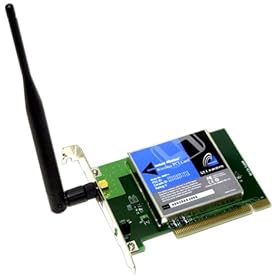
this PCI wireless network card needs to be installed in your dad's computer
This will accept the 2 wirless links from your notebook and/ or your dad's PC and the output port will be connected via cable to the wall socket outlet to the internet.
So do you have all the above installed properly and connected? -
ask dad to use your com.
-
im here.Originally posted by TehJarVu:mago kor kor where r u? -
did u turn on the adapter in the first place? most of the time, this message shows up when u did not turn on the adapter. or if not then most prob is the connection error. try resetting ur settings and see if it worksOriginally posted by missqi:I just changed router and everything, and now its a main one in the hall, and my lappie and the pc connect to the router wirelessly.
I can connect to the router fine, and I am using the Intel PROset wireless thingy.
BUT HAR.
My daddy's pc cannot connect to the net at all.
When I went to the network connections on his PC, it said "Wireless connection unavailable. Linksys G network adapter etc".
So...
HOW TO GO ONLINE? -
Assuming the new router is at its default configuration (Display SSID enabled), your dad's pc should be able to detect the wireless network connection...Originally posted by missqi:I just changed router and everything, and now its a main one in the hall, and my lappie and the pc connect to the router wirelessly.
I can connect to the router fine, and I am using the Intel PROset wireless thingy.
BUT HAR.
My daddy's pc cannot connect to the net at all.
When I went to the network connections on his PC, it said "Wireless connection unavailable. Linksys G network adapter etc".
So...
HOW TO GO ONLINE?
Maybe u can try restarting your modem and router. Then restart your pcs and see if it connects...
If not, if your are using an external adpater for your laptop, try swapping it with your dad's and see if his works on your laptop. ( to check if its a problem with the hardware)
In any case, try to use the Windows Wireless configuration...don't use the linksys wireless configuration...
Hope this helps... -
sometimes windows wireless configuration dunt work.. like mine.. must use the original program then can workOriginally posted by gatekeeper:Assuming the new router is at its default configuration (Display SSID enabled), your dad's pc should be able to detect the wireless network connection...
Maybe u can try restarting your modem and router. Then restart your pcs and see if it connects...
If not, if your are using an external adpater for your laptop, try swapping it with your dad's and see if his works on your laptop. ( to check if its a problem with the hardware)
In any case, try to use the Windows Wireless configuration...don't use the linksys wireless configuration...
Hope this helps... -
Yeah, thats true, but for Linksys adapters, the windows wireless configuration should work just fine...it's the linksys program that'll probably give you more problems...
-
Try updating the driver and firmware of the new hardwares.
-
Can yur dad's computer connect to yur wireless network in the first place? Or can connect, but cannot access the web?