Slow Startup And Shutdown
-
Especially shutdown. Now, when I go start, shutdown, the computer will hang for many mins before showing the options.
I only press ctrl alt del then shutdown from there. Even so, its kinda slow. It will hang at the blue screen with words, system is shutting down for many mins also.
Any way to rectify it? -
u ever try clearing up space and defrag ur drive?
and when u shutdown ur computer..got alot of programs running?
a slow shutdown is sometimes because the computer is trying to close all your processes -
There is one chapter on the improve shut down speed.
http://www.sgforums.com/?action=thread_display&thread_id=190620 -
i never defrag b4. dunno la.. my computer seems to have a lot of programs starting up.Originally posted by StarPuppy:u ever try clearing up space and defrag ur drive?
and when u shutdown ur computer..got alot of programs running?
a slow shutdown is sometimes because the computer is trying to close all your processes
wadever programs when i shutdown tat time... is wad i have on the taaskbar i think.. -
try defragging ur driveOriginally posted by mhcampboy:i never defrag b4. dunno la.. my computer seems to have a lot of programs starting up.
wadever programs when i shutdown tat time... is wad i have on the taaskbar i think..
what u can do is to change those programs that u dun need when u start up
example : MSN Messenger
Tools -> Options -> General -> (untick) auto run MSN messenger when i start windows
OR you could tweak your registry (which i reccomend..dun anyhow play with it)
-
the programs are NOT always from the task barOriginally posted by mhcampboy:wadever programs when i shutdown tat time... is wad i have on the taaskbar i think..
like shown in this pic
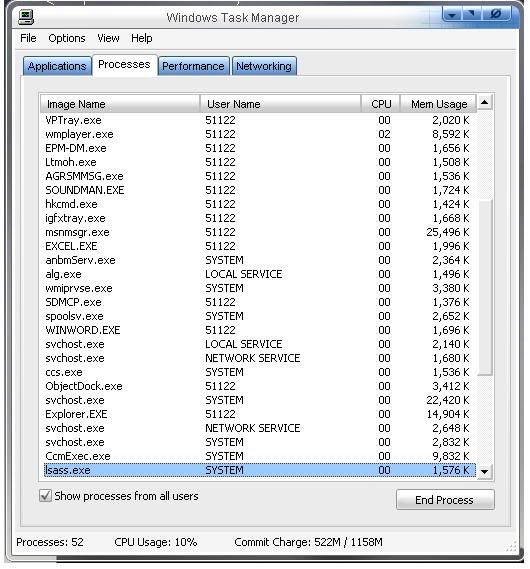
svchost.exe is a program running your network..u dun see it in your taskbars
Explorer.exe runs your desktop..so if u shut it down..your desktop will be blank
so what programs u have running on your taskbars do NOT mean are the only programs running in your PC
-
hmm.. how do i minimise the programs? wad i know hich to off?Originally posted by StarPuppy:the programs are NOT always from the task bar
like shown in this pic
svchost.exe is a program running your network..u dun see it in your taskbars
Explorer.exe runs your desktop..so if u shut it down..your desktop will be blank
so what programs u have running on your taskbars do NOT mean are the only programs running in your PC -
click start>run>input: shutdown -f
-
wads this for?Originally posted by manyu882:click start>run>input: shutdown -f -
Microsoft Windows XP [Version 5.1.2600]Originally posted by mhcampboy:wads this for?
(C) Copyright 1985-2001 Microsoft Corp.
C:\Documents and Settings\Choy Man Yu>shutdown
Usage: shutdown [-i | -l | -s | -r | -a] [-f] [-m \\computername] [-t xx] [-c "c
omment"] [-d up x:yy]
x:yy]
No args Display this message (same as -?)
-i Display GUI interface, must be the first option
-l Log off (cannot be used with -m option)
-s Shutdown the computer
-r Shutdown and restart the computer
-a Abort a system shutdown
-m \\computername Remote computer to shutdown/restart/abort
-t xx Set timeout for shutdown to xx seconds
-c "comment" Shutdown comment (maximum of 127 characters)
-f Forces running applications to close without war
ning
-d [u][p]x:yy The reason code for the shutdown
u is the user code
p is a planned shutdown code
xx is the major reason code (positive integer le
ss than 256)
yy is the minor reason code (positive integer le
ss than 65536)
C:\Documents and Settings\Choy Man Yu>
----------------------
btw try "shutdown -s" first. but if it doesn't work, try "shutdown -s -f" -
about the startup program....last week mayi posted a program which can schdule startup program like 5 minutes later.. 10 minutes later or even 1 day later after computer startupOriginally posted by mhcampboy:Especially shutdown. Now, when I go start, shutdown, the computer will hang for many mins before showing the options.
I only press ctrl alt del then shutdown from there. Even so, its kinda slow. It will hang at the blue screen with words, system is shutting down for many mins also.
Any way to rectify it? -
i have no idea wad u r talking abt.Originally posted by manyu882:Microsoft Windows XP [Version 5.1.2600]
(C) Copyright 1985-2001 Microsoft Corp.
C:\Documents and Settings\Choy Man Yu>shutdown
Usage: shutdown [-i | -l | -s | -r | -a] [-f] [-m \\computername] [-t xx] [-c "c
omment"] [-d upx:yy]
No args Display this message (same as -?)
-i Display GUI interface, must be the first option
-l Log off (cannot be used with -m option)
-s Shutdown the computer
-r Shutdown and restart the computer
-a Abort a system shutdown
-m \\computername Remote computer to shutdown/restart/abort
-t xx Set timeout for shutdown to xx seconds
-c "comment" Shutdown comment (maximum of 127 characters)
-f Forces running applications to close without war
ning
-d [u][p]x:yy The reason code for the shutdown
u is the user code
p is a planned shutdown code
xx is the major reason code (positive integer le
ss than 256)
yy is the minor reason code (positive integer le
ss than 65536)
C:\Documents and Settings\Choy Man Yu>
----------------------
btw try "shutdown -s" first. but if it doesn't work, try "shutdown -s -f" -
is it possible to run explorer.exe again after closing it? or is restart a must?Originally posted by StarPuppy:Explorer.exe runs your desktop..so if u shut it down..your desktop will be blank -
firstly is suspect some application is still running in background when it shutsdown. and u know.. a normal shutdown requires all program to save (registry or whatever) and exit. it not they will stuck thereOriginally posted by mhcampboy:i have no idea wad u r talking abt.
... showndown.exe is a program which can shutdown your computer with selected preference. windows shutdown is a simpler type(start>shtdown), but then they didn't show extra preference
the usage for it is (u have to type it in cmd or in run)
shutdown [function]
the "function" is the type of action u command shutdown.exe to do
function action
-------------------------------------------------------------------------------------
-i Display GUI interface, must be the first option
-l Log off (cannot be used with -m option)
-s Shutdown the computer
-r Shutdown and restart the computer
-a Abort a system shutdown
-m \\computername Remote computer to shutdown/restart/abort
-t xx Set timeout for shutdown to xx seconds
-c "comment" Shutdown comment (maximum of 127 characters)
-f Forces running applications to close without warning
-d [u][p]x:yy The reason code for the shutdown
u is the user code
p is a planned shutdown code
xx is the major reason code (positive integer less than 256)
yy is the minor reason code (positive integer less than 65536)
forexample, i wish to shutdown my dad's computer using my computer, and tell him to have a good rest.. here it goes...
shutdown -s -m \\daddycomputer -c "daddy, have a good rest!=)" -
oh...so by shutting down tat way... shutdown will be faster?
-
.Originally posted by mhcampboy:oh...so by shutting down tat way... shutdown will be faster?
for u la.. lol u go try see if it works. it ignores application which are still running and forces itself to shutdown -
hmm ok. will try later... downloading stuffs nowOriginally posted by manyu882:.
for u la.. lol u go try see if it works. it ignores application which are still running and forces itself to shutdown
thanks -
remember to post it the out come hir. i want to learn moreOriginally posted by mhcampboy:hmm ok. will try later... downloading stuffs now
thanks
-
wad learn more? u mean this have not been tested out b4?Originally posted by manyu882:remember to post it where hor.. the out come. i want to learn more
-
tested out in my com.. but then for your case i donoe..Originally posted by mhcampboy:wad learn more? u mean this have not been tested out b4?
my com nv so jia lat before . sure every 1 month go reformat -
gt 1 time. my com shut down takes very long.
bt it auto-cure after a while. -
gt 1 time. my com shut down takes very long.
bt it auto-cure after a while. -
its possibleOriginally posted by the_unknown:is it possible to run explorer.exe again after closing it? or is restart a must?
ctrl-alt-del
File -> New Task(Run) -> explorer
-
well..i could suggest that those that you DON'T want in your task bar..stop it from running during startupOriginally posted by mhcampboy:hmm.. how do i minimise the programs? wad i know hich to off? -
svchost.exe is a program running your network..u dun see it in your taskbars
It's more than that.