Basic Firefox and Tips
-
Are you using Greasemonkey or Netcraft add on?Originally posted by _n00b_:sorry...but what happened to my firefox?
the big space at the bottom... -
nope...no add-ons for firefox...Originally posted by ndmmxiaomayi:Are you using Greasemonkey or Netcraft add on?
i shut down my com at 4am and it was still fine...switched it back on jus at 1 and i saw this... -
Then it shouldn't be causing this. Greasemonkey and Netcraft add-ons are known to cause this huge space.Originally posted by _n00b_:nope...no add-ons for firefox...
i shut down my com at 4am and it was still fine...switched it back on jus at 1 and i saw this...
Just double check, go to Tools > Addons -
see what this has to say about it.Originally posted by _n00b_:sorry...but what happened to my firefox?
the big space at the bottom...
http://kb.mozillazine.org/Gray_bar_below_status_bar -
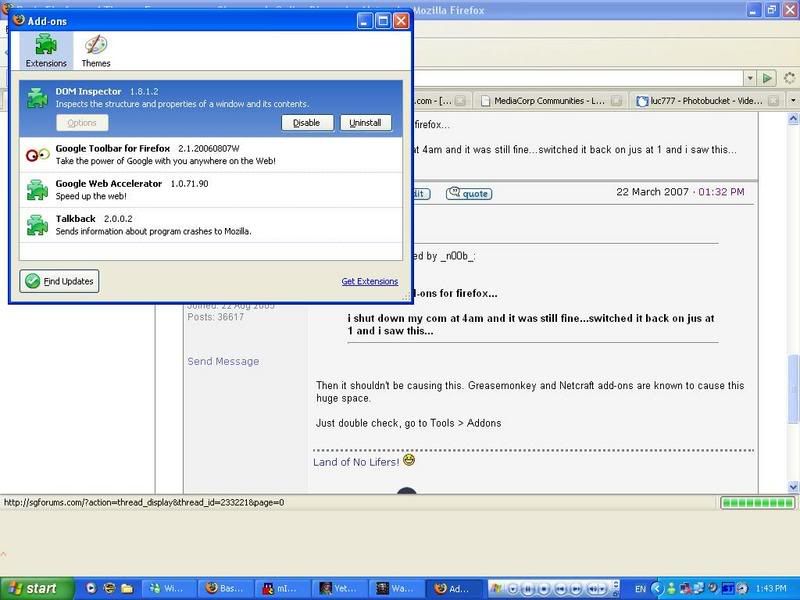
checked and got this...
-
ok...thanks alot...will go through it...Originally posted by skid:
thanks mayi for your time too...
-
I see you have Google Web Accelerator.Originally posted by _n00b_:checked and got this...
You will have to uninstall it or check this extension for updates. -
have u try dragging it down ..
there is once it happen to my ff also .. click on the bottom right corner and drag down -
yep...just uninstalled it and firefox's back to normal...is the accelerator really useful or is the time saved exaggerated?Originally posted by ndmmxiaomayi:I see you have Google Web Accelerator.
You will have to uninstall it or check this extension for updates. -
Don't know, never tried.Originally posted by _n00b_:yep...just uninstalled it and firefox's back to normal...is the accelerator really useful or is the time saved exaggerated?
But if there's no difference, might as well don't use it. -
ok...thanks alot...Originally posted by ndmmxiaomayi:Don't know, never tried.
But if there's no difference, might as well don't use it.
-
-
any reason for firefox causing lag when i run full screen applications?when i alt tab the screen will lag for a while with my cpu red light flashing...last time the alt tab action was smooth with no red light from my cpu...now i have to close firefox to get a smooth alt tab...
-
Full screen programs are very graphic and memory intensive. It's not recommended unless the program requires full screen.
If it has been smooth last time, try defragging your hard disk. -
ok...thanks for the fast reply...Originally posted by ndmmxiaomayi:Full screen programs are very graphic and memory intensive. It's not recommended unless the program requires full screen.
If it has been smooth last time, try defragging your hard disk. -
400?Originally posted by mad.obsessionz:then right click and click modify to set
"network.http.pipelining.maxrequests" to some number like 50 (i set mine to 400 (~^ , )) ).
is it many?
the more the better?
more will spoil or something anot? -
My first attempt to get Mac users to use Firefox.


Safari View, something like IE View. It allows you to view websites as if you are using the Safari browser. -
Ever tweaked your Firefox for one PC and want the same settings for another PC/user account?
You can import all Firefox's tweaked settings into another PC by locating the prefs.js file and copying it into the Firefox's folder.
This trick only works if you've tweaked, but not installed any add-ons. If you've installed any add-ons, then you might have some trouble with Firefox.
The location of this file is at: C:\Documents and Settings\Your Username\Application Data\Mozilla\Firefox\Profiles\XXXXXXXX.default
Copy the prefs.js file into your thumbdrive and paste it into the user Firefox's folder or the other PC Firefox's folder.
Paste it here: C:\Documents and Settings\Your Username\Application Data\Mozilla\Firefox\Profiles\XXXXXXXX.default
Replace C: drive with the drive where Firefox is installed. -
I got a problem. You cannot stream media file in firefox. It will always download first before opening, and I have tried all addons, the closest is launchy but you still need to right click and select open with. It can't automatically open files with programs.
For example you have mp3 link. If you want to stream you must finish download first. Also though Launchy is the closest, I am looking for a direct one click addon that enables instant streaming. -
Yeah... that will save time downloading.
If you want it to stream in Firefox, get IE tab for Firefox. Then switch to the IE rendering engine. -
Hi. I will like to ask if there is any way to save the password for a certain username? For example, i have this username which firefox did not remember the password for it or i have accidentally clicked " do not remember" so the password isn't saved... Is there any way to manually save the password for this user? Thanks.
-
Tools > Options
Select the Security tab at the top.
Under Passwords, click on the Exceptions... button
You will see sites that you've chosen not to remember passwords for. Click once to select the site, then click on Remove Site button.
Go to that website that you want passwords to be saved. Log in as per usual, Firefox will prompt you.
This time, select Remember passwords. -
erm but the site isn't under the "exceptions" list... in fact there is nothing under this listOriginally posted by ndmmxiaomayi:Tools > Options
Select the Security tab at the top.
Under Passwords, click on the Exceptions... button
You will see sites that you've chosen not to remember passwords for. Click once to select the site, then click on Remove Site button.
Go to that website that you want passwords to be saved. Log in as per usual, Firefox will prompt you.
This time, select Remember passwords. -
Did you choose the "Not Now" option?Originally posted by OasisBlue:erm but the site isn't under the "exceptions" list... in fact there is nothing under this list
"Not Now" option will not remember the password temporary until you say yes to it.
Press Ctrl + Shift + Del to clear everything. Then try logging in again. -
Originally posted by ndmmxiaomayi:
ok thanks
Did you choose the "Not Now" option?
"Not Now" option will not remember the password temporary until you say yes to it.
Press [b]Ctrl + Shift + Del to clear everything. Then try logging in again.[/b]
 Warning: Biased contents