Hi, Can Help me . . . @%@
-
Hi, anyone here can help me, i will be very thankful... I have just got this comp from someone. The thing is i have 2 IDE Harddisk on my current comp and i was thinking of taking out the spare one which has all my data & stuff on it and put it over here but this set uses the Sata connection. You see the red wire in Picture 1 & 2, that is the sata connection wires. It has 2 HD already but can i add another? But its in IDE. There is this black pin on the corner of the motherboard which says Sec-IDE on the side (on Picture 10) Can it be use? or cannot mix two different type of connection HD on the Motherboard?
1) If can, what setting should i put at the back of the IDE HD?
2) Anyone know what memory i need to use if i want to add a higher ram, i saw on one of the ram it says PC3200U what kind of ram is this anyone know? and whats the max i can put up too?
3) On Pic 9, there is this white Aux port and Black CD port. Anyone know what are they for?
4) Also from the pictures, what connection type is the graphic card? Just want to know should i want to replace it.
5) Lastly, how do you see or know if the processor has been overclock or not? Or you can't tell weather it has been by just looking at the pictures.
Thanks.
Picture 1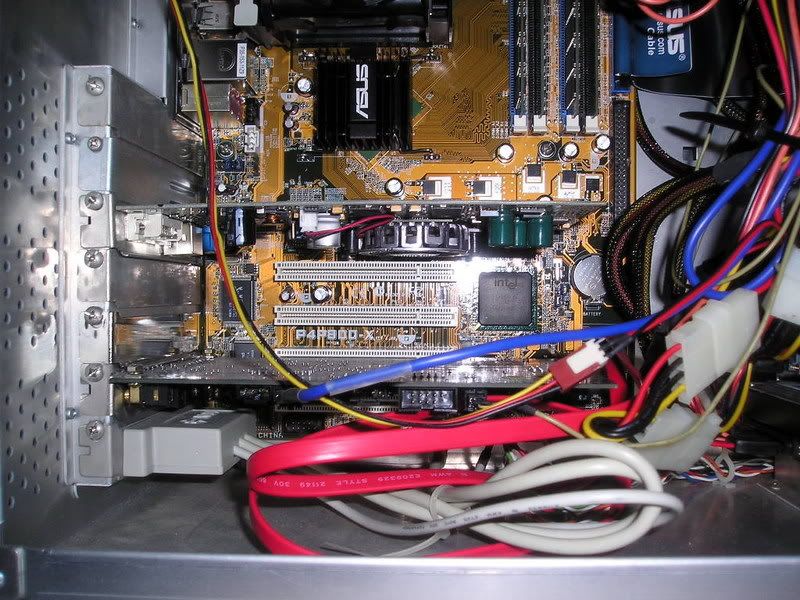
Picture 2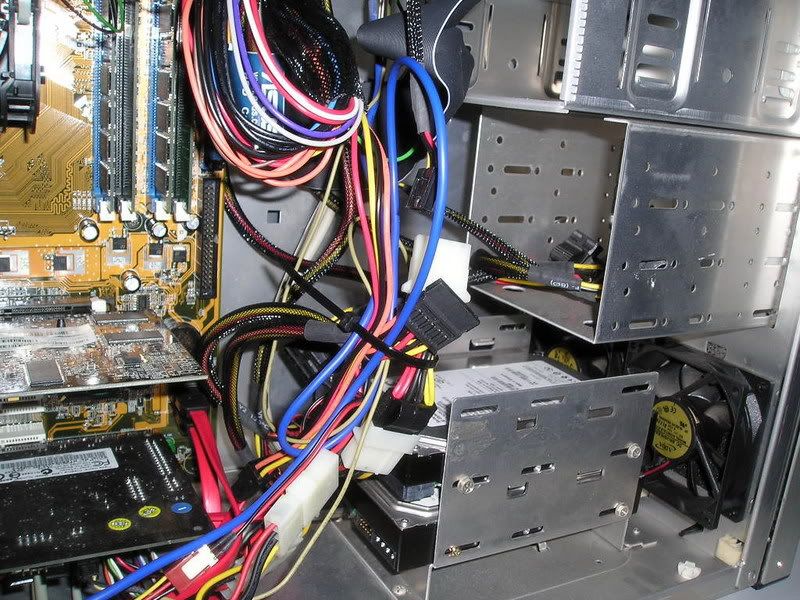
Picture 3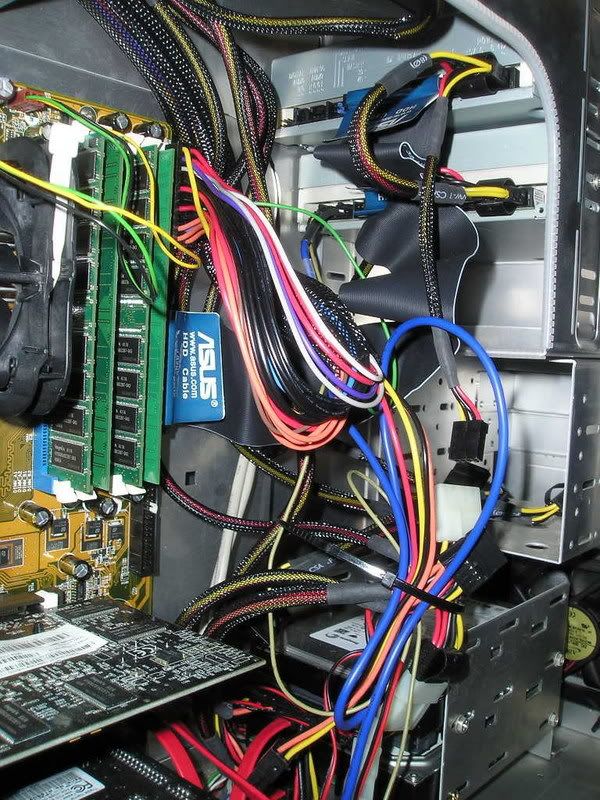
Picture 4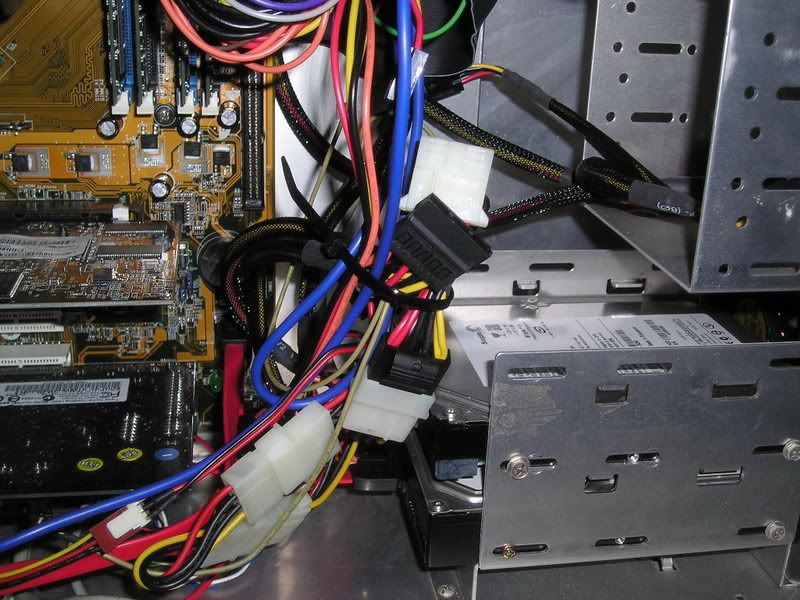
Picture 5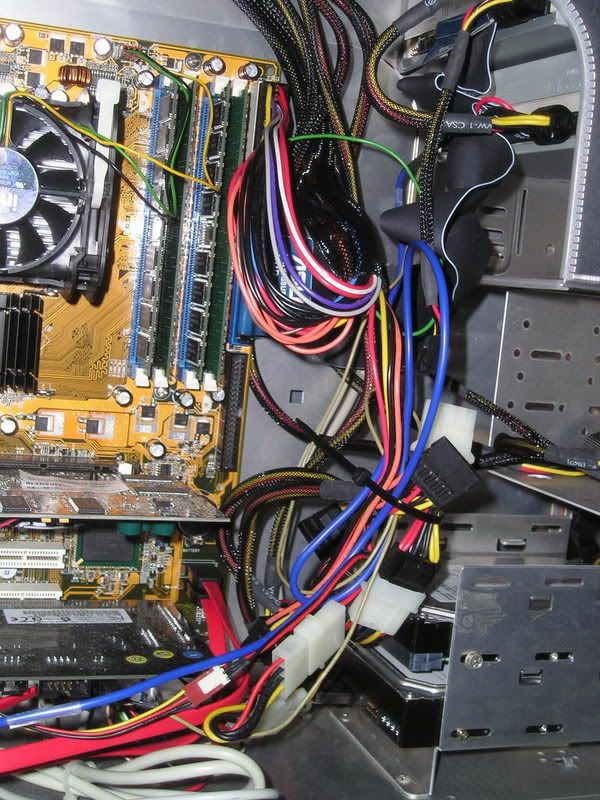
Picture 6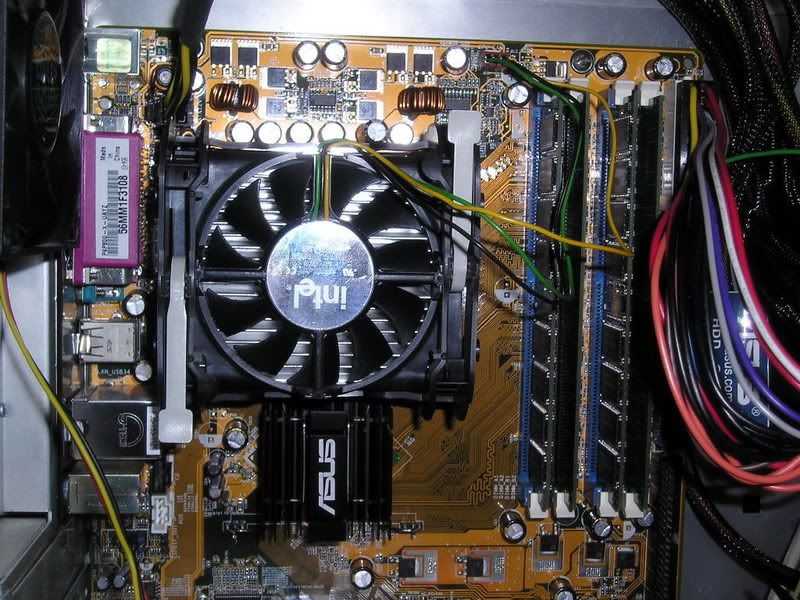
Picture 7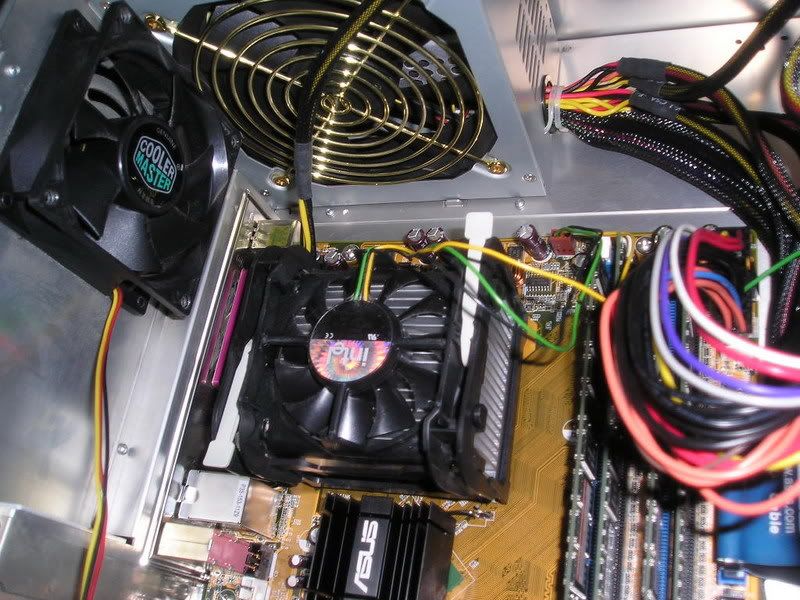
Picture 8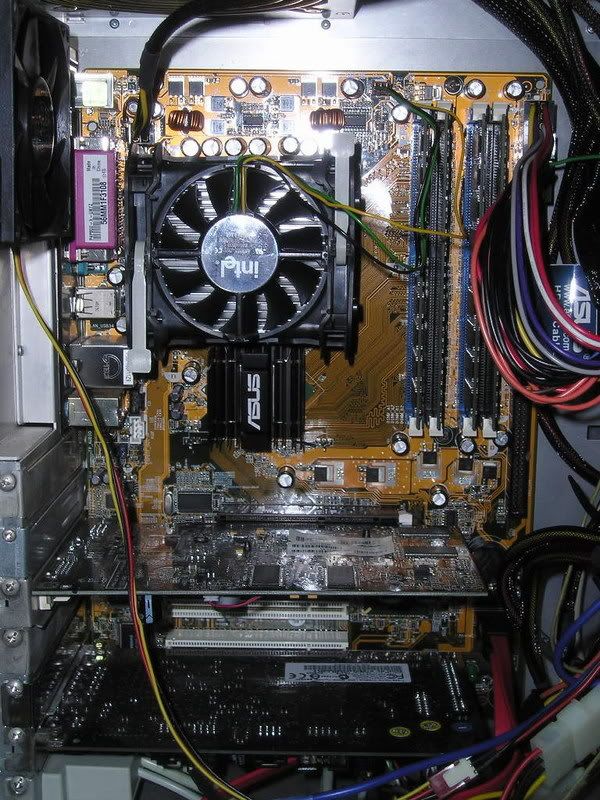
Picture 9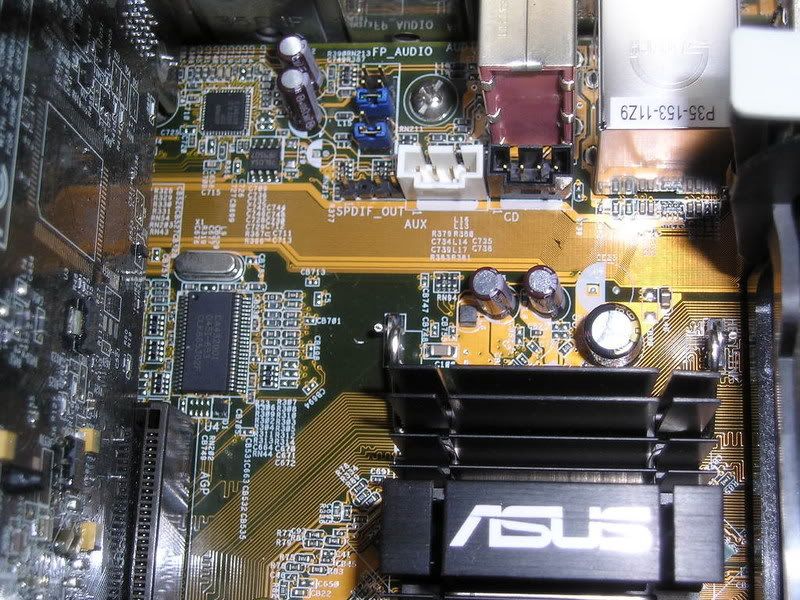
Picture 10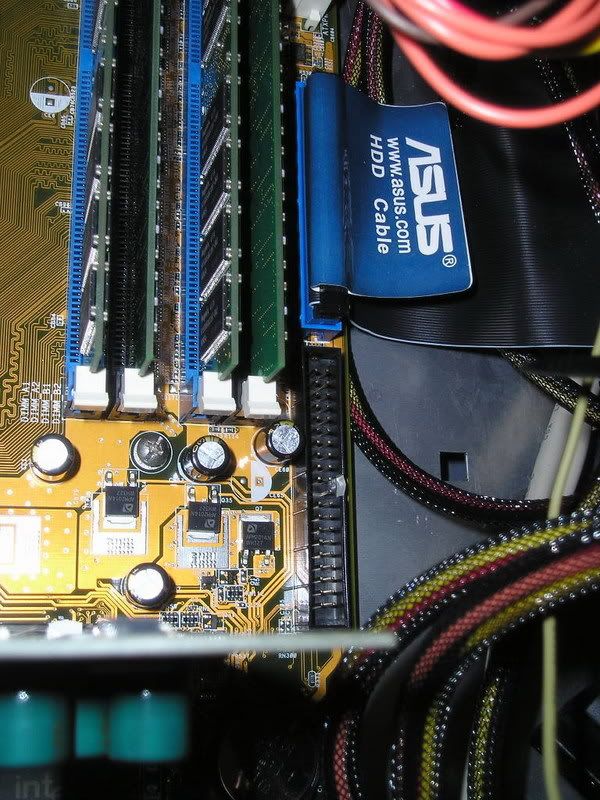
-
wow... so clear the pitures...
-
Wth is asking for help not comment on the pics.Originally posted by mhcampboy:wow... so clear the pitures...
Sry bro i'm not IT tech.
-
wait for mayi
-
I can help you answer your qn 3, 4 and 5.
For qn 3 - that two port is useless. Nowadays, we don't use it anymore, you do not have to worry about it.
For qn 4 - Judging from picture 8, you are currently using a AGP slot graphic card. If you want to change your graphic card, you will need a graphic card that uses AGP slot. You can use PCI graphic card though, but I doubt the market still sell it. Actually, I also don't think market sell AGP graphic card anymore, you can check if you want to.
For qn 5- No you can't check whether if the processor is overclocked from the picture. You need to boot into BIOS to check it if you know how, if not I suggest you to leave it alone.
-----------------------------
For qn 1 - Yes you can add your IDE HDD to this set using the empty IDE connector in picture 10. Set the IDE HDD as master and connect it to the empty IDE connector in picture 10.
As for qn 2 - PC3200U (Model of your ram) is a DDR 400 ram. If you want to increase your ram, you just have to buy the same type of ram and insert into your PC. Judging from your processor fan, I think you are running a pentium 4 PC. You can refer to your computer manual to check out the maximum amount of ram your computer supported, but my guessing is your PC can support for to maximum 2GB of ram. -
Perhaps it might help if you state the model of your system board (motherboard).
-
Judging from your picture, I suspect you are using Asus P4P800-X motherboard. I did some searching from the main website and found it. Yea, the picture of the board on the website is the same as yours, no doubt you are using Asus P4P800-X motherboard.
Sorry I made a mistake in guessing your maximum supported ram.
Your PC can support up to maximum 4GB Ram instead of what I said previously 2GB.
The RAM model you can use include PC3200/2700/2100.
*Above information taken from offical site, click to see full specification - http://sg.asus.com/products.aspx?l1=3&l2=12&l3=31&model=181&modelmenu=2
Oh I notice you are using the same case brand as me, Lian Li, right? -
Ok thanks for all the trouble, So i can fix it into that black Sec-IDE slot right. When i on the comp must i still go to the set up to activate it?Originally posted by furb:I can help you answer your qn 3, 4 and 5.
For qn 3 - that two port is useless. Nowadays, we don't use it anymore, you do not have to worry about it.
For qn 4 - Judging from picture 8, you are currently using a AGP slot graphic card. If you want to change your graphic card, you will need a graphic card that uses AGP slot. You can use PCI graphic card though, but I doubt the market still sell it. Actually, I also don't think market sell AGP graphic card anymore, you can check if you want to.
For qn 5- No you can't check whether if the processor is overclocked from the picture. You need to boot into BIOS to check it if you know how, if not I suggest you to leave it alone.
-----------------------------
For qn 1 - Yes you can add your IDE HDD to this set using the empty IDE connector in picture 10. Set the IDE HDD as master and connect it to the empty IDE connector in picture 10.
As for qn 2 - PC3200U (Model of your ram) is a DDR 400 ram. If you want to increase your ram, you just have to buy the same type of ram and insert into your PC. Judging from your processor fan, I think you are running a pentium 4 PC. You can refer to your computer manual to check out the maximum amount of ram your computer supported, but my guessing is your PC can support for to maximum 2GB of ram.
On the ram, PC3200U is DDR 400 is it? And what DDR ram is PC/2700/2100? If i were to take out 2, must i buy the same as the other 2 on the comp, or the 2 i have taken out or any of those you mentioned, PC3200/2700/2100 can be use together?
Anyway i saw from the link you give and there is this non-ECC DDR SDRAM memory by the side of it. What is non-ECC?
And on the AGP, you mean Sim Lim don't sell this type of AGP graphic card anymore? AGP8X/ 4X can be used but not AGP ATI is it?
Thanks. -
I'm leaving the hard disk question out, not too sure about it. Some others could help you.Originally posted by nikoz:Ok thanks for all the trouble, So i can fix it into that black Sec-IDE slot right. When i on the comp must i still go to the set up to activate it?
On the ram, PC3200U is DDR 400 is it? And what DDR ram is PC/2700/2100? If i were to take out 2, must i buy the same as the other 2 on the comp, or the 2 i have taken out or any of those you mentioned, PC3200/2700/2100 can be use together?
Anyway i saw from the link you give and there is this non-ECC DDR SDRAM memory by the side of it. What is non-ECC?
And on the AGP, you mean Sim Lim don't sell this type of AGP graphic card anymore? AGP8X/ 4X can be used but not AGP ATI is it?
Thanks.
As for the RAM question, all I can say is that nowadays the standards are varied. It's very hard to convert from DDR XXX to PC XXXX, because different manufacturers use different standards.
You can just tell the shopkeeper you want a 184-pin DDR RAM, they should know what to get for you. Otherwise, just state you want a PC3200/2700/2100 RAM.
ECC is error correcting code, an error correcting mechanism for hardware, especially if it's noisy or not so stable.
If you use a ECC-supported RAM, it will take up some computational power, causing a PC to slow down. Whether or not it's significant, I'm not so sure. There are mixed views about it. A non-ECC type of RAM won't check for errors while running (other than during the boot process)
AGP cards should be still in sale, as the ones supported aren't really out of date. -
5) Lastly, how do you see or know if the processor has been overclock or not? Or you can't tell weather it has been by just looking at the pictures.
If you see smoke coming out, means it's being overclocked badly.
If everything is handled well, usually you can't tell, unless the owner uses some other type of cooling system other than the usual ones provided (which is a small fan only)
They may have more fans, or is using liquid cooling system in that case. -
can.. why not? no need to activate it unless your system doesn't detect it.. den it must be your BIOs setting.. but then by default it should detectOriginally posted by nikoz:Ok thanks for all the trouble, So i can fix it into that black Sec-IDE slot right. When i on the comp must i still go to the set up to activate it?
Thanks.
just that never slot 2 IDE hdd in the same splitter cos loading speed(from hdd to mo) will be affected very badly.. one IDE device for each IDE slot is recommended. however, if bo bian, then nvm lo.. -
OK so PC3200/2700/2100 not important just make sure its a 184-pin DDR RAM will do right. And can i use just one piece alone or must be in pairs?Originally posted by ndmmxiaomayi:I'm leaving the hard disk question out, not too sure about it. Some others could help you.
As for the RAM question, all I can say is that nowadays the standards are varied. It's very hard to convert from DDR XXX to PC XXXX, because different manufacturers use different standards.
You can just tell the shopkeeper you want a 184-pin DDR RAM, they should know what to get for you. Otherwise, just state you want a PC3200/2700/2100 RAM.
ECC is error correcting code, an error correcting mechanism for hardware, especially if it's noisy or not so stable.
If you use a ECC-supported RAM, it will take up some computational power, causing a PC to slow down. Whether or not it's significant, I'm not so sure. There are mixed views about it. A non-ECC type of RAM won't check for errors while running (other than during the boot process)
AGP cards should be still in sale, as the ones supported aren't really out of date.
Thanks. -
Best is to get one piece, it will be better.Originally posted by nikoz:OK so PC3200/2700/2100 not important just make sure its a 184-pin DDR RAM will do right. And can i use just one piece alone or must be in pairs?
Thanks.
Makes troubleshooting easier also. -
Ok thanks for the info. In this case since i am not using the IDE HD as a main (No OS) just as an extra storage space disk, it won't matter should i connect 2 HD to the slot right?Originally posted by manyu882:can.. why not? no need to activate it unless your system doesn't detect it.. den it must be your BIOs setting.. but then by default it should detect
just that never slot 2 IDE hdd in the same splitter cos loading speed(from hdd to mo) will be affected very badly.. one IDE device for each IDE slot is recommended. however, if bo bian, then nvm lo..
Thanks. -
dp..
-
yep, doesn't matter.. as long as the jumper settings are correct.Originally posted by nikoz:Ok thanks for the info. In this case since i am not using the IDE HD as a main (No OS) just as an extra storage space disk, it won't matter should i connect 2 HD to the slot right?
Thanks.
if u plan to plugin a IDE hdd which serve as a extension of space(known as slave drive), u need to remove the jumper in the HDD which looks like this:
and plug into slave section. however, if your IDE hdd doesn't have any slave section, just remove the jumper and leave it as it is. by default, jumpers setting is always at Master. and also, if no jumpers are detected in the HDD, it will be automatically recognise as slave if a Master hdd is deteted in other IDE slot.
primary is 1st IDE slot while secondary is 2nd IDE slot. however, in IDE HDD, there only can be ONE master(which contains your OS). if not OS will not load sometimes.
NOTE: Aware the the jumper picture above is an illastration. normally jumper at MASTER will locate at the end which is like:
quote from: http://www.pcguide.com/ref/mbsys/bios/set/stdIDESM-c.html
jumpers in HDD are use to let mother board to recognise whether its a master or slave.
IDE Secondary Master
This is where the hard disk parameters are entered for the secondary master IDE device, normally the third drive in a modern IDE system (though it can be the second as well, if the primary slave device is not used). See the hard disk section for details on what these terms mean and how these devices are set up. The various settings for the drive are discussed in detail in the IDE Setup / Autodetection section. The default setting for this on a system with IDE autodetection, is usually "Auto". -
Must i still set the jumpers for the IDE HD if i am only using them for storage? I still must select Master & Slave even tho the main (with the OS) is on a Sata connection HD.Originally posted by manyu882:jumpers in HDD are use to let mother board to recognise whether its a master or slave. -
yes. you have to set it.if your motherboard detects 2 masters(motherboard dont care which hdd got OS or not), it will either sometimes boot from the first hdd or second hdd. if suay suay boot from second hdd which u use for storage, it will show cannot find OS or some other errors.Originally posted by nikoz:Must i still set the jumpers for the IDE HD if i am only using them for storage? I still must select Master & Slave even tho the main (with the OS) is on a Sata connection HD. -
Ok, as long as can use 1 pc should be better, i thot must use in pairs cos from the pics, got 4 ram, both in pairs in terms of brand and speed. 2 pcs alike in brand and speed but different from the other 2. The other 2 also same speed and brand but not the same from the first 2.Originally posted by ndmmxiaomayi:Best is to get one piece, it will be better.
Makes troubleshooting easier also. -
In this case i set both to slave or one master one slave cos both got no OS.Originally posted by manyu882:yes. you have to set it.if your motherboard detects 2 masters(motherboard dont care which hdd got OS or not), it will either sometimes boot from the first hdd or second hdd. if suay suay boot from second hdd which u use for storage, it will show cannot find OS or some other errors. -
If you are going to use two IDE HDD, just set one to master and one to slave.
I remember seeing a thread with a person having trouble booting IDE (Contains OS) as Main, because the PC keep booting up with SATA as Main. -
MUST HAVE one( 1 and really 1) master(MUST contain OS), any number of slaves(any amount of slaves from 0 to positive infinity)Originally posted by nikoz:In this case i set both to slave or one master one slave cos both got no OS.
but for your case, you set your sata one to master and IDE one to slave ba since sata has much trasnferring rate. but be aware that u must install OS in master which is sata. -
Ok, Thanks, thanks guys. One more thing is, from the pictures no.4 & 5, How come SATA HD use the black plug - like one thin line whereas the normal HD uses the standard 4 pin plug for power supply? Does all Sata HD use this kind of (like one thin line) for power supply, if not do they sell something to change the (thin line black plug) to a normal 4 pin type?
Thanks.