Problem after login
-
Hi, I hope to get some advice here.
After defragmenting my pc one day, a strange thing happens. Everytime after I login, the adobe Acrobat Reader (AR) (v 5?) will open up and prompt me to install the programme. This happens even when the prog had been installed a long time ago.
I tried several things to get rid of it, including:
- uninstalling the AR programme (v 5)
- reinstall the AR prog (v 5)
- install the latest AR prog (v 7 or 8 ) [after uninstalling AR v 5]
Still, the AR (v 5) still prompt me to install each time after login. How can I get rid of this prompting? I'm using WinXP.
 -
Start > Run and type in msconfig
Select the Startup tab
You should see quite a few programs
There will be 2 Adobe programs listed, one is the reader, one is the installer.
Untick the box for the installer. Click OK and restart PC.
If unsure, just post back these 2 entries or take a screenshot. -
Thanks, I go home and try tonight.Originally posted by ndmmxiaomayi:Start > Run and type in msconfig
Select the Startup tab
You should see quite a few programs
There will be 2 Adobe programs listed, one is the reader, one is the installer.
Untick the box for the installer. Click OK and restart PC.
If unsure, just post back these 2 entries or take a screenshot.
-
Xiaomayi, which box should I uncheck huh? I've tried unchecking firstly, Adobe Reader speed launch but it didn't work. Then I unchecked Adobe Reader Synchronizer, but it didn't work either. Should I uncheck both?Originally posted by ndmmxiaomayi:Start > Run and type in msconfig
Select the Startup tab
You should see quite a few programs
There will be 2 Adobe programs listed, one is the reader, one is the installer.
Untick the box for the installer. Click OK and restart PC.
If unsure, just post back these 2 entries or take a screenshot.
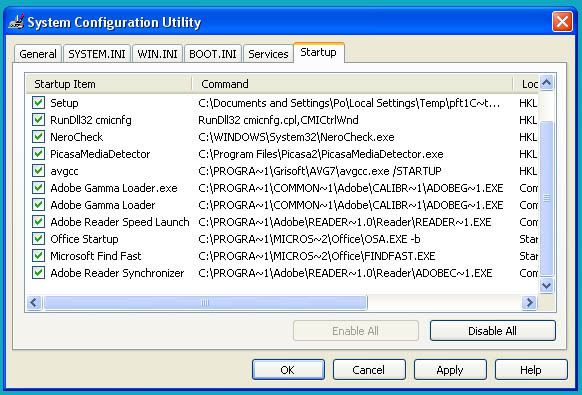
-
Update: I've tried unchecking both - also didn't work.Originally posted by Wanda:Xiaomayi, which box should I uncheck huh? I've tried unchecking firstly, Adobe Reader speed launch but it didn't work. Then I unchecked Adobe Reader Synchronizer, but it didn't work either. Should I uncheck both?
In the end, I tried unchecking all 4 Adobe items, it still didn't work.
How ah? Any solution? -
Clean up the temporary folder. I see some files there.
Use CCleaner or ATF Cleaner.
Then uncheck all the Adobe Reader boxes and restart PC. -
Dear mayi, your method worked!! Yayy!! I'm so happy to finally get rid of it.Originally posted by ndmmxiaomayi:Clean up the temporary folder. I see some files there.
Use CCleaner or ATF Cleaner.
Then uncheck all the Adobe Reader boxes and restart PC.
Thanks so much, appreciate your help! -
You are welcome.Originally posted by Wanda:Dear mayi, your method worked!! Yayy!! I'm so happy to finally get rid of it.
Thanks so much, appreciate your help! 