removing rmvb pop-up
-
When playing certain rmvb files, it'll open the firefox and go to some websites. Is there anyway to stop it? The pop-up only occurs after (for eg) 5mins of playing or when fast-forward is used.
Scan using Ad-aware and Avg revealed no abnormality. -
d.l movies somemore.Originally posted by the_unknown:When playing certain rmvb files, it'll open the firefox and go to some websites. Is there anyway to stop it? The pop-up only occurs after (for eg) 5mins of playing or when fast-forward is used.
Scan using Ad-aware and Avg revealed no abnormality.
u get these kind of craps one, dats the price to pay~ -
i didnt mention dl movies.Originally posted by hiphop2009:d.l movies somemore.
u get these kind of craps one, dats the price to pay~
the prob occurs mainly to variety shows and mtv. -
ya la, i mean, wad ever shows or movies u d.lOriginally posted by the_unknown:i didnt mention dl movies.
the prob occurs mainly to variety shows and mtv.
coz it is for advertising.
dun worry, ur com wont have spyware~ -
ya i know what you meant, but i'm just asking if anyone has a solution to it.Originally posted by hiphop2009:ya la, i mean, wad ever shows or movies u d.l
coz it is for advertising.
dun worry, ur com wont have spyware~
it isnt spyware? then how it opens another program by itself? my thinking is that certain scripts are embedded into the file... -
Use Real Alternative. It's in sticky page 4 or 5 for freewares.
-
i played using both media player classic and real player got the same problem. it appears that this only happen to files originating from chinese websites...Originally posted by ndmmxiaomayi:Use Real Alternative. It's in sticky page 4 or 5 for freewares. -
Originally posted by the_unknown:i played using both media player classic and real player got the same problem. it appears that this only happen to files originating from chinese websites...

I don't have problems... -
Depend..
-
not all files have this problem. only some files.Originally posted by ndmmxiaomayi:
I don't have problems...
edit: hi i juz found the u/m and it's in chinese (hope u can understand it), would it be possible to tell me if the rmevents.exe and realfilter.exe are malwares? or if any of the instructions are suspicious? thx in advance!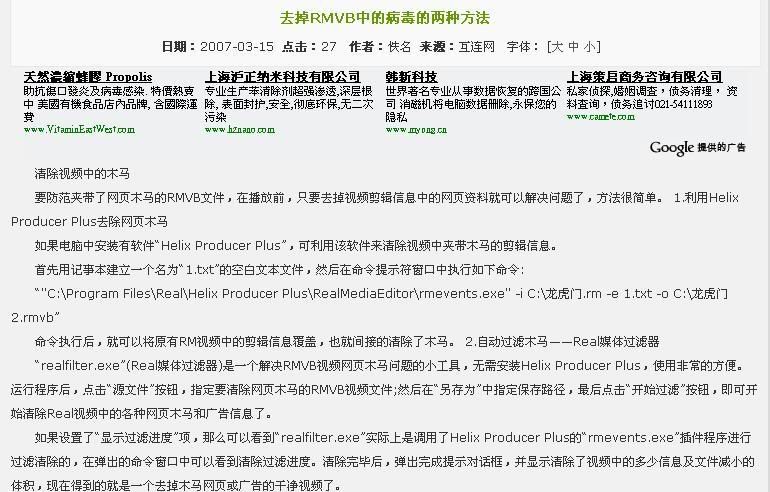
-
After I switch, all files that produces RMVB files that produces popups no longer does.Originally posted by the_unknown:not all files have this problem. only some files.
Might be embedded in the file itself.
There's another method, you could try if it works.
I assume that you are using Windows XP.
Go to Start > Run and type in notepad C:\WINDOWS\SYSTEM32\DRIVERS\ETC
Whenever there's a popup, note them the website.
In the Notepad file that opens, add this to the last line:
127.0.0.1 the popup website
For example, you get this:
www.stupidpopup.com/whatever.html
In that Notepad file, type in: 127.0.0.1 www.stupidpopup.com -
when i typed in " notepad C:\WINDOWS\SYSTEM32\DRIVERS\ETC ", it opens an empty notepad and prompts "Access is denied" (i'm using adminstrator acc).Originally posted by ndmmxiaomayi:After I switch, all files that produces RMVB files that produces popups no longer does.
Might be embedded in the file itself.
There's another method, you could try if it works.
I assume that you are using Windows XP.
Go to Start > Run and type in notepad C:\WINDOWS\SYSTEM32\DRIVERS\ETC
Whenever there's a popup, note them the website.
In the Notepad file that opens, add this to the last line:
127.0.0.1 the popup website
For example, you get this:
www.stupidpopup.com/whatever.html
In that Notepad file, type in: 127.0.0.1 www.stupidpopup.com
do i continue? if yes, any particular filename needed? -
Oops, I forget an extra part.Originally posted by the_unknown:when i typed in " notepad C:\WINDOWS\SYSTEM32\DRIVERS\ETC ", it opens an empty notepad and prompts "Access is denied" (i'm using adminstrator acc).
do i continue? if yes, any particular filename needed?
Hosts
Exact one is notepad C:\WINDOWS\SYSTEM32\DRIVERS\ETC\Hosts -
it didnt exactly work...Originally posted by ndmmxiaomayi:Oops, I forget an extra part.
Hosts
Exact one is notepad C:\WINDOWS\SYSTEM32\DRIVERS\ETC\Hosts
i tried replacing it by juz the website (ie instead of www.p.com/a.html, i used www.p.com), the only difference is that it didnt load the webpage. still it fails to prevent the popup...
anyway thx alot!
i'll try to backup my system and used the method found earlier. (do let me know if you have any comments on it, thx) -
Hmm... I did have the same problem as you when I tried this.Originally posted by the_unknown:it didnt exactly work...
i tried replacing it by juz the website (ie instead of www.p.com/a.html, i used www.p.com), the only difference is that it didnt load the webpage. still it fails to prevent the popup...
anyway thx alot!
i'll try to backup my system and used the method found earlier. (do let me know if you have any comments on it, thx)
You need to clear some stuffs first.
Start > Run and type in cmd
ipconfig /renew
ipconfig /flushdns
Works quite well. -
the pop-ups doesn't occur when i played the infected rmvbs in windows media player...

-
Just try using another player, any but Real Player.
If pop-ups open in Real player's browser itself, there isn't really much to worry, except dun click on anything and just close it.
However, if an external browser opens up, be mindful that it could be a script not related to real player's browser function and could be harmful. scan the file in this case.
Most of this rvmb popups came from china websites because they provides lots of movies and videos encoded with rvmb format online for download through torrents. And their competition is real tough, desperate to get most clicks on their own website, they do this. Just bare with it, remember whatever video you get you are not paying for it.
You can also look out for avi format next time instead of rvmb, a lot safer technically. -
wondering how come realplayer doesnt release a patch to fix/prevent the bug/script? so that can prevent ppl from exploiting it...Originally posted by chenc:Just try using another player, any but Real Player.
If pop-ups open in Real player's browser itself, there isn't really much to worry, except dun click on anything and just close it.
However, if an external browser opens up, be mindful that it could be a script not related to real player's browser function and could be harmful. scan the file in this case.
Most of this rvmb popups came from china websites because they provides lots of movies and videos encoded with rvmb format online for download through torrents. And their competition is real tough, desperate to get most clicks on their own website, they do this. Just bare with it, remember whatever video you get you are not paying for it.
You can also look out for avi format next time instead of rvmb, a lot safer technically.
it worked!Originally posted by mev:the pop-ups doesn't occur when i played the infected rmvbs in windows media player... 
-
wondering how come realplayer doesnt release a patch to fix/prevent the bug/script? so that can prevent ppl from exploiting it...
It's the files that are infected, nothing to do with Real Player... -
did you dl frm chinanese websites?