memory for running applications
-
jus compared with my friends...
when they run warcraft III they the memory their com use ranges around 60k to 70k while mine is 220k...
and their firefox uses 20k while mines takes up to 100k...
any reason for this big difference?
my firefox has 4 tabs open if it's contributing to the usage...
thanks...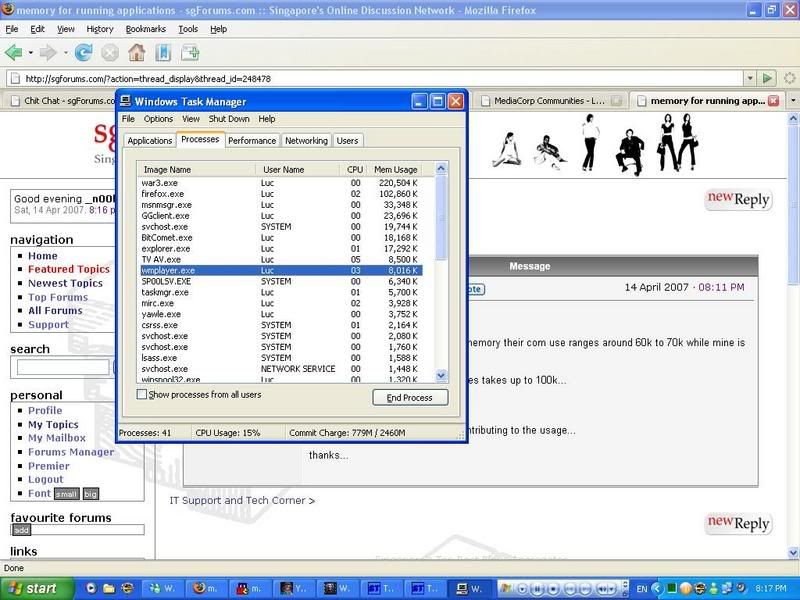
-
Yes, those 4 tabs are contributing. One tab alone can take up to 20k.

-
Hmm.. You have four instances of firefox.exe?
Generally, an instance of an application (eg. firefox.exe) is captured on your Task Manager for every attempt made to launch that application. So, that means something(s) on your computer is trying to launch your browser (for three times) even though it was already launched. As a result, Task Manager will just "pool" these processes together and "share" the RAM.
As to what actually caused this, I have no idea. It may be malware, or it might be driver conflicts. But, since you are using mIRC, Bit Torrent, and somewhat of an online gaming platform, I would suggest you to scan your computer for potential malware. If nothing turns up, try updating all your programs to resolve any potential "conflicts" in your system. -
You can also try downloading this to evaluate your system processes.
http://www.neuber.com/taskmanager/download.html
However, a process with a high rating may not nescessarily equate dangerous or malicious. It just mean that it has some undesirable characteristics, like "remembering" your logged entries. An example would be the PENCHS.DLL, which is actually used by the Microsoft Handwriting program to record what you "written" so that it can find similar words to show you what is the word you want to use. Once you confirmed that an application is malicious in nature, you can quarantine it to prevent it from running again.
To unlock the 30 day trial, copy and paste this into the box.
Name:lee4you.mycv.tv
Key :lee4you.mycv.tv+&:.xm.N1111JTmW11WwhI111hx11bwc
Courtesy of http://zhidao.baidu.com/question/16619999.html -
hor! you use irc

-
Originally posted by Conner MacDermott:
You can also try downloading this to evaluate your system processes.
http://www.neuber.com/taskmanager/download.html
However, a process with a high rating may not nescessarily equate dangerous or malicious. It just mean that it has some undesirable characteristics, like "remembering" your logged entries. An example would be the PENCHS.DLL, which is actually used by the Microsoft Handwriting program to record what you "written" so that it can find similar words to show you what is the word you want to use. Once you confirmed that an application is malicious in nature, you can quarantine it to prevent it from running again.
To unlock the 30 day trial, copy and paste this into the box.
[b]Name:lee4you.mycv.tv
Key :lee4you.mycv.tv+&:.xm.N1111JTmW11WwhI111hx11bwc
Courtesy of http://zhidao.baidu.com/question/16619999.html[/b]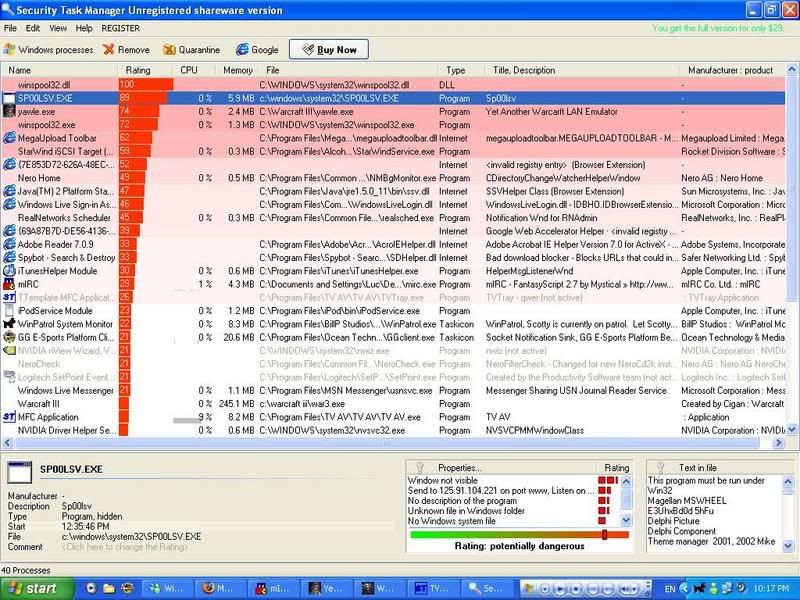
i get this...
and for malware...is it the same thing if i use ad-aware?or is there a seperate scanning software?
thanks... -
Malware = Spyware, Adware, Trojans, Virus, and all the other nonsense that could harm your computer.
Adaware is fine. Update and scan regularly. -
Hmm.. Get rid of the invalid registries first. The most recommended one around here is CCleaner. Then, scan with your Adaware. Pay attention to these files.
winspool32.dll = Not signed by Microsoft, and resides in System32
winspool32.exe = Not signed by Microsoft, and resides in System32
megauploadtoolbar.dll = Third party vendor
I can't find much information for MegaUpload Toolbar, so I take extra precaution. -
ok thanks...Originally posted by Conner MacDermott:Give me some time to google some things first.
Check for my edited post later.
whenever i scan using ad-aware...i only get some IE related items...and i jus quarantine and delete them... -
Originally posted by Conner MacDermott:
removed the 32 items thru the task manager...
Hmm.. Get rid of the invalid registries first. The most recommended one around here is [b]CCleaner. Then, scan with your Adaware. Pay attention to these files.
winspool32.dll = Not signed by Microsoft, and resides in System32
winspool32.exe = Not signed by Microsoft, and resides in System32
megauploadtoolbar.dll = Third party vendor
I can't find much information for MegaUpload Toolbar, so I take extra precaution.[/b]
restarting computer is compulsory to see the changes? -
What did you mean by removed? Adaware detected problems with them?
Yes. You need to restart to see the effects. -
The registry entries I asked you to get rid of are
[7E853D72... invalid registry entry (Browser Extension)
[698A7B7D... Google Web Accelerator Helper (invalid registry...) -
Post back to let me know how is your computer.

-
i removed the items via taskmanager...Originally posted by Conner MacDermott:What did you mean by removed? Adaware detected problems with them?
Yes. You need to restart to see the effects.
restarted my com and there's a decrease in the memory used for warcraft and firefox but an increase in the other applications...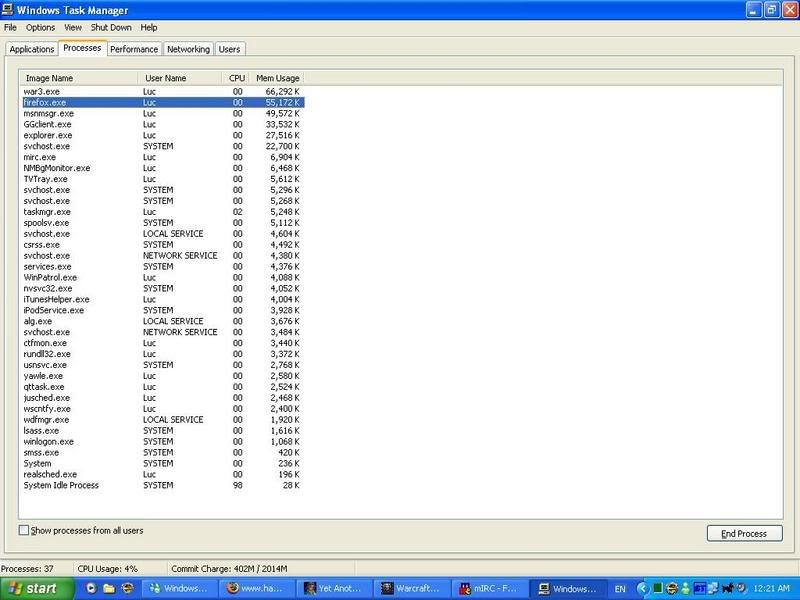
-
Phew~ Scare me to death..
Next time, QUARANTINE the processes first.
If ok, then leave them in quarantine. Your antivirus program should be able to remove any malware inside. If not ok, then come back to sgForums. -
It's expected. Task Manager will allocate the free RAM to the other processes. It's normal.Originally posted by _n00b_:i removed the items via taskmanager...
restarted my com and there's a decrease in the memory used for warcraft and firefox but an increase in the other applications... -
oh ok...thanks alot for the help... =)Originally posted by Conner MacDermott:It's expected. Task Manager will allocate the free RAM to the other processes. It's normal. -
I confirm + chop that there is malware on your system.
Your processes reveal too much.
Not only so, your computer is now a zombie. This means the PC is now not yours, it's under a control of hacker(s).
Security Task Manager - Clone of Process Manager from Sysinternals (acquire by MS now). -
so i need to uninstall this security task manager now?and what else can i do?Originally posted by ndmmxiaomayi:I confirm + chop that there is malware on your system.
Your processes reveal too much.
Not only so, your computer is now a zombie. This means the PC is now not yours, it's under a control of hacker(s).
Security Task Manager - Clone of Process Manager from Sysinternals (acquire by MS now). -
Yeah... remove it.Originally posted by _n00b_:so i need to uninstall this security task manager now?and what else can i do?
And reformat and reinstall Windows. Your PC is under control of other users.
-
ok...removed it...it was recommended by conner...think he got scammed too?any recommendation as to go where for data backup and reformat services and price wise?Originally posted by ndmmxiaomayi:Yeah... remove it.
And reformat and reinstall Windows. Your PC is under control of other users.
i tried to reformat last time and my cd drive was unable to detect my windows xp cd...genuine though...
thanks for the warning...
-
Since you guys cracked it, doesn't matter if you are scammed.Originally posted by _n00b_:ok...removed it...it was recommended by conner...think he got scammed too?any recommendation as to go where for data backup and reformat services and price wise?
i tried to reformat last time and my cd drive was unable to detect my windows xp cd...genuine though...
thanks for the warning...
http://www.mozy.com/ for data backup of up to 2GB.
As for reformatting services, not sure. -
ok...guess i'll jus buy a external hdd...my korean dramas are already dunno many GB...lol...Originally posted by ndmmxiaomayi:Since you guys cracked it, doesn't matter if you are scammed.
http://www.mozy.com/ for data backup of up to 2GB.
As for reformatting services, not sure.