help pls why is my internet connection so lag one..
-
my internet connection is the 12,000KBps connection provided by starhub...i am behind a router but im using a line to connect my com to the router not a adapter...the modem and router is in my living room and and com is in my room...3 other com are in the living room all using adapter..one of them is laptop..by saying lag what i meant was when i try to surf net it takes long to load, for example if i go to sgforum chitchat it will take around 30sec+ to load completely and when i went to test my speed at www.speedtest.net it was showing about 4k-5k connection speed..my fren told me that adapter will suck all the connection from router is that true? and the 3 computer only the laptop download stuff using bittorrent and stuff like dat..and btw i got a question..where does laotop get their connection from(the laptop isnt using the modem connection)? the other 2 computer outside is only for playing games no downloading stuff at all..o yea and im living in the ground floor does it affect my connection? and when i download things from megaupload.com..the speed i was getting is about 3kb/s-9kb/s dam bad..and when i load up flash games it takes forever to load...if the game got like percentage of it loading..the percent will move like 5sec 1% and theres a lanshop which is near my house the connection of the lan shop is 5-6MBps but when it download stuff from megaupload it has got like 100+KB/s what is happening? and when it load up flash game..it will move dam fast...is there any solution i can do to stop all this lagging stuff? what is happening? issit virus? help pls...
-
A very common type of issue that you will face when more and more residents in your block are using StarHub MaxOnline service for broadband connection...Originally posted by darkfuryex:my internet connection is the 12,000KBps connection provided by starhub...i am behind a router but im using a line to connect my com to the router not a adapter...the modem and router is in my living room and and com is in my room...3 other com are in the living room all using adapter..one of them is laptop..by saying lag what i meant was when i try to surf net it takes long to load, for example if i go to sgforum chitchat it will take around 30sec+ to load completely and when i went to test my speed at www.speedtest.net it was showing about 4k-5k connection speed..my fren told me that adapter will suck all the connection from router is that true? and the 3 computer only the laptop download stuff using bittorrent and stuff like dat..and btw i got a question..where does laotop get their connection from(the laptop isnt using the modem connection)? the other 2 computer outside is only for playing games no downloading stuff at all..o yea and im living in the ground floor does it affect my connection? and when i download things from megaupload.com..the speed i was getting is about 3kb/s-9kb/s dam bad..and when i load up flash games it takes forever to load...if the game got like percentage of it loading..the percent will move like 5sec 1% and theres a lanshop which is near my house the connection of the lan shop is 5-6MBps but when it download stuff from megaupload it has got like 100+KB/s what is happening? and when it load up flash game..it will move dam fast...is there any solution i can do to stop all this lagging stuff? what is happening? issit virus? help pls...
As more users join in the common cable bandwidth for the block, your speed will also slow down... Just like an expressway, as more cars join in, the speed will decrease...
As for your plan of MaxOnline Ultimate (not too sure if it is yours), you will not get the topend of the speed.... -

your internet connection hates you as you never done any research before posting
i am using a much cheaper package than you, but i never suffer much latency issue before -
If you are a hubber and have more than 2 PCs connecting to the Net at the same time, please don't complain.
Hubber's Net connections are shared, not dedicated. -
i dont understand about net but i wan to know more about it...and hor b4 i subscribe to starhub..im using singtel a slower connection and its the same thing..and all the thing i mention only happen on my com whether im on a fast pr slow connection..btw i thought that its becos of my singtel speed so i changed ti starhub and cancel the singtel line...so u guys can help me out? whether im on slow or fast its the same thing that happen AND only happen on this com..
-
-_-
if you have a router, which has one firewall, and furthermore, you have two pc, your bandwidth is going to split
so it is very normal for you to suffer from low download speed, and you are using bittorrent, perhaps you might want to check out on the sticky thread about bittorrent. -
Singtel line is slow if you misconfigure.Originally posted by darkfuryex:i dont understand about net but i wan to know more about it...and hor b4 i subscribe to starhub..im using singtel a slower connection and its the same thing..and all the thing i mention only happen on my com whether im on a fast pr slow connection..btw i thought that its becos of my singtel speed so i changed ti starhub and cancel the singtel line...so u guys can help me out? whether im on slow or fast its the same thing that happen AND only happen on this com..
And if you are using router, turn off NAT. -
wait..uhh..its the laptop thats using bittorrent downloading BIG GB movies...btw where does laptop get their connection from? whats bandwidth? will downloading of big GB files affect my connection? does adapter suck connection? the laotop is very near to my router and my com is the furthest away from my router but m using line..will it affect my net speed? and can i do anything like trying to turn off the computer outside and see if my net speed got increase anot? and is there any other answer that my net is lagging? help pls.. thanksOriginally posted by allentyb:-_-
if you have a router, which has one firewall, and furthermore, you have two pc, your bandwidth is going to split
so it is very normal for you to suffer from low download speed, and you are using bittorrent, perhaps you might want to check out on the sticky thread about bittorrent.
-
how do i turn it off? help pls..thanksOriginally posted by ndmmxiaomayi:Singtel line is slow if you misconfigure.
And if you are using router, turn off NAT.
-
you are not suffering from latency issue........................Originally posted by darkfuryex:wait..uhh..its the laptop thats using bittorrent downloading BIG GB movies...btw where does laptop get their connection from? whats bandwidth? will downloading of big GB files affect my connection? does adapter suck connection? the laotop is very near to my router and my com is the furthest away from my router but m using line..will it affect my net speed? and can i do anything like trying to turn off the computer outside and see if my net speed got increase anot? and is there any other answer that my net is lagging? help pls.. thanks
either your torrent is poorly seeded or that torrent is either a very old torrent
and you have a router, which have a firewall, and you have xp2 and another firewall, either macfee or norton, do you really think, information is able to reach your com fast enough?
and i don't even know whether did you open up any port in your firewall and in your router
and i don't even know, how many seeders and leeches are provided for torrent engine, and i don't even know, how many seeders and leechers are connected to your torrent engine
and i don't even know, did you open up more port for your torrent engine
and i doubt you are accessing private tracker, and most probably, you download those torrent from either isohunt, mininova and bitjunkie, or torrentspy
all this website that i mention, those are search engine, and they don't host any torrent at all, so basically, i don't know which tracker you are downloading your file from.
haiz. you never provide any information on your situation
and your thread is related to torrent issue............... so this is the 12473254375068743962484069024642646 thread about torrent
P.S. i spend nearly 2 weeks on research on torrent, do spend more time on researching on torrent and how to improve your speed, read up........ -
Log in to your router, navigate around and see if the NAT feature is present.Originally posted by darkfuryex:how do i turn it off? help pls..thanks -
reply to allentyb..
i dont wanna quote its too long..anyway its not about torrent..cos i dont even know where laptop get their connection from(only the laptop is using torrent to download now)btw the router that i have got password and there is no way my laptop can use it cause the laptop actually belongs to my sister one and she doesnt use our connection(i think so cos we didnt tell her password) and b4 i got router and my starhub net the laptop already has connection already when i didnt..so where does it get the connection from? and am i suffering from the things that shes downloading using torrent now? -
Can you please paragraph and punctuate as and where necessary?
I don't understand a single bit. -
this one?Originally posted by ndmmxiaomayi:Log in to your router, navigate around and see if the NAT feature is present.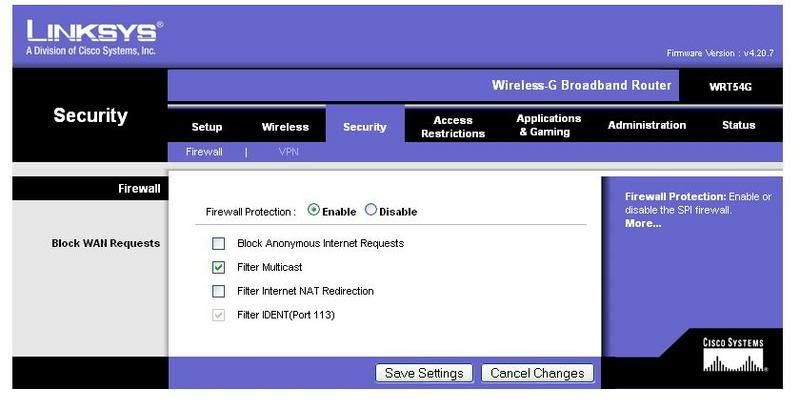
and do you know how to configure linksys router? help pls.. -
as long, you have a router, you will split your bandwidth.....................Originally posted by darkfuryex:reply to allentyb..
i dont wanna quote its too long..anyway its not about torrent..cos i dont even know where laptop get their connection from(only the laptop is using torrent to download now)btw the router that i have got password and there is no way my laptop can use it cause the laptop actually belongs to my sister one and she doesnt use our connection(i think so cos we didnt tell her password) and b4 i got router and my starhub net the laptop already has connection already when i didnt..so where does it get the connection from? and am i suffering from the things that shes downloading using torrent now?
and it is almost impossible to trace who are your downloading from, as all the ip address that is reflected in your torrent engine, ish those isp address, i know, i trace them before.
and please rephrase your question, IF both of your PC and laptop is accessing the internet! you will suffer from latency issue AS both of you are accessing the internet AND you will split the bandwidth AND if you or your sister is downloading, regardless, is FTP server or http server or P2P engine,
you will split the bandwidth and if you are connected to multi torrent, you will further split your bandwidth, i was using a router in the past, in eventually, i have to direct connect to the internet to reduce latency issue, imagine, i am playing world of warcraft and i have to connect to a US server, and if i continue to use a router, how bad, will my latency be? -
just disable the firewall, and please don't touch the dmz setting, and set up a port for your torrent
then open up more tcp port for your torrent engine or your network will be very congested
and i don't know how many seeders and leechers are you connected to..................................................................... -
sorry...i always type like that one..anyway ill re type everytingOriginally posted by ndmmxiaomayi:Can you please paragraph and punctuate as and where necessary?
I don't understand a single bit.
the laptop belongs to my sister and before i subscribe to starhub i was using singtel connection..after we subscribe to starhub we straight ahead cancel the singtel connection and i + the 2 computer outside doesnt have any connection at all for about 1 week cos waiting for the starhub people to bring the modem to my house and help us configure it but in the one week my sister laptop still has connection so i dont think that after i subscribe to starhub my sister is using my net...cos allentyb said that its the torrent that my sister laptop is using that is affecting my net so i ask him where does laptop get their connection from? i know that if ur behind a router and someone is who is using the same router as u uses some program like flashget/bitorrent etc etc it will have a great impact on ur net slowing down ur connection..but my sister isnt using the same router as me cos of the explanation above ^ and when configure my router i added a password so no one can steal my connection and my sister doesnt know about the password cos she already has a connection liao so there is no way that shes using my connection..k now for the questions...
1) where does the laptop get the connection from?
2) is there anyway where i can check if shes using my connection?
3) am i suffering from the things that shes downloading using torrent now even tho i think that shes not using my connection??
4) does adapter suck connection like my fren said? as in slow down ur speed and the computer thats using the adapter will get grest speed
pls reply..thanks for helping -
Piang......
OK, you give me some time to digest first.
-
sorry for bothering u guys plus asking so much question and not asking it properly lol..anyway k i know how to disable it..but whats dmz? and its not about torrent, pls refer to the previous post i posted...thanks in advance!Originally posted by allentyb:just disable the firewall, and please don't touch the dmz setting, and set up a port for your torrent
then open up more tcp port for your torrent engine or your network will be very congested
and i don't know how many seeders and leechers are you connected to..................................................................... -
omg is my english that bad? so sorryOriginally posted by ndmmxiaomayi:Piang......
OK, you give me some time to digest first. 
-
you are not staying around bukit panjang, right?
my friend was suffering from the same issue also, he is also using starhub, and he suffer from almost no connection, then eventually they found out that it is a technical problem, which is, the connection wasn't establish properly, and they have to fix the problem by tightening the cable from outside
-_-*
so i guess you have to wait those people from starhub -
Demilitarized zone (computing)Originally posted by darkfuryex:sorry for bothering u guys plus asking so much question and not asking it properly lol..anyway k i know how to disable it..but whats dmz? and its not about torrent, pls refer to the previous post i posted...thanks in advance!
http://en.wikipedia.org/wiki/Demilitarized_zone_(computing) -
i know you are asking about your download speed.............Originally posted by darkfuryex:sorry for bothering u guys plus asking so much question and not asking it properly lol..anyway k i know how to disable it..but whats dmz? and its not about torrent, pls refer to the previous post i posted...thanks in advance! -
wait? what u mean? when i have my singtel connection its the same thing...and it has been 3 years liao lmao have i waited long enough? and btw theres a lan not far away from my house..about 60+ steps can reach(about 2 blocks away from my house)..its at the ground floor too(im living on ground floor) it has slower connection then me but when it download file it will be 100+kb/s so issit the cable problem anymore?Originally posted by allentyb:
you are not staying around bukit panjang, right?
my friend was suffering from the same issue also, he is also using starhub, and he suffer from almost no connection, then eventually they found out that it is a technical problem, which is, the connection wasn't establish properly, and they have to fix the problem by tightening the cable from outside
-_-*
so i guess you have to wait those people from starhub -
ever since after the underwater earthquake, every one is complaining about their download speed, and singtel is the worst - i heard you will lose connection halfway through the nightOriginally posted by darkfuryex:wait? what u mean? when i have my singtel connection its the same thing...and it has been 3 years liao lmao have i waited long enough? and btw theres a lan not far away from my house..about 60+ steps can reach(about 2 blocks away from my house)..its at the ground floor too(im living on ground floor) it has slower connection then me but when it download file it will be 100+kb/s so issit the cable problem anymore?
it might be a technical problem.............. i think
don't take my words for it
my friend was suffering from almost 0 download speed,
his case is almost similar like yours, he can surf the net, but when he wants to download something, he will lose connection -_-*