Internet connection disconnect and connect itself..
-
I'm using a router and my internet connection disconnect and connect itself occasionally. But that doesn't happen to my second computer connected to the router. It's getting a bit irritating as when I'm downloading large files, it suddenly disconnects and I have to redownload the whole file again. Any solutions? A picture of the problem is as of below:
Picture of my internet connections.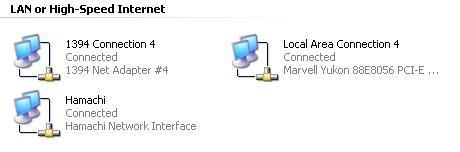
-
For marvell-yukon drivers, search for them here, perhaps you need to update the driver for your ethernet controller hardware:
http://www.marvell.com/drivers/search.do -
I've done a search for marvell-yukon drivers and ethernet controller hardware but no results.Originally posted by kawasaki2:For marvell-yukon drivers, search for them here, perhaps you need to update the driver for your ethernet controller hardware:
http://www.marvell.com/drivers/search.do -
I see that you are using hamachi as your VPN, which network or ISP are you connected to/using?
-
Huh? Meaning?Originally posted by kawasaki2:I see that you are using hamachi as your VPN, which network or ISP are you connected to/using? -
You have a Hamachi network interface, and hamachi is a VPN program.
Which network are you connected to? Or ISP (Singnet broadband, Starhub Maxonline or Pacific internet)?
I need to know which network you are using before I can help you further. -
who else using the router beside you?
-
Using Singnet broadband. Hamachi is for my lan-gaming.Originally posted by kawasaki2:You have a Hamachi network interface, and hamachi is a VPN program.
Which network are you connected to? Or ISP (Singnet broadband, Starhub Maxonline or Pacific internet)?
I need to know which network you are using before I can help you further.
-
Download HijackThis from here:
http://www.merijn.org/files/HiJackThis_v2.exe
Run a system scan and post the log back here for review. Use this program on the first computer connected to the router. -
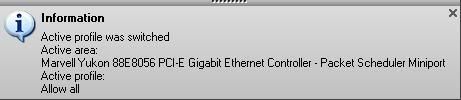
http://i160.photobucket.com/albums/t174/vballguyy/problem.jpg
It says "Active profile was switched".
That means your connection has been auto switching.
Looking at the pictures provided, you have Local Area Connection 4. By default, it's Local Area Connection with no numbers.
Looks like you have quite a few users on this computer or a new connection has been created automatically.
http://www.marvell.com/drivers/driverDisplay.do?dId=175&pId=3
Please download the installer from the above link. Uninstall any old drivers present. -
Im the only user. But this computer is built by a guy in SimLim Square. Maybe he has use this comp for testing.Originally posted by ndmmxiaomayi:It says "Active profile was switched".
That means your connection has been auto switching.
Looking at the pictures provided, you have Local Area Connection 4. By default, it's Local Area Connection with no numbers.
Looks like you have quite a few users on this computer or a new connection has been created automatically.
http://www.marvell.com/drivers/driverDisplay.do?dId=175&pId=3
Please download the installer from the above link. Uninstall any old drivers present. -
Could be, different modems will create a different Local Area Connection, each of them numbered in sequential order.Originally posted by coldzero:Im the only user. But this computer is built by a guy in SimLim Square. Maybe he has use this comp for testing. -
Then what should I do now? How do I uninstall the drivers?
-
Go to Start-->Run and type devmgmt.msc
Inside Device Manager, look under Network Adapters. Select the correct device and right-click, click on Uninstall. -
Right click My Computer and select Properties.Originally posted by coldzero:Then what should I do now? How do I uninstall the drivers?
Select the Hardware tab. Click on Device Manager.
Scroll down to Network Adapters.
See if Marvell Yukon or Gigabit adapters are listed there. Right click on it and select Uninstall. -
Before that, download all the drivers needed. Otherwise, you lock yourself out of the Net.
-
I've uninstall the Marvell Yukon only. After that I've got no access to internet already. So I install the program you told me to download then I got onto internet again.Originally posted by ndmmxiaomayi:Right click My Computer and select Properties.
Select the Hardware tab. Click on Device Manager.
Scroll down to Network Adapters.
See if Marvell Yukon or Gigabit adapters are listed there. Right click on it and select Uninstall.
It became like this:
-
Can you monitor your connections over the next few days to next few weeks?Originally posted by coldzero:I've uninstall the Mervell Yukon only. After that I've got no access to internet already. So I install the program you told me to download then I got onto internet again.
Try downloading large files, see if it disconnects and re-connects again. -
Should I uninstall the Network Adapter?Originally posted by ndmmxiaomayi:Can you monitor your connections over the next few days to next few weeks?
Try downloading large files, see if it disconnects and re-connects again. -
Which network adapter are you referring to? Is it the 1394 Net adapter? It appears to be a Firewire connection.Originally posted by coldzero:Should I uninstall the Network Adapter?
You should not uninstall it. -
Yup.. I'm referring to that. So I shan't uninstall that right?Originally posted by kawasaki2:Which network adapter are you referring to? Is it the 1394 Net adapter? It appears to be a Firewire connection.
-
Which one? The Yukon one - no. You've just installed it.Originally posted by coldzero:Should I uninstall the Network Adapter?
1394 - you could, since it's not in use. Either that, just disable it, in case you need it one day. Same steps for uninstalling, except you choose Disable rather than uninstall.
Hamachi - no. You are using it for LAN gaming. -
What's the difference between the network I used just now and the one you told me to download and install? It seems the same to me.. :/
-
You mean that the driver version for the marvell-yukon is still the same?Originally posted by coldzero:What's the difference between the network I used just now and the one you told me to download and install? It seems the same to me.. :/
Earlier on I did ask you to search for drivers but you reported back with nothing... -
No difference, only the drivers. If it has stabilized, it is the old drivers problem. If it has not, then some other things are messing with the connections.Originally posted by coldzero:What's the difference between the network I used just now and the one you told me to download and install? It seems the same to me.. :/