Internet connection disconnect and connect itself..
-
My internet connection still auto disconnect and connect leh!Originally posted by ndmmxiaomayi:No difference, only the drivers. If it has stabilized, it is the old drivers problem. If it has not, then some other things are messing with the connections.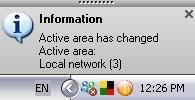
But I can't see a Local Network (3) in my Internet Connection. :/ -
You have to set it to show...Originally posted by coldzero:My internet connection still auto disconnect and connect leh!
But I can't see a Local Network (3) in my Internet Connection. :/
Start > Control Panel > Network Connections
All your connections are there...
Again, it has switched, which resulted in auto disconnections. -
I see that you are using AVG. Does this come with a firewall?
-
But my Network connection dont use Local Network (3).Originally posted by ndmmxiaomayi:You have to set it to show...
Start > Control Panel > Network Connections
All your connections are there...
Again, it has switched, which resulted in auto disconnections.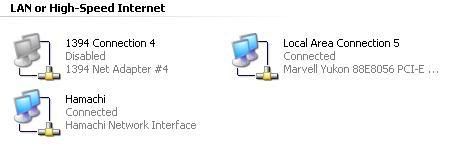
-
Yup. Comes with a firewall.Originally posted by ndmmxiaomayi:I see that you are using AVG. Does this come with a firewall? -
OK. Problem solved. It's AVG firewall that's causing the problem.Originally posted by coldzero:Yup. Comes with a firewall. -
I've noticed this.
-
What do I do with it?Originally posted by ndmmxiaomayi:OK. Problem solved. It's AVG firewall that's causing the problem. -
I don't have AVG firewall, so I can't tell. Try finding if there's a Active Area section and disable this feature.Originally posted by coldzero:What do I do with it?
Or Area Detection. -
Okay. Solved! Thanks!Originally posted by ndmmxiaomayi:I don't have AVG firewall, so I can't tell. Try finding if there's a Active Area section and disable this feature.
-
You are welcome.Originally posted by coldzero:Okay. Solved! Thanks!
-
Simple. Go to Wireless LAN and set all network as 'On demand' rather than 'automatic'. Problem solved and your network won't automatically switched.Originally posted by coldzero:I'm using a router and my internet connection disconnect and connect itself occasionally. But that doesn't happen to my second computer connected to the router. It's getting a bit irritating as when I'm downloading large files, it suddenly disconnects and I have to redownload the whole file again. Any solutions? A picture of the problem is as of below: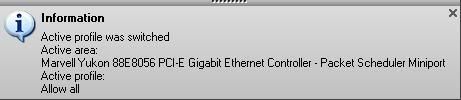
Picture of my internet connections.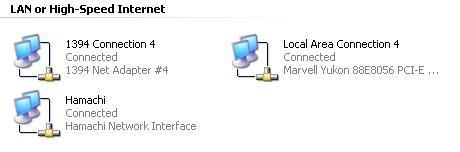
-
Problem solved le. ThanksOriginally posted by Fire Star:Simple. Go to Wireless LAN and set all network as 'On demand' rather than 'automatic'. Problem solved and your network won't automatically switched. I dont have Wireless connection btw.