Msn virus?-Pic.zip
-
Logfile of Trend Micro HijackThis v2.0.0 (BETA)
Scan saved at 18:41:55, on 08/08/2007
Platform: Windows XP SP2 (WinNT 5.01.2600)
Boot mode: Normal
Running processes:
C:\WINDOWS\System32\smss.exe
C:\WINDOWS\system32\winlogon.exe
C:\WINDOWS\system32\services.exe
C:\WINDOWS\system32\lsass.exe
C:\WINDOWS\system32\svchost.exe
C:\WINDOWS\System32\svchost.exe
C:\Program Files\Alwil Software\Avast4\aswUpdSv.exe
C:\Program Files\Alwil Software\Avast4\ashServ.exe
C:\WINDOWS\Explorer.EXE
C:\WINDOWS\system32\spoolsv.exe
C:\PROGRA~1\Grisoft\AVG7\avgamsvr.exe
C:\PROGRA~1\ALWILS~1\Avast4\ashDisp.exe
C:\WINDOWS\system32\rundll32.exe
C:\PROGRA~1\Grisoft\AVG7\avgcc.exe
C:\WINDOWS\system32\NotifyPhoneBook.exe
C:\PROGRA~1\Grisoft\AVG7\avgupsvc.exe
C:\PROGRA~1\Grisoft\AVG7\avgemc.exe
C:\Program Files\Java\jre1.6.0_01\bin\jusched.exe
C:\Program Files\Common Files\Real\Update_OB\realsched.exe
C:\Program Files\Common Files\Microsoft Shared\VS7DEBUG\MDM.EXE
C:\WINDOWS\system32\ctfmon.exe
C:\Program Files\CyberLink\Shared Files\RichVideo.exe
C:\WINDOWS\system32\s2.exe
C:\Program Files\Alcohol Soft\Alcohol 120\StarWind\StarWindService.exe
C:\WINDOWS\system32\systemw32.exe
C:\Program Files\Alwil Software\Avast4\ashMaiSv.exe
C:\Program Files\Alwil Software\Avast4\ashWebSv.exe
C:\Program Files\Mozilla Firefox\firefox.exe
C:\Program Files\MSN Messenger\usnsvc.exe
C:\Program Files\MSN Messenger\msnmsgr.exe
C:\Documents and Settings\Charlizard\Desktop\HiJackThis_v2.exe
R3 - URLSearchHook: Yahoo! μ?o?ì? - {EF99BD32-C1FB-11D2-892F-0090271D4F88} - (no file)
O2 - BHO: AcroIEHlprObj Class - {06849E9F-C8D7-4D59-B87D-784B7D6BE0B3} - C:\Program Files\Adobe\Acrobat 5.0\Reader\ActiveX\AcroIEHelper.ocx
O2 - BHO: BitComet ClickCapture - {39F7E362-828A-4B5A-BCAF-5B79BFDFEA60} - C:\Program Files\BitComet\tools\BitCometBHO_1.1.3.19.dll
O2 - BHO: SSVHelper Class - {761497BB-D6F0-462C-B6EB-D4DAF1D92D43} - C:\Program Files\Java\jre1.6.0_01\bin\ssv.dll
O2 - BHO: (no name) - {7E853D72-626A-48EC-A868-BA8D5E23E045} - (no file)
O2 - BHO: Alcohol Toolbar Helper - {8126A4A5-BFD3-46FE-BBDF-BFB5CF78E489} - C:\Program Files\Alcohol Toolbar\v3.2.0.0\Alcohol_Toolbar.dll
O2 - BHO: Google Toolbar Helper - {AA58ED58-01DD-4d91-8333-CF10577473F7} - c:\program files\google\googletoolbar1.dll
O2 - BHO: Google Toolbar Notifier BHO - {AF69DE43-7D58-4638-B6FA-CE66B5AD205D} - C:\Program Files\Google\GoogleToolbarNotifier\2.0.301.7164\swg.dll
O2 - BHO: EpsonToolBandKicker Class - {E99421FB-68DD-40F0-B4AC-B7027CAE2F1A} - C:\Program Files\EPSON\EPSON Web-To-Page\EPSON Web-To-Page.dll
O3 - Toolbar: &Google - {2318C2B1-4965-11d4-9B18-009027A5CD4F} - c:\program files\google\googletoolbar1.dll
O3 - Toolbar: EPSON Web-To-Page - {EE5D279F-081B-4404-994D-C6B60AAEBA6D} - C:\Program Files\EPSON\EPSON Web-To-Page\EPSON Web-To-Page.dll
O3 - Toolbar: Alcohol Toolbar - {ED4BD629-C1B6-4399-8A34-02CCAA921DC9} - C:\Program Files\Alcohol Toolbar\v3.2.0.0\Alcohol_Toolbar.dll
O4 - HKLM\..\Run: [avast!] C:\PROGRA~1\ALWILS~1\Avast4\ashDisp.exe
O4 - HKLM\..\Run: [AME_CSA] rundll32 amecsa.cpl,RUN_DLL
O4 - HKLM\..\Run: [AVG7_CC] C:\PROGRA~1\Grisoft\AVG7\avgcc.exe /STARTUP
O4 - HKLM\..\Run: [IMJPMIG8.1] "C:\WINDOWS\IME\imjp8_1\IMJPMIG.EXE" /Spoil /RemAdvDef /Migration32
O4 - HKLM\..\Run: [MSPY2002] C:\WINDOWS\system32\IME\PINTLGNT\ImScInst.exe /SYNC
O4 - HKLM\..\Run: [PHIME2002ASync] C:\WINDOWS\system32\IME\TINTLGNT\TINTSETP.EXE /SYNC
O4 - HKLM\..\Run: [PHIME2002A] C:\WINDOWS\system32\IME\TINTLGNT\TINTSETP.EXE /IMEName
O4 - HKLM\..\Run: [EPSON Stylus C79 Series] C:\WINDOWS\System32\spool\DRIVERS\W32X86\3\E_FATIBGP.EXE /FU "C:\WINDOWS\TEMP\E_S8E.tmp" /EF "HKLM"
O4 - HKLM\..\Run: [SunJavaUpdateSched] "C:\Program Files\Java\jre1.6.0_01\bin\jusched.exe"
O4 - HKLM\..\Run: [boat32] boat32.exe
O4 - HKLM\..\Run: [TkBellExe] "C:\Program Files\Common Files\Real\Update_OB\realsched.exe" -osboot
O4 - HKLM\..\Run: [sy] s2.exe
O4 - HKLM\..\Run: [systemw32] systemw32.exe
O4 - HKLM\..\RunServices: [boat32] boat32.exe
O4 - HKLM\..\RunServices: [sy] s2.exe
O4 - HKLM\..\RunServices: [systemw32] systemw32.exe
O4 - HKCU\..\Run: [ctfmon.exe] C:\WINDOWS\system32\ctfmon.exe
O4 - HKCU\..\Run: [MsnMsgr] "C:\Program Files\MSN Messenger\MsnMsgr.Exe" /background
O4 - HKUS\S-1-5-19\..\Run: [AVG7_Run] C:\PROGRA~1\Grisoft\AVG7\avgw.exe /RUNONCE (User 'LOCAL SERVICE')
O4 - HKUS\S-1-5-20\..\Run: [AVG7_Run] C:\PROGRA~1\Grisoft\AVG7\avgw.exe /RUNONCE (User 'NETWORK SERVICE')
O4 - HKUS\S-1-5-18\..\Run: [AVG7_Run] C:\PROGRA~1\Grisoft\AVG7\avgw.exe /RUNONCE (User 'SYSTEM')
O4 - HKUS\.DEFAULT\..\Run: [AVG7_Run] C:\PROGRA~1\Grisoft\AVG7\avgw.exe /RUNONCE (User 'Default user')
O8 - Extra context menu item: &D&ownload &with BitComet - res://C:\Program Files\BitComet\BitComet.exe/AddLink.htm
O8 - Extra context menu item: &D&ownload all video with BitComet - res://C:\Program Files\BitComet\BitComet.exe/AddVideo.htm
O8 - Extra context menu item: &D&ownload all with BitComet - res://C:\Program Files\BitComet\BitComet.exe/AddAllLink.htm
O8 - Extra context menu item: E&xport to Microsoft Excel - res://C:\PROGRA~1\MICROS~2\OFFICE11\EXCEL.EXE/3000
O9 - Extra button: (no name) - {08B0E5C0-4FCB-11CF-AAA5-00401C608501} - C:\Program Files\Java\jre1.6.0_01\bin\ssv.dll
O9 - Extra 'Tools' menuitem: Sun Java Console - {08B0E5C0-4FCB-11CF-AAA5-00401C608501} - C:\Program Files\Java\jre1.6.0_01\bin\ssv.dll
O9 - Extra button: Research - {92780B25-18CC-41C8-B9BE-3C9C571A8263} - C:\PROGRA~1\MICROS~2\OFFICE11\REFIEBAR.DLL
O9 - Extra button: (no name) - {e2e2dd38-d088-4134-82b7-f2ba38496583} - %windir%\Network Diagnostic\xpnetdiag.exe (file missing)
O9 - Extra 'Tools' menuitem: @xpsp3res.dll,-20001 - {e2e2dd38-d088-4134-82b7-f2ba38496583} - %windir%\Network Diagnostic\xpnetdiag.exe (file missing)
O9 - Extra button: Messenger - {FB5F1910-F110-11d2-BB9E-00C04F795683} - C:\Program Files\Messenger\msmsgs.exe
O9 - Extra 'Tools' menuitem: Windows Messenger - {FB5F1910-F110-11d2-BB9E-00C04F795683} - C:\Program Files\Messenger\msmsgs.exe
O12 - Plugin for .spop: C:\Program Files\Internet Explorer\Plugins\NPDocBox.dll
O15 - ESC Trusted Zone: http://*.update.microsoft.com
O16 - DPF: {20A60F0D-9AFA-4515-A0FD-83BD84642501} (Checkers Class) - http://messenger.zone.msn.com/binary/msgrchkr.cab56986.cab
O16 - DPF: {30528230-99f7-4bb4-88d8-fa1d4f56a2ab} (YInstStarter Class) - C:\Program Files\Yahoo!\Common\yinsthelper.dll
O16 - DPF: {6E32070A-766D-4EE6-879C-DC1FA91D2FC3} (MUWebControl Class) - http://update.microsoft.com/microsoftupdate/v6/V5Controls/en/x86/client/muweb_site.cab?1176030438218
O16 - DPF: {B46FA8BD-AE41-4821-AFF4-D4FFE4F3D390} (AcuViewer Control) - http://www.mjc.wizlearn.com/databank/ims/%7B0C4355C5-AB4A-4904-A344-3AF1692E78B2%7D/Chemistry_Gases_HoAiLeng_160407_files/acuviewer.cab
O16 - DPF: {C3F79A2B-B9B4-4A66-B012-3EE46475B072} (MessengerStatsClient Class) - http://messenger.zone.msn.com/binary/MessengerStatsPAClient.cab56907.cab
O17 - HKLM\System\CCS\Services\Tcpip\..\{1C706630-C97B-4068-A4F7-FFBC681D2927}: NameServer = 165.21.100.88 165.21.83.88
O22 - SharedTaskScheduler: Browseui preloader - {438755C2-A8BA-11D1-B96B-00A0C90312E1} - C:\WINDOWS\system32\browseui.dll
O22 - SharedTaskScheduler: Component Categories cache daemon - {8C7461EF-2B13-11d2-BE35-3078302C2030} - C:\WINDOWS\system32\browseui.dll
O23 - Service: avast! iAVS4 Control Service (aswUpdSv) - ALWIL Software - C:\Program Files\Alwil Software\Avast4\aswUpdSv.exe
O23 - Service: avast! Antivirus - ALWIL Software - C:\Program Files\Alwil Software\Avast4\ashServ.exe
O23 - Service: avast! Mail Scanner - ALWIL Software - C:\Program Files\Alwil Software\Avast4\ashMaiSv.exe
O23 - Service: avast! Web Scanner - ALWIL Software - C:\Program Files\Alwil Software\Avast4\ashWebSv.exe
O23 - Service: AVG7 Alert Manager Server (Avg7Alrt) - GRISOFT, s.r.o. - C:\PROGRA~1\Grisoft\AVG7\avgamsvr.exe
O23 - Service: AVG7 Update Service (Avg7UpdSvc) - GRISOFT, s.r.o. - C:\PROGRA~1\Grisoft\AVG7\avgupsvc.exe
O23 - Service: AVG E-mail Scanner (AVGEMS) - GRISOFT, s.r.o. - C:\PROGRA~1\Grisoft\AVG7\avgemc.exe
O23 - Service: Google Updater Service (gusvc) - Google - C:\Program Files\Google\Common\Google Updater\GoogleUpdaterService.exe
O23 - Service: Cyberlink RichVideo Service(CRVS) (RichVideo) - Unknown owner - C:\Program Files\CyberLink\Shared Files\RichVideo.exe
O23 - Service: ServiceLayer - Nokia. - C:\Program Files\Common Files\PCSuite\Services\ServiceLayer.exe
O23 - Service: StarWind iSCSI Service (StarWindService) - Rocket Division Software - C:\Program Files\Alcohol Soft\Alcohol 120\StarWind\StarWindService.exe
--
End of file - 8686 bytes -
Can you please download the latest version of HijackThis.
http://www.trendsecure.com/portal/en-US/threat_analytics/HJTInstall.exe
Install it, but do not run it.- [*]Download SDFix by AndyManchesta and save it to your desktop.
[*]Double click on SDFix.exe. By default, it will install to C:\.
[*]Click on Install.
Next, boot into Safe Mode.- [*]When you see BIOS screen, start pressing F8.
[*]A boot menu will appear shortly.
[*]Using the up down arrows, select Safe Mode and press the Enter key.
[*]Windows will now load.
[*]Log in to your usual account.
[*]Navigate to C:\SDfix (if you installed it to the default location, otherwise, locate where you installed it)
[*]Double click on RunThis.bat
[*]Type Y to begin the cleanup process.
[*]It will remove any Trojan Services and Registry Entries that it finds then prompt you to press any key to Reboot.
[*]Press any key to reboot.
[*]When the PC restarts the tool will run again and complete the removal process then display Finished, press any key to end the script and load your desktop icons.
[*]Once the desktop icons load, the SDFix report will open on screen. You can also find the report in SDFix folder, named Report.txt.
Upload these 2 files to Virus Total or Jotti for a scan.
1. C:\WINDOWS\system32\s2.exe
2. C:\WINDOWS\system32\systemw32.exe
Copy and paste the first file into the Browse box. After the first file is done with the scanning, save the results of the scan and repeat with the second file.
Post these 3 logs:
1. SDFix report
2. A new HijackThis log
3. The scan results of the 2 files -
SDFix: Version 1.96
Run by Charlizard on 08/08/2007 at 19:13
Microsoft Windows XP [Version 5.1.2600]
Running From: C:\SDFix
Safe Mode:
Checking Services:
Restoring Windows Registry Values
Restoring Windows Default Hosts File
Rebooting...
Normal Mode:
Checking Files:
No Trojan Files Found
Removing Temp Files...
ADS Check:
C:\WINDOWS
No streams found.
C:\WINDOWS\system32
No streams found.
C:\WINDOWS\system32\svchost.exe
No streams found.
C:\WINDOWS\system32\ntoskrnl.exe
No streams found.
Final Check:
Remaining Services:
------------------
Authorized Application Key Export:
[HKEY_LOCAL_MACHINE\system\currentcontrolset\services\sharedaccess\parameters\firewallpolicy\standardprofile\authorizedapplications\list]
"C:\\Program Files\\MSN Messenger\\msnmsgr.exe"="C:\\Program Files\\MSN Messenger\\msnmsgr.exe:*:Enabled:Messenger"
"C:\\WINDOWS\\system32\\svchost32.exe"="C:\\WINDOWS\\system32\\svchost32.exe:*:Enabled:svchost32"
[HKEY_LOCAL_MACHINE\system\currentcontrolset\services\sharedaccess\parameters\firewallpolicy\domainprofile\authorizedapplications\list]
"%windir%\\system32\\sessmgr.exe"="%windir%\\system32\\sessmgr.exe:*:enabled:@xpsp2res.dll,-22019"
"C:\\Program Files\\MSN Messenger\\msnmsgr.exe"="C:\\Program Files\\MSN Messenger\\msnmsgr.exe:*:Enabled:Windows Live Messenger 8.1"
"C:\\Program Files\\MSN Messenger\\livecall.exe"="C:\\Program Files\\MSN Messenger\\livecall.exe:*:Enabled:Windows Live Messenger 8.1 (Phone)"
"%windir%\\Network Diagnostic\\xpnetdiag.exe"="%windir%\\Network Diagnostic\\xpnetdiag.exe:*:Enabled:@xpsp3res.dll,-20000"
Remaining Files:
---------------
Files with Hidden Attributes:
C:\WINDOWS\system32\s2.exe
C:\WINDOWS\system32\systemw32.exe
C:\Documents and Settings\All Users\DRM\Cache\Indiv01.tmp
C:\Documents and Settings\All Users\DRM\Cache\Indiv02.tmp
Finished
s2.exe
A-Squared
Found nothing
AntiVir
Found nothing
ArcaVir
Found nothing
Avast
Found nothing
AVG Antivirus
Found nothing
BitDefender
Found nothing
ClamAV
Found nothing
CPsecure
Found nothing
Dr.Web
Found nothing
F-Prot Antivirus
Found nothing
F-Secure Anti-Virus
Found nothing
Fortinet
Found nothing
Kaspersky Anti-Virus
Found nothing
NOD32
Found nothing
Norman Virus Control
Found nothing
Panda Antivirus
Found nothing
Rising Antivirus
Found nothing
Sophos Antivirus
Found nothing
VirusBuster
Found nothing
VBA32
Found nothing
system32.exe
File systemw32.exe_ received on 08.08.2007 14:00:27 (CET)
Current status: Loading ... queued waiting scanning finished NOT FOUND STOPPED
Result: 0/32 (0%)
Loading server information...
Your file is queued in position: ___.
Estimated start time is between ___ and ___ .
Do not close the window until scan is complete.
The scanner that was processing your file is stopped at this moment, we are going to wait a few seconds to try to recover your result.
If you are waiting for more than five minutes you have to resend your file.
Your file is being scanned by VirusTotal in this moment,
results will be shown as they're generated.
Compact Compact
Print results Print results
Your file has expired or does not exists.
Service is stopped in this moments, your file is waiting to be scanned (position: ) for an undefined time.
You can wait for web response (automatic reload) or type your email in the form below and click "request" so the system sends you a notification when the scan is finished.
Email:
Antivirus Version Last Update Result
AhnLab-V3 2007.8.3.0 2007.08.08 -
AntiVir 7.4.0.57 2007.08.08 -
Authentium 4.93.8 2007.08.07 -
Avast 4.7.1029.0 2007.08.07 -
AVG 7.5.0.476 2007.08.07 -
BitDefender 7.2 2007.08.08 -
CAT-QuickHeal 9.00 2007.08.07 -
ClamAV 0.91 2007.08.08 -
DrWeb 4.33 2007.08.08 -
eSafe 7.0.15.0 2007.07.31 -
eTrust-Vet 31.1.5043 2007.08.08 -
Ewido 4.0 2007.08.08 -
FileAdvisor 1 2007.08.08 -
Fortinet 2.91.0.0 2007.08.08 -
F-Prot 4.3.2.48 2007.08.07 -
F-Secure 6.70.13030.0 2007.08.08 -
Ikarus T3.1.1.12 2007.08.08 -
Kaspersky 4.0.2.24 2007.08.08 -
McAfee 5092 2007.08.07 -
Microsoft 1.2704 2007.08.08 -
NOD32v2 2443 2007.08.08 -
Norman 5.80.02 2007.08.07 -
Panda 9.0.0.4 2007.08.07 -
Prevx1 V2 2007.08.08 -
Rising 19.35.22.00 2007.08.08 -
Sophos 4.19.0 2007.08.01 -
Sunbelt 2.2.907.0 2007.08.07 -
Symantec 10 2007.08.08 -
TheHacker 6.1.7.163 2007.08.07 -
VBA32 3.12.2.2 2007.08.07 -
VirusBuster 4.3.26:9 2007.08.07 -
Webwasher-Gateway 6.0.1 2007.08.08 -
Additional information
File size: 144896 bytes
MD5: b9ffc181c6b7182775cd2d58da6d3529
SHA1: ebc6ffe7fd9e909700bbc67e7425ffedf0646fc5
Logfile of Trend Micro HijackThis v2.0.2
Scan saved at 20:06:30, on 08/08/2007
Platform: Windows XP SP2 (WinNT 5.01.2600)
MSIE: Internet Explorer v7.00 (7.00.6000.16473)
Boot mode: Normal
Running processes:
C:\WINDOWS\System32\smss.exe
C:\WINDOWS\system32\winlogon.exe
C:\WINDOWS\system32\services.exe
C:\WINDOWS\system32\lsass.exe
C:\WINDOWS\system32\svchost.exe
C:\WINDOWS\System32\svchost.exe
C:\Program Files\Alwil Software\Avast4\aswUpdSv.exe
C:\Program Files\Alwil Software\Avast4\ashServ.exe
C:\WINDOWS\Explorer.EXE
C:\WINDOWS\system32\spoolsv.exe
C:\PROGRA~1\Grisoft\AVG7\avgamsvr.exe
C:\PROGRA~1\Grisoft\AVG7\avgupsvc.exe
C:\PROGRA~1\Grisoft\AVG7\avgemc.exe
C:\WINDOWS\system32\conime.exe
C:\Program Files\Common Files\Microsoft Shared\VS7DEBUG\MDM.EXE
C:\Program Files\CyberLink\Shared Files\RichVideo.exe
C:\Program Files\Alcohol Soft\Alcohol 120\StarWind\StarWindService.exe
C:\Program Files\Alwil Software\Avast4\ashMaiSv.exe
C:\Program Files\Alwil Software\Avast4\ashWebSv.exe
C:\PROGRA~1\ALWILS~1\Avast4\ashDisp.exe
C:\WINDOWS\system32\rundll32.exe
C:\PROGRA~1\Grisoft\AVG7\avgcc.exe
C:\WINDOWS\system32\NotifyPhoneBook.exe
C:\Program Files\Java\jre1.6.0_01\bin\jusched.exe
C:\Program Files\Common Files\Real\Update_OB\realsched.exe
C:\WINDOWS\system32\s2.exe
C:\WINDOWS\system32\systemw32.exe
C:\WINDOWS\system32\ctfmon.exe
C:\Program Files\Mozilla Firefox\firefox.exe
C:\WINDOWS\system32\NOTEPAD.EXE
C:\Program Files\Internet Explorer\iexplore.exe
C:\Program Files\BitComet\BitComet.exe
C:\Downloads\HiJackThis.exe
R3 - URLSearchHook: Yahoo! μ?o?ì? - {EF99BD32-C1FB-11D2-892F-0090271D4F88} - (no file)
O2 - BHO: AcroIEHlprObj Class - {06849E9F-C8D7-4D59-B87D-784B7D6BE0B3} - C:\Program Files\Adobe\Acrobat 5.0\Reader\ActiveX\AcroIEHelper.ocx
O2 - BHO: BitComet ClickCapture - {39F7E362-828A-4B5A-BCAF-5B79BFDFEA60} - C:\Program Files\BitComet\tools\BitCometBHO_1.1.3.19.dll
O2 - BHO: SSVHelper Class - {761497BB-D6F0-462C-B6EB-D4DAF1D92D43} - C:\Program Files\Java\jre1.6.0_01\bin\ssv.dll
O2 - BHO: (no name) - {7E853D72-626A-48EC-A868-BA8D5E23E045} - (no file)
O2 - BHO: Alcohol Toolbar Helper - {8126A4A5-BFD3-46FE-BBDF-BFB5CF78E489} - C:\Program Files\Alcohol Toolbar\v3.2.0.0\Alcohol_Toolbar.dll
O2 - BHO: Google Toolbar Helper - {AA58ED58-01DD-4d91-8333-CF10577473F7} - c:\program files\google\googletoolbar1.dll
O2 - BHO: Google Toolbar Notifier BHO - {AF69DE43-7D58-4638-B6FA-CE66B5AD205D} - C:\Program Files\Google\GoogleToolbarNotifier\2.0.301.7164\swg.dll
O2 - BHO: EpsonToolBandKicker Class - {E99421FB-68DD-40F0-B4AC-B7027CAE2F1A} - C:\Program Files\EPSON\EPSON Web-To-Page\EPSON Web-To-Page.dll
O3 - Toolbar: &Google - {2318C2B1-4965-11d4-9B18-009027A5CD4F} - c:\program files\google\googletoolbar1.dll
O3 - Toolbar: EPSON Web-To-Page - {EE5D279F-081B-4404-994D-C6B60AAEBA6D} - C:\Program Files\EPSON\EPSON Web-To-Page\EPSON Web-To-Page.dll
O3 - Toolbar: Alcohol Toolbar - {ED4BD629-C1B6-4399-8A34-02CCAA921DC9} - C:\Program Files\Alcohol Toolbar\v3.2.0.0\Alcohol_Toolbar.dll
O4 - HKLM\..\Run: [avast!] C:\PROGRA~1\ALWILS~1\Avast4\ashDisp.exe
O4 - HKLM\..\Run: [AME_CSA] rundll32 amecsa.cpl,RUN_DLL
O4 - HKLM\..\Run: [AVG7_CC] C:\PROGRA~1\Grisoft\AVG7\avgcc.exe /STARTUP
O4 - HKLM\..\Run: [IMJPMIG8.1] "C:\WINDOWS\IME\imjp8_1\IMJPMIG.EXE" /Spoil /RemAdvDef /Migration32
O4 - HKLM\..\Run: [MSPY2002] C:\WINDOWS\system32\IME\PINTLGNT\ImScInst.exe /SYNC
O4 - HKLM\..\Run: [PHIME2002ASync] C:\WINDOWS\system32\IME\TINTLGNT\TINTSETP.EXE /SYNC
O4 - HKLM\..\Run: [PHIME2002A] C:\WINDOWS\system32\IME\TINTLGNT\TINTSETP.EXE /IMEName
O4 - HKLM\..\Run: [EPSON Stylus C79 Series] C:\WINDOWS\System32\spool\DRIVERS\W32X86\3\E_FATIBGP.EXE /FU "C:\WINDOWS\TEMP\E_S8E.tmp" /EF "HKLM"
O4 - HKLM\..\Run: [SunJavaUpdateSched] "C:\Program Files\Java\jre1.6.0_01\bin\jusched.exe"
O4 - HKLM\..\Run: [TkBellExe] "C:\Program Files\Common Files\Real\Update_OB\realsched.exe" -osboot
O4 - HKLM\..\Run: [sy] s2.exe
O4 - HKLM\..\Run: [systemw32] systemw32.exe
O4 - HKLM\..\RunServices: [sy] s2.exe
O4 - HKLM\..\RunServices: [systemw32] systemw32.exe
O4 - HKCU\..\Run: [ctfmon.exe] C:\WINDOWS\system32\ctfmon.exe
O4 - HKCU\..\Run: [MsnMsgr] "C:\Program Files\MSN Messenger\MsnMsgr.Exe" /background
O4 - HKUS\S-1-5-19\..\Run: [AVG7_Run] C:\PROGRA~1\Grisoft\AVG7\avgw.exe /RUNONCE (User 'LOCAL SERVICE')
O4 - HKUS\S-1-5-20\..\Run: [AVG7_Run] C:\PROGRA~1\Grisoft\AVG7\avgw.exe /RUNONCE (User 'NETWORK SERVICE')
O4 - HKUS\S-1-5-18\..\Run: [AVG7_Run] C:\PROGRA~1\Grisoft\AVG7\avgw.exe /RUNONCE (User 'SYSTEM')
O4 - HKUS\.DEFAULT\..\Run: [AVG7_Run] C:\PROGRA~1\Grisoft\AVG7\avgw.exe /RUNONCE (User 'Default user')
O8 - Extra context menu item: &D&ownload &with BitComet - res://C:\Program Files\BitComet\BitComet.exe/AddLink.htm
O8 - Extra context menu item: &D&ownload all video with BitComet - res://C:\Program Files\BitComet\BitComet.exe/AddVideo.htm
O8 - Extra context menu item: &D&ownload all with BitComet - res://C:\Program Files\BitComet\BitComet.exe/AddAllLink.htm
O8 - Extra context menu item: E&xport to Microsoft Excel - res://C:\PROGRA~1\MICROS~2\OFFICE11\EXCEL.EXE/3000
O9 - Extra button: (no name) - {08B0E5C0-4FCB-11CF-AAA5-00401C608501} - C:\Program Files\Java\jre1.6.0_01\bin\ssv.dll
O9 - Extra 'Tools' menuitem: Sun Java Console - {08B0E5C0-4FCB-11CF-AAA5-00401C608501} - C:\Program Files\Java\jre1.6.0_01\bin\ssv.dll
O9 - Extra button: Research - {92780B25-18CC-41C8-B9BE-3C9C571A8263} - C:\PROGRA~1\MICROS~2\OFFICE11\REFIEBAR.DLL
O9 - Extra button: (no name) - {e2e2dd38-d088-4134-82b7-f2ba38496583} - C:\WINDOWS\Network Diagnostic\xpnetdiag.exe
O9 - Extra 'Tools' menuitem: @xpsp3res.dll,-20001 - {e2e2dd38-d088-4134-82b7-f2ba38496583} - C:\WINDOWS\Network Diagnostic\xpnetdiag.exe
O9 - Extra button: Messenger - {FB5F1910-F110-11d2-BB9E-00C04F795683} - C:\Program Files\Messenger\msmsgs.exe
O9 - Extra 'Tools' menuitem: Windows Messenger - {FB5F1910-F110-11d2-BB9E-00C04F795683} - C:\Program Files\Messenger\msmsgs.exe
O12 - Plugin for .spop: C:\Program Files\Internet Explorer\Plugins\NPDocBox.dll
O15 - ESC Trusted Zone: http://*.update.microsoft.com
O16 - DPF: {20A60F0D-9AFA-4515-A0FD-83BD84642501} (Checkers Class) - http://messenger.zone.msn.com/binary/msgrchkr.cab56986.cab
O16 - DPF: {30528230-99f7-4bb4-88d8-fa1d4f56a2ab} (YInstStarter Class) - C:\Program Files\Yahoo!\Common\yinsthelper.dll
O16 - DPF: {6E32070A-766D-4EE6-879C-DC1FA91D2FC3} (MUWebControl Class) - http://update.microsoft.com/microsoftupdate/v6/V5Controls/en/x86/client/muweb_site.cab?1176030438218
O16 - DPF: {B46FA8BD-AE41-4821-AFF4-D4FFE4F3D390} (AcuViewer Control) - http://www.mjc.wizlearn.com/databank/ims/%7B0C4355C5-AB4A-4904-A344-3AF1692E78B2%7D/Chemistry_Gases_HoAiLeng_160407_files/acuviewer.cab
O16 - DPF: {C3F79A2B-B9B4-4A66-B012-3EE46475B072} (MessengerStatsClient Class) - http://messenger.zone.msn.com/binary/MessengerStatsPAClient.cab56907.cab
O17 - HKLM\System\CCS\Services\Tcpip\..\{1C706630-C97B-4068-A4F7-FFBC681D2927}: NameServer = 165.21.100.88 165.21.83.88
O23 - Service: avast! iAVS4 Control Service (aswUpdSv) - ALWIL Software - C:\Program Files\Alwil Software\Avast4\aswUpdSv.exe
O23 - Service: avast! Antivirus - ALWIL Software - C:\Program Files\Alwil Software\Avast4\ashServ.exe
O23 - Service: avast! Mail Scanner - ALWIL Software - C:\Program Files\Alwil Software\Avast4\ashMaiSv.exe
O23 - Service: avast! Web Scanner - ALWIL Software - C:\Program Files\Alwil Software\Avast4\ashWebSv.exe
O23 - Service: AVG7 Alert Manager Server (Avg7Alrt) - GRISOFT, s.r.o. - C:\PROGRA~1\Grisoft\AVG7\avgamsvr.exe
O23 - Service: AVG7 Update Service (Avg7UpdSvc) - GRISOFT, s.r.o. - C:\PROGRA~1\Grisoft\AVG7\avgupsvc.exe
O23 - Service: AVG E-mail Scanner (AVGEMS) - GRISOFT, s.r.o. - C:\PROGRA~1\Grisoft\AVG7\avgemc.exe
O23 - Service: Google Updater Service (gusvc) - Google - C:\Program Files\Google\Common\Google Updater\GoogleUpdaterService.exe
O23 - Service: Cyberlink RichVideo Service(CRVS) (RichVideo) - Unknown owner - C:\Program Files\CyberLink\Shared Files\RichVideo.exe
O23 - Service: ServiceLayer - Nokia. - C:\Program Files\Common Files\PCSuite\Services\ServiceLayer.exe
O23 - Service: StarWind iSCSI Service (StarWindService) - Rocket Division Software - C:\Program Files\Alcohol Soft\Alcohol 120\StarWind\StarWindService.exe
--
End of file - 8387 bytes -
Open Notepad and copy and paste the bold parts into Notepad:
Windows Registry Editor Version 5.00
[HKEY_LOCAL_MACHINE\system\currentcontrolset\services\sharedaccess\parameters\firewallpolicy\standardprofile\authorizedapplications\list]
"C:\\WINDOWS\\system32\\svchost32.exe"=-
Click on File > Save As
In the File Name field, copy and paste in fix.reg
In the Save As Type field, select All Files from the drop-down list
Click Save.
Double click on fix.reg. You will be prompted to merge. Click Yes.
Can you please upload C:\WINDOWS\system32\systemw32.exe for a scan again. It failed. -
sorry sorry
i now scanning the StarWindService.exe and C:\WINDOWS\system32\systemw32.exe -
There's a foolproof way of getting rid of the virus,and that's to reformat ur PC

-
StarWindService is from Alcohol. I see that you have this program installed. Systemw32.exe is what I don't like. And if it comes clean, I will have it zipped up for experts.Originally posted by AMEN567889:sorry sorry
i now scanning the StarWindService.exe and C:\WINDOWS\system32\systemw32.exe -
Service load:
0% 100%
File: systemw32.exe_
Status:
OK
MD5: b9ffc181c6b7182775cd2d58da6d3529
Packers detected:
-
Bit9 reports: File not found
Scanner results
Scan taken on 08 Aug 2007 12:24:09 (GMT)
A-Squared
Found nothing
AntiVir
Found nothing
ArcaVir
Found nothing
Avast
Found nothing
AVG Antivirus
Found nothing
BitDefender
Found nothing
ClamAV
Found nothing
CPsecure
Found nothing
Dr.Web
Found nothing
F-Prot Antivirus
Found nothing
F-Secure Anti-Virus
Found nothing
Fortinet
Found nothing
Kaspersky Anti-Virus
Found nothing
NOD32
Found nothing
Norman Virus Control
Found nothing
Panda Antivirus
Found nothing
Rising Antivirus
Found nothing
Sophos Antivirus
Found nothing
VirusBuster
Found nothing
VBA32
Found nothing -
File StarWindService.exe received on 08.08.2007 14:23:59 (CET)
Current status: Loading ... queued waiting scanning finished NOT FOUND STOPPED
Result: 0/32 (0%)
Loading server information...
Your file is queued in position: 1.
Estimated start time is between 40 and 58 seconds.
Do not close the window until scan is complete.
The scanner that was processing your file is stopped at this moment, we are going to wait a few seconds to try to recover your result.
If you are waiting for more than five minutes you have to resend your file.
Your file is being scanned by VirusTotal in this moment,
results will be shown as they're generated.
Compact Compact
Print results Print results
Your file has expired or does not exists.
Service is stopped in this moments, your file is waiting to be scanned (position: ) for an undefined time.
You can wait for web response (automatic reload) or type your email in the form below and click "request" so the system sends you a notification when the scan is finished.
Email:
Antivirus Version Last Update Result
AhnLab-V3 2007.8.3.0 2007.08.08 -
AntiVir 7.4.0.57 2007.08.08 -
Authentium 4.93.8 2007.08.08 -
Avast 4.7.1029.0 2007.08.07 -
AVG 7.5.0.476 2007.08.07 -
BitDefender 7.2 2007.08.08 -
CAT-QuickHeal 9.00 2007.08.07 -
ClamAV 0.91 2007.08.08 -
DrWeb 4.33 2007.08.08 -
eSafe 7.0.15.0 2007.07.31 -
eTrust-Vet 31.1.5043 2007.08.08 -
Ewido 4.0 2007.08.08 -
FileAdvisor 1 2007.08.08 -
Fortinet 2.91.0.0 2007.08.08 -
F-Prot 4.3.2.48 2007.08.08 -
F-Secure 6.70.13030.0 2007.08.08 -
Ikarus T3.1.1.12 2007.08.08 -
Kaspersky 4.0.2.24 2007.08.08 -
McAfee 5092 2007.08.07 -
Microsoft 1.2704 2007.08.08 -
NOD32v2 2443 2007.08.08 -
Norman 5.80.02 2007.08.07 -
Panda 9.0.0.4 2007.08.07 -
Prevx1 V2 2007.08.08 -
Rising 19.35.22.00 2007.08.08 -
Sophos 4.19.0 2007.08.01 -
Sunbelt 2.2.907.0 2007.08.07 -
Symantec 10 2007.08.08 -
TheHacker 6.1.7.163 2007.08.07 -
VBA32 3.12.2.2 2007.08.07 -
VirusBuster 4.3.26:9 2007.08.07 -
Webwasher-Gateway 6.0.1 2007.08.08 -
Additional information
File size: 217600 bytes
MD5: ab2b9349ada4ac5ec74b622b8303fe23
SHA1: d740fd86003f1ffaf4076db8eba1bd02a4492eb5 -
thx so muc in advance for helping me out
i really appreciate that
-
Looks like you have to zipped up these 2 files.
Please download Suspicious File Packer and save it to your desktop.- [*]Locate sfp.zip.
[*]Right click on sfp.zip and select Extract All....
[*]Click Next on seeing the Welcome to the Compressed (zipped) Folders Extraction Wizard.
[*]Click on the Browse button. Click on Desktop. Then click OK.
[*]Check (tick) the Show extracted files box.
[*]Double click on sfp.exe to run it.
[*]Copy and paste in C:\WINDOWS\system32\s2.exe
C:\WINDOWS\system32\systemw32.exe into Suspicious File Packer.
[*]It will start packing. Once done, visit this website: http://www.uploadmalware.com/
[*]Fill in all the relevant details. Don't fill in the Submit a URL Link box.
[*]In the Browse field, browse to where the file was packed. It's named requested-files[date].cab
[*]Click on Send Files. -
submit liao le
-
If everything reformat no such thing such as IT Support leOriginally posted by ceecookie:There's a foolproof way of getting rid of the virus,and that's to reformat ur PC -
any 1????

-
plz help...
i think i ot infected becuz of ebots...=/ -
Sorry for the delay.
Please open HijackThis and select Do a system scan only.
Put a tick next to these lines:
O2 - BHO: (no name) - {7E853D72-626A-48EC-A868-BA8D5E23E045} - (no file)
O4 - HKLM\..\Run: [sy] s2.exe
O4 - HKLM\..\Run: [systemw32] systemw32.exe
O4 - HKLM\..\RunServices: [sy] s2.exe
O4 - HKLM\..\RunServices: [systemw32] systemw32.exe
Click Fix checked.
Close HijackThis.
Next, open Task Manager.
End these processes if they are there:
C:\WINDOWS\system32\s2.exe
C:\WINDOWS\system32\systemw32.exe
Delete these 2 files.
C:\WINDOWS\system32\s2.exe
C:\WINDOWS\system32\systemw32.exe
Please post back a new HijackThis log. -
another virus i received from my friend:
Recieved from: MSN
Accompanied words: Hey! is that you in the picture?
File: PictureAlbum2007.zip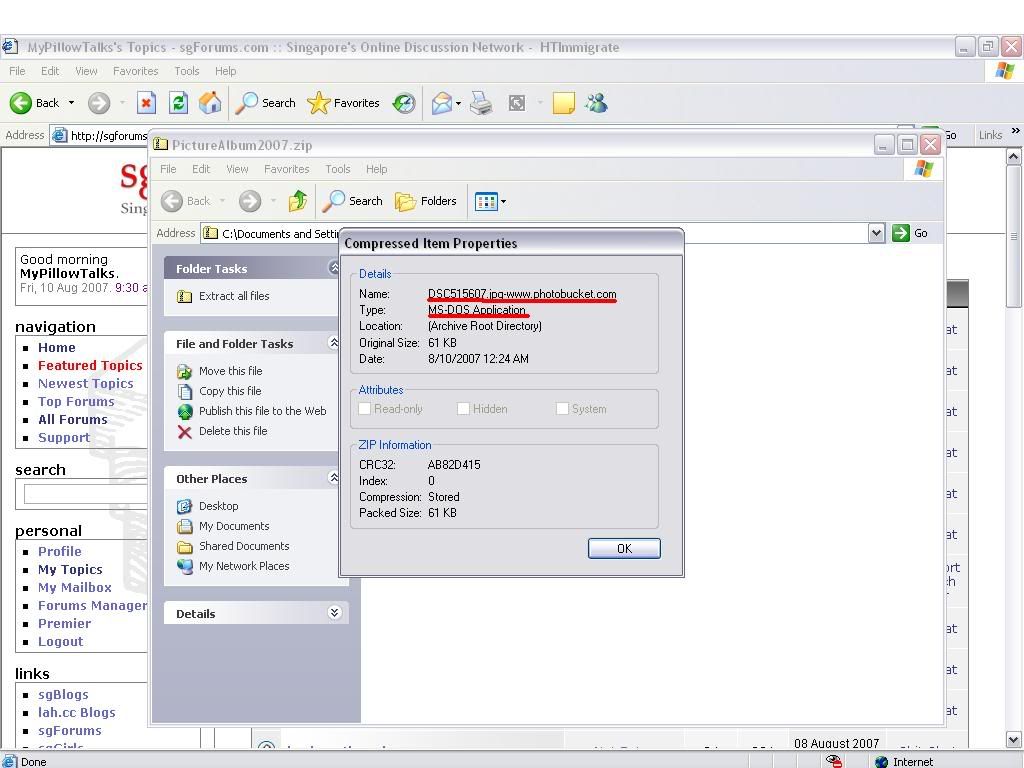
-
Virus creators are getting creative.
-
Originally posted by ndmmxiaomayi:Virus creators are getting creative.
even the name is DSC2348.jpg-www.photobucket.com
hmm... can anti virus system check codes in pif files and see if they do damage?
-
No. At the most, they can only tell if it's harmful. If you want, you can load the virus into a hex editor and see what it does.Originally posted by MyPillowTalks:
even the name is DSC2348.jpg-www.photobucket.com
hmm... can anti virus system check codes in pif files and see if they do damage? -
orh..Originally posted by ndmmxiaomayi:No. At the most, they can only tell if it's harmful. If you want, you can load the virus into a hex editor and see what it does.
hmm....yar, i oweis wanted to be able to open up and see it like opening a batch file wid notepad
if kena this kind of things hor, how to fix? -
Use a test machine... kena already can reformat.Originally posted by MyPillowTalks:orh..
hmm....yar, i oweis wanted to be able to open up and see it like opening a batch file wid notepad
if kena this kind of things hor, how to fix?
Or load it to a virtual machine. MS has a virtual PC... or use VMWare....
If use hex editor... should have no harm... as long as it's not executed. -
i mean if executed how to fix?Originally posted by ndmmxiaomayi:Use a test machine... kena already can reformat.
Or load it to a virtual machine. MS has a virtual PC... or use VMWare....
If use hex editor... should have no harm... as long as it's not executed. -
Scan with antivirus...Originally posted by MyPillowTalks:i mean if executed how to fix? -
i wanna try, sure can fix or notOriginally posted by ndmmxiaomayi:Scan with antivirus... 


