:( StarHub is capping intl websites to 10-15KB/sec
-
Originally posted by ndmmxiaomayi:Results:
1st file: 17:15:41 (79.07 KB/s) - `1MB...80.ndmmxiaomayi.file.zip' saved [1048576/1048576]
2nd file: 17:16:14 (57.79 KB/s) - `1MB...27015.ndmmxiaomayi.file.zip' saved [1048576/1048576]
Also why are you connecting from 2 completely different IPs? 165.* and 116.*?
Edit: Retracted above statement. Added all the text below this line.
I know why he is getting these results. ndmmxiaomayi is not a StarHub user at all, in fact he is a SingNet user. It is clear from the topic title that this thread is for StarHub users. If there are any other legimate StarHub users who would like to run these two tests, please post your interest here.
Nice try to discredit me there ndmmxiaomayi! Almost fell for it too.
tail /var/log/httpd/access_log
165.21.*.* - - [09/Sep/2007:19:15:28 +1000] "GET /1MB...80.ndmmxiaomayi.file.zip HTTP/1.0" 200 1048576 "-" "Wget/1.10.2"
116.15.*.* - - [09/Sep/2007:19:15:57 +1000] "GET /1MB...27015.ndmmxiaomayi.file.zip HTTP/1.0" 200 1048576 "-" "Wget/1.10.2"
* = Removed for ndmmxiaomayi's privacy...
host 165.21.*.*
*.*.21.165.in-addr.arpa domain name pointer *-14.singnet.com.sg.
host 116.15.*.*
*.*.15.116.in-addr.arpa domain name pointer *-15-40-100.singnet.com.sg.
In needs to be asked.. Why are you trying to discredit me ndmmxiaomayi? What ulteriour motives do you have? Do you work for or someone you know work for StarHub? -
Who's my ISP I think many knows it. I don't work for Starhub, neither do I know someone working for Starhub.
Singnet or Starhub... try to find. Just a hint, I'm not at home now. -
Up to you to believe lor. Say I'm not at home liao. Connecting to Singnet via Starhub is not that hard you know.

I have discredited you, no doubt. I proved otherwise that you can't bypass nuisances. -
I already know who your ISP is. It is SingNet. After asking the above question I did my research, found my answer, and had to wait the 5 minues before I could sumbit my edit.Originally posted by ndmmxiaomayi:Who's my ISP I think many knows it. I don't work for Starhub, neither do I know someone working for Starhub.
Singnet or Starhub... try to find. Just a hint, I'm not at home now.
Tell me, why run the tests on a SingNet conncetion and then post them here?
If you have StarHub at home, then by all means, run the test again when you are at home. However I would need to generate two new files to ensure that they are not cached somewhere.
If any other StarHub person wants to run the same test, please post your interest. -
My ISP is Singnet. I'm not at home only means one thing. I'm connecting through a Starhub user's PC. But I played with you if you get what I mean. Those results are crooked enough.
-
Actually you haven't proved that can't bypass nuisances at all. Instead all that you have proved is that SingNet don't cap their international web traffic to ISDN speeds. Which I already proved in my first post.Originally posted by ndmmxiaomayi:Up to you to believe lor. Say I'm not at home liao. Connecting to Singnet via Starhub is not that hard you know.
I have discredited you, no doubt. I proved otherwise that you can't bypass nuisances.
If you are a StarHub user and are interested in running this test legitimately, post your interest in this thread.
I have to ask, why are you afraid of the results? -
Pray tell, if you connected to a StarHub user's PC, why don't I see a connection from his ISP StarHub? Instead all I see is a connection from your ISP Singnet in my logs.Originally posted by ndmmxiaomayi:My ISP is Singnet. I'm not at home only means one thing. I'm connecting through a Starhub user's PC. But I played with you if you get what I mean. Those results are crooked enough. -
Originally posted by johnnygamer:
Hey I would like to try. But knows nuts about the specific issues you are talking about so can post some kind of guides.
Actually you haven't proved that can't bypass nuisances at all. [b]Instead all that you have proved is that SingNet don't cap their international web traffic to ISDN speeds. Which I already proved in my first post.
If you are a StarHub user and are interested in running this test legitimately, post your interest in this thread.
I have to ask, why are you afraid of the results? [/b]
Haha not afraid of the result at all my plan ends this November so its a good time to have a change, except that all along I have not much problems with Starhub. -
Originally posted by kenn3th:
kenn3th: What you are seeing here is that someone has already downloaded the file before you and it is sitting in a cache ready to be served to the next person at full speed. If you are interested, I can create a unique download file for you to test.
Nxt, As A Starhub user, I Dont Find That My Internet Connection Is Slow @ All, I Tested Downloading a 1mb file and it's rate is @ 665kb/sec on a MaxOnline Premium connection. -
Originally posted by johnnygamer:
I'm not a Starhub user. Period.
Actually you haven't proved that can't bypass nuisances at all. [b]Instead all that you have proved is that SingNet don't cap their international web traffic to ISDN speeds. Which I already proved in my first post.
If you are a StarHub user and are interested in running this test legitimately, post your interest in this thread.
I have to ask, why are you afraid of the results? [/b]
As I've said, it's not enough proof. I can easily tweak the results as I deem fit. You will need better ones.
Let's see others first. -
..................Originally posted by johnnygamer:Pray tell, if you connected to a StarHub user's PC, why don't I see a connection from his ISP StarHub? Instead all I see is a connection from your ISP Singnet in my logs.
Read again. I say it isn't very hard to do something. -
Originally posted by johnnygamer:
I hope I have this posted before chenc comes back with the results.
The 4 urls I will PM to you are:
1. anapnea port 80
2. blacksburgpower port 80
3. 220.233.*.* port 80
4. 220.233.*.* port 27015
Now before someone raises the allegation that port 80 is being speedcap at the other end(server end) of 220.233.*.* both `()cpZ! results and ndmmxiaomayi results(providing that they are accurate and even if they were forged, `()cpZ! results alone are strong enough) prove that no speedcapping is occuring at the server of 220.233.*.* -
Yes you could lie about the results, but the community generally expects more from people in positions of power and trust. As a moderator, you have that expectation placed upon your sholders. Quite disappointing behaviour from you reallyOriginally posted by ndmmxiaomayi:I'm not a Starhub user. Period.
As I've said, it's not enough proof. I can easily tweak the results as I deem fit. You will need better ones.
Let's see others first.
Anyway I digress. Lets see the results from chenc -
All set waiting for your PM URLsOriginally posted by johnnygamer:Yes you could lie about the results, but the community generally expects more from people in positions of power and trust. As a moderator, you have that expectation placed upon your sholders. Quite disappointing behaviour from you really
Anyway I digress. Lets see the results from chenc -
You still don't understand. This test you are trying to do has way too many flaws regardless of whether I tweak it to suit myself.Originally posted by johnnygamer:Yes you could lie about the results, but the community generally expects more from people in positions of power and trust. As a moderator, you have that expectation placed upon your sholders. Quite disappointing behaviour from you really
Anyway I digress. Lets see the results from chenc
You need much more better evidence than these tests.
Get a Starhub user, get a website host from some small web hosting company and test.
Then try doing it on another large well-known web hosting company to see the difference.
They must fulfill these criteria:
1. Same server hardware
2. Same amount of bandwidth allocated
3. Nobody should be visiting your website during the test except the tester
Then we shall see. -
I'm sure chenc's results will be sweet vindication that my testing methodology is sound. I shall explain to you the logic behind it once we have the results as it is clear that you are failing to understand it.Originally posted by ndmmxiaomayi:You still don't understand. This test you are trying to do has way too many flaws regardless of whether I tweak it to suit myself.
You need much more better evidence than these tests.
Get a Starhub user, get a website host from some small web hosting company and test.
Then try doing it on another large well-known web hosting company to see the difference.
They must fulfill these criteria:
1. Same server hardware
2. Same amount of bandwidth allocated
3. Nobody should be visiting your website during the test except the tester
Then we shall see. -
One person's results is not enough to prove anything. You should know how Science works. You need more results. Anyway, you got lots of thinking to do. The IP address is nothing interesting, but the results are. To some extent, there is some truth in your words, but it still doesn't mean anything.Originally posted by johnnygamer:I hope I have this posted before chenc comes back with the results.
Now before someone raises the allegation that port 80 is being speedcap at the other end(server end) of 220.233.*.* both `()cpZ! results and ndmmxiaomayi results(providing that they are accurate and even if they were forged, `()cpZ! results alone are strong enough) prove that no speedcapping is occuring at the server of 220.233.*.*
Whether Singnet or Starhub or Pacnet, you just have to know one thing - we are definitely being ripped off. -
Originally posted by johnnygamer:
If you actually spend as much time Googling as to post all these BS, you will know that SpeedNet is not one of StarHub's partner site, by logic and by proof. As you can see that someone have already achieved DL speeds of 1.8k/sec with a server in Auckland, would you please stop spreading such baseless statements? It's just wasting yours and our time, unless you are a troll or a SingNet representative.
I could not find their list of partner sites. So if your testing to a so called partner website you will receive the full speed. .[b]Try surfing to a website outsite their list and you will be surfing at the crippling speed of 10-15KB/s. Try with some other smaller servers around. I'm sure you will find similar results. BTW `()cpZ! who uses SingNet got a speed of 120.40KB/s to anapnea and a speed of 175.20KB/s to blacksburgpower.[/b][/b]
http://asia.cnet.com/explains/starhub/maxonline/
http://www.starhub.com/portal/site/Online/menuitem.935dac8c897c3fb7eaaf3b608324a5a0/?vgnextoid=00c528043c6ef010VgnVCM100000464114acRCRD
-
Perhaps. I will wait.Originally posted by johnnygamer:I'm sure chenc's results will be sweet vindication that my testing methodology is sound. I shall explain to you the logic behind it once we have the results as it is clear that you are failing to understand it. -
PM already sent. Awaiting your results when ready. Please don't repeat any downloads as then they would be cached.Originally posted by chenc:All set waiting for your PM URLs -
Never mind, we shall wait and see.Originally posted by LatecomerX:If you actually spend as much time Googling as to post all these BS, you will know that SpeedNet is not one of StarHub's partner site, by logic and by proof. As you can see that someone have already achieved DL speeds of 3k+/sec with a server in Auckland, would you please stop spreading such baseless statements? It's just wasting yours and our time, unless you are a troll or a SingNet representative.
http://asia.cnet.com/explains/starhub/maxonline/
http://www.starhub.com/portal/site/Online/menuitem.935dac8c897c3fb7eaaf3b608324a5a0/?vgnextoid=00c528043c6ef010VgnVCM100000464114acRCRD -
Johnny, A Report By Cnet Asia to research on the speed of our internet experience.
This test is done over 12 days (with me participating too) and 3381 tests were conducted.
http://asia.cnet.com/promo/gbd/gbdreport.pdf
Therefore, I would rather trust their numbers than yours. -
Seriously I don't think starhub is that bad for surfing website. But for what i know is that When i play WOW connected to US server it sure lag like shit compare to when i' in US
 But when i tried my friend singnet line is not so bad. So i guess starhub is not that good for mmorpg so far away. I'm someone who can't take lag. So is preferred. I got some friend who play with 1000ms latency and they say is fine. so is all about preferred.
 -
ISP: StarhubOriginally posted by johnnygamer:Dear chenc,
Quite a simple test really.... I will PM you 4 unique urls of files to download.. to be fair, be sure to stop any p2p and torrents and any other downloads that you might have running. Also please don't use any download accelerators as they make multiple connections to a single server.
You can either use WGET or a browser, WGET is preferred:
0. Download WGET from here:
WGET for Windows
1. Extract the zip file to C:\wget
2. Start up a Command Prompt. Start | Run | cmd | OK
3. Type in this and press enter afterwards:
cd \wget
4. Type in this and press enter afterwards:
wget
E.g.
wget http://anapnea.net/~benlee/1MB.anapnea.LatecomerX.file.zip
5. When that finishes copy and paste the last line into here. It will look similar to this:
09:52:45 (120.40KB/s KB/s) - `1MB.anapnea.LatecomerX.file.zip' saved [1048576/1048576]
6. Repeat for the other 3 urls.
7. Post your results here.
If you are uncomfortable with WGET, you can use your browser instead, however WGET is preferred over a browser.
The 4 urls I will PM to you are:
1. anapnea port 80
2. blacksburgpower port 80
3. 220.233.*.* port 80
4. 220.233.*.* port 27015
Plan: Maxonline Premium
Tool Used: WGET
Location: CCK
URLs Tested:
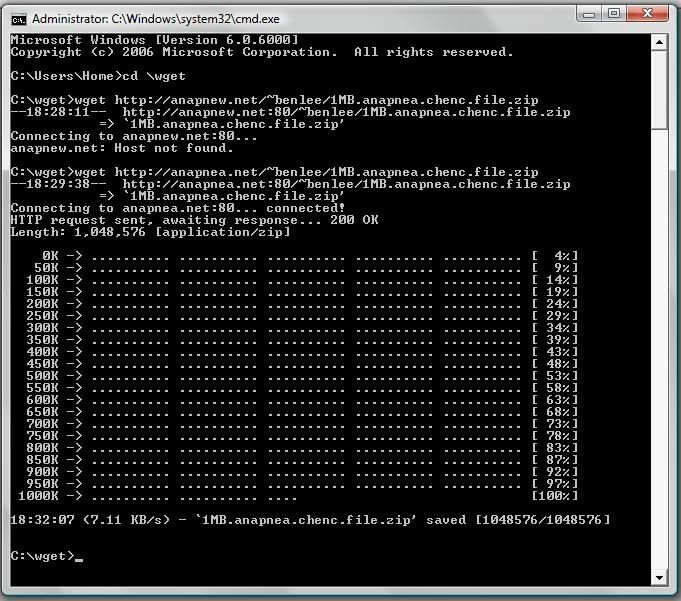
1. anapnea port 80
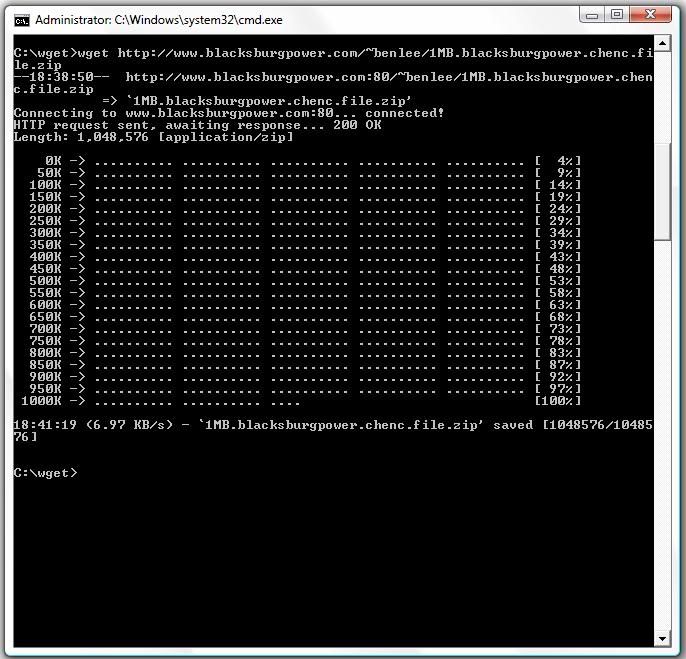
2. blacksburgpower port 80
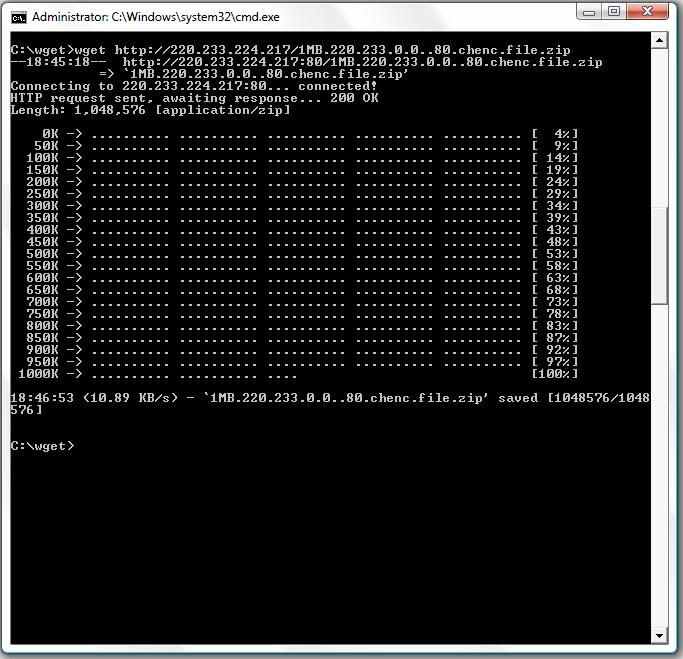
3. 220.233.*.* port 80
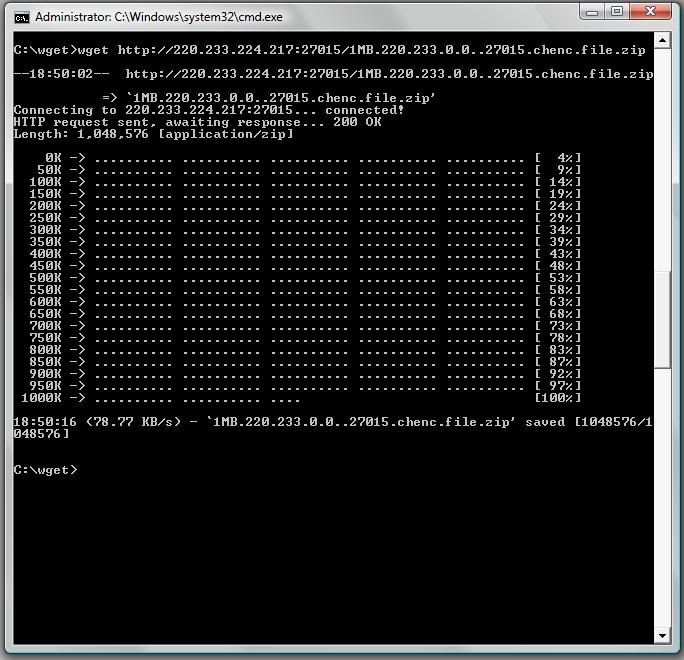
4. 220.233.*.* port 27015
Results:
1. anapnea port 80
18:32:07 (7.11 KB/s) - `1MB.anapnea.chenc.file.zip' saved [1048576/1048576]
Screenshothttp://i11.photobucket.com/albums/a178/aaecharry/1-1.jpg
2. blacksburgpower port 80
18:41:19 (6.97 KB/s) - `1MB.blacksburgpower.chenc.file.zip' saved [1048576/10485
76]
Screenshothttp://i11.photobucket.com/albums/a178/aaecharry/2.jpg
3. 220.233.*.* port 80
18:46:53 (10.89 KB/s) - `1MB.220.233.0.0..80.chenc.file.zip' saved [1048576/1048
576]
Screenshothttp://i11.photobucket.com/albums/a178/aaecharry/3.jpg
4. 220.233.*.* port 27015
18:50:16 (78.77 KB/s) - `1MB.220.233.0.0..27015.chenc.file.zip' saved [1048576/1
048576]
Screenshothttp://i11.photobucket.com/albums/a178/aaecharry/4.jpg -
Just to try a bit on conspiracy into the mix, StarHub is already behaving like Internet2 is supposed to :p