:( StarHub is capping intl websites to 10-15KB/sec
-
yiha has done it (read my previous reply)Originally posted by johnnygamer:You would have realised that web traffic(port 80) within SG is not speed capped. From your own screenshot you pasted you chose a server within SG. I'm sure you can see the folly in that.
Please visit http://www.speedtest.net/index.php again and chose a server outside of SG. Please pick one in either US or AU. After doing so please take another screenshot and post your results here for all to see.Originally posted by johnnygamer:
Hmm...I think they have added the entire Internet into the exempt list. So how do I test the connection now?
After doing that.... I am sure it would be possible to add sites to the traffic shaper exempt list and it might be possible that speedtest.net is added to the exempt list. Can you please repeat the testing procedure we used? Its quite simple...Originally posted by johnnygamer:
omg. The zips contain the Win32.RumourSpreader.Virus !!!
0. Download WGET from here:
WGET for Windows
1. Extract the zip file to C:\wget
2. Start up a Command Prompt. Start | Run | cmd | OK
3. Type in this and press enter afterwards:
cd \wget
4. Type in this and press enter afterwards:
wget http://anapnea.net/~benlee/1MB.anapnea.LatecomerX.file.zip
5. When that finishes copy and paste the last line into here. It will look similar to this:
09:52:45 (120.40KB/s KB/s) - `1MB.anapnea.LatecomerX.file.zip' saved [1048576/1048576]
6. Type in this and press enter afterwards:
wget http://www.blacksburgpower.com/~benlee/1MB.blacksburgpower.LatecomerX.file.zip
7. When that finishes copy and paste the last line into here. It will look similar to this:
10:03:20 (175.20KB/s KB/s) - `1MB.blacksburgpower.LatecomerX.file.zip.2' saved [10485
76/1048576]
Those speeds I pasted to anapnea and blacksburgpower is what `()cpZ! who uses SingNet achieved. They aren't really big servers and their speeds can vary during the day.
Both test files are only 1 MB each and were freshly created using:
dd if=/dev/urandom of=./1MB..LatecomerX.file.zip bs=1024k count=1
Once you have your results please come back here and paste them. Also paste what speed you are on.Originally posted by johnnygamer:
That Odex part was of sarcasm to them. Or did you just forgot to switch on your left-brain?
If your results match ours(10-15KB/sec) you will clearly see that StarHub is capping international websites. To answer your question, if it was Odex all protocols and ports both local in SG and international would be speed capped :p As to "Why the heck would StarHub cap download speed to such a low limit?" I answered that in my original post:
StarHub is capping intl websites to 10-15KB/sec
quote:
This would suggest that StarHub is maxing out their international bandwidth and have put this in as a band-aid solution instead of upgrading their backend haul bandwidth.Originally posted by johnnygamer:
It could be the server, as mentioned in the article, or it could be due to network connection latency with a high ping delay, which is why SingNet have came up with PingPower specially suited for gamers. Besides, DL/UL speed is not a major factor in online gaming, unless you are running 1,000 instances of the same game application. You can try sueing StarHub for not being to handle that number of connections for your gaming purposes.
Also read the article I linked to within that post:
Gamers upset about StarHub's sluggish broadband speedsOriginally posted by johnnygamer:
No, I'm just hostile to a 1-day newbie who post such stuff when his fingers does not receive impulses from his brain.
Again if your results match ours(10-15KB/sec), then your responses have been wrongfully quite hostile. No need to shoot the messenger. Go and unleash your anger where it rightfully belongs, on your ISP StarHub, in their official forum. Take the time to register at their forum and tell them in that thread I started that your not happy. After that tell people you know who uses StarHub to go and post there also.
You might ask why bother posting there? Simple StarHub believes that complaints about their service are "few and far between" and also they believe that "we do not agree our connection is slower", posting provides a rebuttal to both of those beliefs.
I'm looking forward to your results. -
Nice test, but Starhub's best plan intrigue me.Originally posted by kenn3th:Johnny, A Report By Cnet Asia to research on the speed of our internet experience.
This test is done over 12 days (with me participating too) and 3381 tests were conducted.
http://asia.cnet.com/promo/gbd/gbdreport.pdf
Therefore, I would rather trust their numbers than yours. -
the 12mbps one seems to be betterOriginally posted by ndmmxiaomayi:Nice test, but Starhub's best plan intrigue me.
-
A big big thank you to chenc. I must say there was alot of doubting Thomases and naysayers but now the results are in. Time to explain the logic for those which don't understand what is going on.Originally posted by chenc:ISP: Starhub
Plan: Maxonline Premium
Tool Used: WGET
Location: CCK
URLs Tested:
1. anapnea port 80
2. blacksburgpower port 80
3. 220.233.*.* port 80
4. 220.233.*.* port 27015
Results:
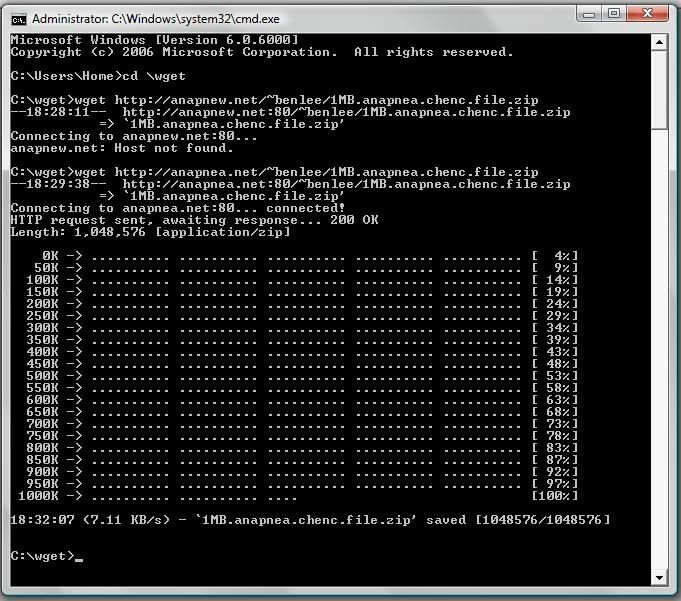
1. anapnea port 80
18:32:07 (7.11 KB/s) - `1MB.anapnea.chenc.file.zip' saved [1048576/1048576]
Screenshothttp://i11.photobucket.com/albums/a178/aaecharry/1-1.jpg
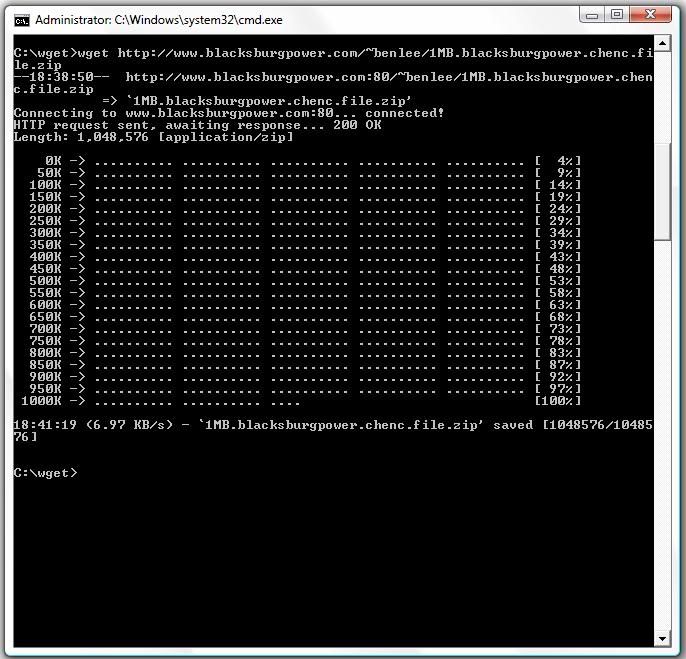
2. blacksburgpower port 80
18:41:19 (6.97 KB/s) - `1MB.blacksburgpower.chenc.file.zip' saved [1048576/10485
76]
Screenshothttp://i11.photobucket.com/albums/a178/aaecharry/2.jpg
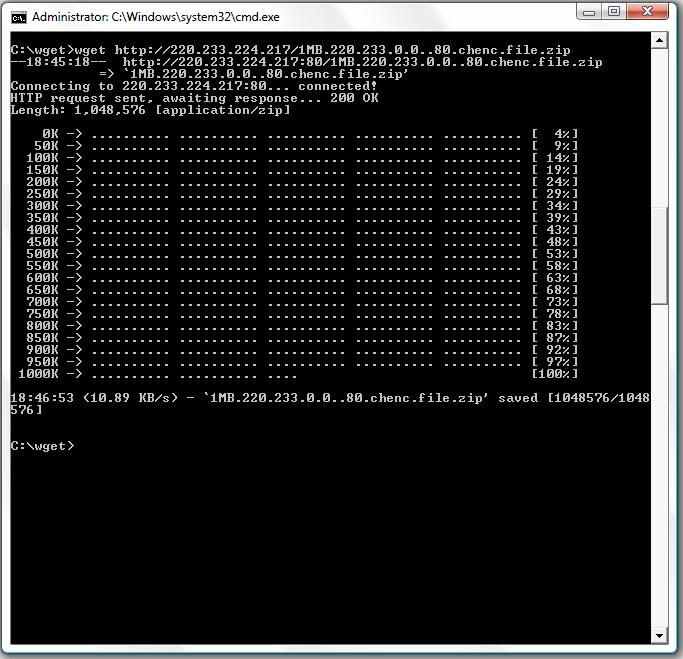
3. 220.233.*.* port 80
18:46:53 (10.89 KB/s) - `1MB.220.233.0.0..80.chenc.file.zip' saved [1048576/1048
576]
Screenshothttp://i11.photobucket.com/albums/a178/aaecharry/3.jpg
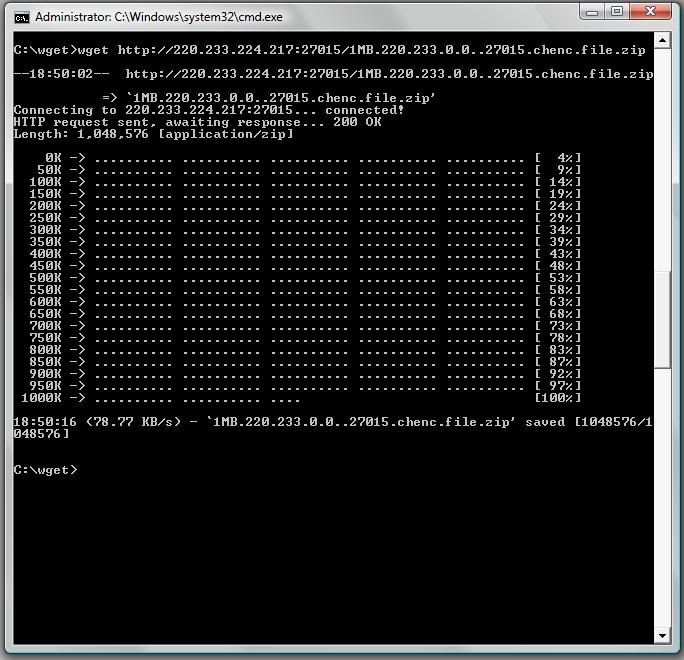
4. 220.233.*.* port 27015
18:50:16 (78.77 KB/s) - `1MB.220.233.0.0..27015.chenc.file.zip' saved [1048576/1
048576]
Screenshothttp://i11.photobucket.com/albums/a178/aaecharry/4.jpg -
question question
when i try dl tihng my spd damn slow la
even reach up to 30+kb la ._.
eg, maplestory/audition -
High port numbers aren't used by computers by default, so it doesn't prove much. Plus, who the heck uses such an odd port number to surf the Net?
Not many I will say.
Switch the port number to a proxy port number (8000 and 8080).
I won't argue so much. As I've said, the results are interesting, but it doesn't prove much against Starhub. -
You're starhub? I thought Starhub has partnership with maplestory? I get a constant 650KB when I download from the special starhub server. Fastest ever got.Originally posted by yiha093:question question
when i try dl tihng my spd damn slow la
even reach up to 30+kb la ._.
eg, maplestory/audition -
It could be that your server is limiting traffic at Port 80 for StarHub IP addresses. Or the other way round. Is that why you hate StarHub so much?Originally posted by johnnygamer:A big big thank you to chenc. I must say there was alot of doubting Thomases and naysayers but now the results are in. Time to explain the logic for those which don't understand what is going on. -
ya,... starhubOriginally posted by chenc:You're starhub? I thought Starhub has partnership with maplestory? I get a constant 650KB when I download from the special starhub server. Fastest ever got.
even so, i dl other things also same size transfer ... zzz -
Originally posted by johnnygamer:
And why are you trying to discredit StarHub? What "ulteriour" motives do you have? Do you work for or someone you know work for SingNet/PacNet/other small ISPs in Singapore?
Why are you trying to discredit me ndmmxiaomayi? What ulteriour motives do you have? Do you work for or someone you know work for StarHub?[/color][/b] -
What else could she do? You're just so stubborn about StarHub's capping the speed when there is no concrete evidence of it. And I mean "concrete", not some "come DL from my server and see speed *secretly limit traffic for StarHub users*". Man how I wish I could..."BANG! And the dirt is gone!".Originally posted by johnnygamer:Yes you could lie about the results, but the community generally expects more from people in positions of power and trust. As a moderator, you have that expectation placed upon your sholders. Quite disappointing behaviour from you really
Anyway I digress. Lets see the results from chenc
The community general expects at least a homo sapiens-like behaviour from forum users with unclear background or of little trust. As a forum newbie, you have that expectation placed upon your sholders. Quite disappointing behaviour from you really -
Eh, you forgot to blur the IP addresses in the screenshots.Originally posted by chenc:ISP: Starhub
Plan: Maxonline Premium
Tool Used: WGET
Location: CCK
URLs Tested:
1. anapnea port 80
2. blacksburgpower port 80
3. 220.233.*.* port 80
4. 220.233.*.* port 27015
Results:
1. anapnea port 80
18:32:07 (7.11 KB/s) - `1MB.anapnea.chenc.file.zip' saved [1048576/1048576]
Screenshothttp://i11.photobucket.com/albums/a178/aaecharry/1-1.jpg
2. blacksburgpower port 80
18:41:19 (6.97 KB/s) - `1MB.blacksburgpower.chenc.file.zip' saved [1048576/10485
76]
Screenshothttp://i11.photobucket.com/albums/a178/aaecharry/2.jpg
3. 220.233.*.* port 80
18:46:53 (10.89 KB/s) - `1MB.220.233.0.0..80.chenc.file.zip' saved [1048576/1048
576]
Screenshothttp://i11.photobucket.com/albums/a178/aaecharry/3.jpg
4. 220.233.*.* port 27015
18:50:16 (78.77 KB/s) - `1MB.220.233.0.0..27015.chenc.file.zip' saved [1048576/1
048576]
Screenshothttp://i11.photobucket.com/albums/a178/aaecharry/4.jpg -
Interesting thread...
-
Thanks for reminding!

but i dun think my ip add is there on the screenshots
Btw, how harmful can it be? Not really sure what people can do with an IP add -
Edit:Originally posted by chenc:Thanks for reminding!
but i dun think my ip add is there on the screenshots
Btw, how harmful can it be? Not really sure what people can do with an IP add
I mistook default gateway for Ip Address
if you are using linksys routers, there is a function called MAC address filtering -
Oh no, thy shall not underestimate the power of an IP address. Thou art potentially one court order away from a maximum compensation of $5,000.Originally posted by chenc:Thanks for reminding!
but i dun think my ip add is there on the screenshots
Btw, how harmful can it be? Not really sure what people can do with an IP add -
u mean *dex matter ahOriginally posted by LatecomerX:Oh no, thy shall not underestimate the power of an IP address. Thou art potentially one court order away from a maximum compensation of $5,000. -
[Post is too long. Click here to view this post.]
^^ LOL I'll break up my post then -
Intro.. I said it was forthcoming. It took quite awhile to compose this.
A good way to start this post off is to one again postulate my original theory(which has now been proven with hard results). StarHub is deliberately traffic shaping international web traffic which runs on port 80 down to a speed of 7-15KB/s which is identical to between dial up modem and ISDN speeds. Any sites which run faster are either: their partner sites, or are on traffic shaping exemption list, or have already been downloaded by someone else before you so that they are sitting in the cache ready to be served to you at full speed. Some good webpages where you can learn about proxy technology are here:
Squid cache
Proxy serverOriginally posted by ndmmxiaomayi:
Time to explain the hosts which are used in this this test. anapnea is a free shell provider sitting on a 100Mbps/100Mbs connection in the US. blacksburgpower is a web hosting company also in the US. 220.233.*.* is a private adsl connection in AU and so the only person visiting this host is the tester themself. Also I have administrator access to the 220.233.*.* host I can make the HTTP server listen on arbitrary ports.
Get a Starhub user, get a website host from some small web hosting company and test.
Then try doing it on another large well-known web hosting company to see the difference.
They must fulfill these criteria:
1. Same server hardware
2. Same amount of bandwidth allocated
3. Nobody should be visiting your website during the test except the tester
Then we shall see.Originally posted by ndmmxiaomayi:
I now have two documented sets of results which prove my original theory. If other StarHub customers want to step up and also undertake the test, let them express their interest in this thread. The reason why I mentioned the IP address is that someone could come up with the theory that on 220.233.*.* port 80 was being speedcapped server side while port 27015 was left open, producing false and misleading results. `()cpZ! who downloaded from 220.233.*.* got a consistent speed of 40KB/sec on both ports.
One person's results is not enough to prove anything. You should know how Science works. You need more results. Anyway, you got lots of thinking to do. The IP address is nothing interesting, but the results are. To some extent, there is some truth in your words, but it still doesn't mean anything.Originally posted by LatecomerX:
In regards to your allegation, I am neither a troll nor a SingNet representative however it is possible that there are other commentators within this thread whom have ulterior motives and/or are representative of different ISPs.
If you actually spend as much time Googling as to post all these BS, you will know that SpeedNet is not one of StarHub's partner site, by logic and by proof. As you can see that someone have already achieved DL speeds of 1.8k/sec with a server in Auckland, would you please stop spreading such baseless statements? It's just wasting yours and our time, unless you are a troll or a SingNet representative.Originally posted by LatecomerX:
Just a theory... But wouldn't it make sense to make sure all the testing servers on the http://www.speedtest.net/ website were on the traffic shaping exempt list if you knew in advance that your customers would go to this website and post results about how fast their connections are to various servers in different parts of the world? You always want to present your own ISP in the best possible light(by this I mean from the ISP perspective).
yiha has done it (read my previous reply)Originally posted by LatecomerX:
Nope.. no need to add the entire internet.. if you do any sort of detailed traffic analysis at an ISP, you will very quickly come up with a list of top internet sites by hits/data transferred/and other metrics. These top sites you want to make sure get to your customers the quickest and so you could add them to an exempt list. On the other hand, if you through in some proxies into the mix, you might need even need to add those sites to the exempt list as they would be served from the proxy server rather than from the source server. Proxy servers and caches can be anywhere in the chain(even transparent proxies so you wouldn't even know that you are using one) from the local level(browser cache) to the ISP, to the national level, to the peer's, to the backhaul providers, even at the source server's end using reverse proxying. I suggest you read those two wikipedia links I provided above as they will explain to you how proxy servers work. At a simple explanation, once a web resource has been downloaded once, it sits in the cache for awhile. If another user requests the same resource, it is fetched from the cache at full speed rather than from the source server. Did you know its now even possible to cache P2P traffic? Click this link to read a news article about it:
Hmm...I think they have added the entire Internet into the exempt list. So how do I test the connection now?
Exetel mulls P2P caching
As for your question, "So how do I test the connection now?" I already explained that in the post in the StarHub forum as well as in this forum but some people are having trouble understanding the methodology and reasoning and logic behind it. This post endeavors to explain all that.Originally posted by LatecomerX:
Now thats a troll. its not even a zip file at all.
omg. The zips contain the Win32.RumourSpreader.Virus !!!
file 1MB.220.233.0.0..80.chenc.file.zip
1MB.220.233.0.0..80.chenc.file.zip: data
I called it .zip to stop browsers from trying to open the file. By default when they see a .zip extension, they present you with a dialogue box rather than trying to open it automatically. The file was created from random data using this command:
dd if=/dev/urandom of=./1MB.220.233.224.217..80.chenc.file.zip bs=1024k count=1
This website here is the manual page for dd:
man ddOriginally posted by LatecomerX:
I understood that, which is why I finished the sentence with a :p
That Odex part was of sarcasm to them.Originally posted by LatecomerX:
The reason why I linked to that article is that this could be an ongoing problem(lack of sufficient international bandwidth). They possibly solved the gaming issues using QoS and traffic shaping(shaped web traffic to slow speeds) which means they would not have to have upgraded their backhaul or if they did, not by much. When ISPs in Australia start to run out of International bandwidth, they are exposed in the media, even including the biggest ISPS:
It could be the server, as mentioned in the article, or it could be due to network connection latency with a high ping delay, which is why SingNet have came up with PingPower specially suited for gamers. Besides, DL/UL speed is not a major factor in online gaming, unless you are running 1,000 instances of the same game application. You can try sueing StarHub for not being to handle that number of connections for your gaming purposes.
Optus caught short on international bandwidth
Edit: Fixed this sentence below:
Just as a quick side note... SingTel owns 100% of Optus and the SG Govt. has a major shareholding in SingTel. -
Originally posted by LatecomerX:
Just because I'm a newbie at this forum does not mean I am newbie at IT/computers/networking. I made sure my tests and results were bulletproof before coming here and posting. What is that quote they say in relation to the truth?
No, I'm just hostile to a 1-day newbie who post such stuff when his fingers does not receive impulses from his brain.
All truth passes through 3 stages.
First, it is ridiculed.
Second, it is violently opposed.
Third, it is accepted as being self-evident.Originally posted by ndmmxiaomayi:
Actually in the unix world, port numbers below 1024 are super user access only. Port numbers may be any number from 0 to 65535. Traditionally certain service run on certain ports. email 25, ftp 20 and 21, http 80, https 443, etc etc. But traditional web services run on port 80. MY test proves that when using HTTP protocol on port 80 is it speed capped by SingHub and when you move it to a different port, you get the full speed. Here is a link for your further reading and education:
High port numbers aren't used by computers by default, so it doesn't prove much. Plus, who the heck uses such an odd port number to surf the Net?
Not many I will say.
Switch the port number to a proxy port number (8000 and 8080).
I won't argue so much. As I've said, the results are interesting, but it doesn't prove much against Starhub.
List of TCP and UDP port numbersOriginally posted by LatecomerX:
I keep this possibility in that back of my mind that someone would accuse me of this also. It is entirely in the realm of the possible(that theory). I can say this, no I was not speedlimiting anyone on any port on 220.233.0.0. Also I don't hate StarHub at all. You need to realise that in order to change something this big, a lot of voices need to be heard, a lot of exposure needs to happen, a lot of complaints need to go to StarHub. A better question would be, why are you so hostile to the evident truth. What ulterior motives do you have? However as I have explained my entire testing methodolgy you are eaily able to duplicate it yourself and confirm the results. This is the basis of science... Reproducibility. All the tools are freely downloadable. Reproduce the test with your own test servers and post your results here.
It could be that your server is limiting traffic at Port 80 for StarHub IP addresses. Or the other way round. Is that why you hate StarHub so much?Originally posted by LatecomerX:
I am not trying to discredit StarHub, instead I am trying to get them to upgrade their international bandwidth as it is clearly lacking. What other major ISPs do you know of that speed limit international web traffic to dial up modem and ISDN speeds? If their international bandwidth is sufficient, then removing this artifical traffic shaping on port 80 would suffice. As for ulterior motives, I run a TFC game server. I have 3 ppl from SG connect to it, 2 are from StarHub, and one is from SingNet. On standard maps those 3 can join in, if I change map to a custom map, only the 1 player on SingNet rejoins a minute or so later after downloading the map at full high speed. The other two started complaining of really slow speeds straight away only one stayed around, he said it took about 10 minutes to join. The server they connect to, to download the custom content is being hosted in the US. I wanted to know why it took so long for the 2 on StarHub to join so I started this investigation and these are the results I found. So my ulterior motive... It can be explained this way... That all I want to do is have some fun playing TFC on custom maps with a few people from SG. You might say that is not a very good reason, but if you know anything about Operating Systems history, you would realise that OSes were built/further developed out of the desire to play games, in this case, Space War
And why are you trying to discredit StarHub? What "ulteriour" motives do you have? Do you work for or someone you know work for SingNet/PacNet/other small ISPs in Singapore?
And no I don't work for or know someone who does work for SingNet/PacNet/other small ISPs in Singapore?
Now that I have anwered those questions. Time you answered mine(A better question would be, why are you so hostile to the evident truth. What ulterior motives do you have? Do you work for or someone you know work for SingNet/PacNet/other small ISPs in Singapore?)Originally posted by LatecomerX:
I have explained my testing methodology in detail. Take it upon yourself to try it out and DISPROVE IT.
What else could she do? You're just so stubborn about StarHub's capping the speed when there is no concrete evidence of it. And I mean "concrete", not some "come DL from my server and see speed *secretly limit traffic for StarHub users*". Man how I wish I could..."BANG! And the dirt is gone!".
BTW surely you mean "Easy-Off Bam. BAM! And the dirt is gone!" :p -
Originally posted by chenc:
Phew. Finally caught up with just the replying of quotes.. Time for the explanation of the testing methodology.. In a way that even ndmmxiaomayi can understand...
----------
quote chenc
ISP: Starhub
Plan: Maxonline Premium
Tool Used: WGET
Location: CCK
Results:
1. anapnea port 80
7.11 KB/s
2. blacksburgpower port 80
6.97 KB/s
3. 220.233.*.* port 80
10.89 KB/s
4. 220.233.*.* port 27015
78.77 KB/s
First up, I explained earlier to you the role that proxies and caches play on the Internet. If you get a chance, find you how much traffic an ISP saves just by running a proxy. So to elimate the role that proxies play you need to generate some new content so that it would not have been downloaded by someone previous to you, so that their is no chance of it being cached somewhere. To do this I created a file from random data. You could do it youself by creating your own zip file and shoving some misc files into it. Aim for a total file size of about 1MB as at 7-15KB/s transfer rate, it will take approximately 3-4 mins for you to download.
Second I stated that it was International web traffic so don't find a host in SG. Also web traffic is by default on port 80 so don't go comparing FTP downloads(thats another test we should run) with HTTP downloads as FTP uses ports 20 and 21. You need to compare like with like. So how did we establish that HTTP wasn't affected within SG? Pretty simple. We setup a HTTP server on the standard web port(80) and a random port(27080) on a SingNet adsl connection. Next we got a client on StarHub to download two different 1MB files from the SingNet HTTP server. On both ports the StarHub client got identical speeds well and truely above 7-15KB/sec so that eliminates national SG web traffic shaping.
Statement of basic facts:
anapnea is a free shell server in the US. I only have a client account there so I have no way of negatively or positively influencing the results via stange firewall and/or shaping rules.
blacksburgpower is a web hosting provider in the US. Again I only have a client account there.
220.233.*.* is a host in AU that I have administrator access to. I do have the power on this machine to influence the test results either for the negative or postive via stange firewall and/or shaping rules. However I did not do so for theses test.
For all intents and purposes both anapnea and blacksburgpower are identical in terms of our test results so we will only consider the blacksburgpower as it appears to have more bandwidth allocated to it.
The next simple test we test was create a random file on blacksburgpower and then have a SingNet client and a StarHub client download the same file and compare what speeds they got. The SingNet client got ~175KB/s, the StarHub client got ~10KB/s. Just to let you know, we had the SingNet client the file first and when he had finished, the StarHub client then downloaded the same file so if proxies were going to effect this test, they would have done so in the StarHub client's favour. What this test proves, is that this webhosting provider is capable of more than 7-15KB/s upload. A question remains, is it because that these two clients who have taken a different path/route to the server that we could account for the difference in download speed? Time to devise the final test.
For this final test a HTTP server running on the standard web port(80) and a random port(27015) on the 220.233.*.* host in AU. Again two random files were created 1MB in size, one of them to be downloaded on port 80, the other on port 27015. Again we had both the SingNet client and a StarHub client download the same two files and once again after the SingNet client had finished then the StarHub client would start. The SingNet client same the same transfer speed(~40KB/s) on both ports which is what is expected when no traffic shaping is occuring. Next the StarHub client first downloaded the first file using port 80 and got its usual 10-15KB/s. Next it downloaded the other 1MB file, this time from the random port of 27015 saw a 5x gain in speed. Why such a huge difference in speed? Same host! Same HTTP server! Same file sizes! Only difference is, different ports! By having the StarHub client download from the same HTTP server off two different ports, it would be taking the same path/route to the server both times and so path/routing cannot account for the difference in speeds. The only logical conclusion left is StarHub is deliberately traffic shaping international web traffic which runs on port 80 down to a speed of 7-15KB/s. -
A good way to start this post off is to one again postulate my original theory(which has now been proven with hard results). StarHub is deliberately traffic shaping international web traffic which runs on port 80 down to a speed of 7-15KB/s which is identical to between dial up modem and ISDN speeds. Any sites which run faster are either: their partner sites, or are on traffic shaping exemption list, or have already been downloaded by someone else before you so that they are sitting in the cache ready to be served to you at full speed. Some good webpages where you can learn about proxy technology are here:
Hard results? From one person only? If this was a scientific experiment, you would have gotten an F.
Squid cache
Proxy server
Port 80 is the port used by HTTP traffic. Proxies typically use another port. Common ones are 8000 and 8080. You haven't tested that.
You keep harping on their partner sites or traffic exemption list, but where's the list? At the most, you quoted that particular few sentences from Starhub to prove that. It only says a wide selection of websites, it doesn't tell much.In regards to your allegation, I am neither a troll nor a SingNet representative however it is possible that there are other commentators within this thread whom have ulterior motives and/or are representative of different ISPs.
None of the moderators here are working for anybody as they are still studying.
Ulterior motives? Sure I do. To disprove it. Port 27015 is a high port number and is typically closed by firewalls unless you open it yourself. I wouldn't say much about this port, not many use this port to surf the Net anyway.Just because I'm a newbie at this forum does not mean I am newbie at IT/computers/networking. I made sure my tests and results were bulletproof before coming here and posting. What is that quote they say in relation to the truth?
One person's results won't prove anything. Get a proper sample size.
All truth passes through 3 stages.
First, it is ridiculed.
Second, it is violently opposed.
Third, it is accepted as being self-evident.Actually in the unix world, port numbers below 1024 are super user access only. Port numbers may be any number from 0 to 65535. Traditionally certain service run on certain ports. email 25, ftp 20 and 21, http 80, https 443, etc etc. But traditional web services run on port 80. MY test proves that when using HTTP protocol on port 80 is it speed capped by SingHub and when you move it to a different port, you get the full speed. Here is a link for your further reading and education:
Unix world of permission doesn't affect test results.I keep this possibility in that back of my mind that someone would accuse me of this also. It is entirely in the realm of the possible(that theory). I can say this, no I was not speedlimiting anyone on any port on 220.233.0.0.
Perhaps you are not. But you sure the one providing you with the hosting is not? Speed limiting could be a security feature. MS does it, I won't discount the fact that web hosting companies won't do it.The only logical conclusion left is StarHub is deliberately traffic shaping international web traffic which runs on port 80 down to a speed of 7-15KB/s.
My question to you will be - why? By limiting it, it will be pretty obvious. Users will notice it during surfing or when they are downloading files off the Net from HTTP servers.
It won't take long for some technically inclined user to find out what's happening.
As the news spread, it will only hurt their business. From a business point of view, I could see no reason in doing that to irk customers. While ISPs do need to balance security and speed, to limit broadband speeds to near dial-up speeds is ridiculous. Not logical at all.
From a technical point of view, why give broadband if they are going to limit speeds? Marketing technique?
Besides, employing such a technique will incur extra costs. Makes no sense either when they could do things cheaply.
If you are a Singaporean, perhaps you could get some other reasons out. If you are not... then it's a bit too hard to explain the logic. Security aside, politics may play a part. How big that part is, will be everyone's guess. -
Originally posted by ndmmxiaomayi:
Try two people(count them :p). Apparently even though my instructions were written in English and were pretty concise, no one has yet duplicate the same test I have been performing. I guess its because quite a bit of technical knowledge is required to setup said test. To make things more easier for the average punter I have setup an online speedtest that only requires visiting said website and clicking the download link and then posting their results in the forum.
Hard results? From one person only? If this was a scientific experiment, you would have gotten an F.
Port 80 is the port used by HTTP traffic. Proxies typically use another port. Common ones are 8000 and 8080. You haven't tested that.
You keep harping on their partner sites or traffic exemption list, but where's the list? At the most, you quoted that particular few sentences from Starhub to prove that. It only says a wide selection of websites, it doesn't tell much.
BTW the most common proxy port is 3128, default port used by squid, which is the default proxy program used on the net. But I guess you already knew that.Ulterior motives? Sure I do. To disprove it. Port 27015 is a high port number and is typically closed by firewalls unless you open it yourself. I wouldn't say much about this port, not many use this port to surf the Net anyway.
Your port arguement is a red herring. Ports are arbitrary. To the underlying program is does not care if it was on 2004 or 64004. I think some of your confusion creeps in because you are confusing source ports and destination post and proxy ports and somehow muddling them all up. I'll explain it a little more simple for you to understand... When you type this into your browser:
http://www.sgforums.com/
http is the protocol
www.sgforums.com is the server
there is an implicit :80 done automatically by your browser. Its done in the background so you don't notice it. Try clicking on this link here:
http://www.sgforums.com:80/?action=forum_display&forum_id=2250
and tell me where you end up. The :80 is the server port or destination port. You can confirm this by dropping to a cmd prompt and typing in:
netstat -n
and look in the "Foreign Address" column for:
64.22.86.75:80
as thats the IP address of www.sgforums.com
See plain as day. Your connecting to port 80 of the server.Unix world of permission doesn't affect test results.
I know especially if it is a windows server. I threw that bit of background information in for the interested observers of this thread.Perhaps you are not. But you sure the one providing you with the hosting is not? Speed limiting could be a security feature. MS does it, I won't discount the fact that web hosting companies won't do it.
This line of reasoning would quickly develop into a paranoid conspiratorial viewpoint. 3 different servers, all speedlimiting StarHub IPs on port 80 only? It must be a conspiracy :p Anyway with the release of my new speedtest tool there is a call for more servers to join in.My question to you will be - why? By limiting it, it will be pretty obvious. Users will notice it during surfing or when they are downloading files off the Net from HTTP servers.
I have already told you my theory on why. It was so they could put off upgrading their international bandwidth. My theory is that this has been ongoing since or shortly after that article's news report when StarHub must have introduced QoS and traffic shaping. By making sure applications that need low latency are giver a higher priority and making sure that applications which aren't time sensitive(web surfing) are given a low priority and speed, they can fake network improvements. Don't get me wrong, QoS and traffic shaping can give you network improvements, but International websites at dialup and ISDN speeds is not an improvement, its a step backwards. By the way it would not be too noticeable if the majority your traffic was already been cached beforehand. But what happens when it hasn't been, it would be extremely slow. Previously it would have been tempting to blame it on the other end for being under heavy load or not having enough bandwidth. Now it turns out to be the opposite, the server is fine, its the ISP who does not have enough bandwidthIt won't take long for some technically inclined user to find out what's happening.
I found out two weeks ago when out 2 of the 3 Singaporeans who happened to be on the same ISP both complained of slow speeds while the other Singaporean on a different ISP had lightening fast speeds. Immediately I thought it was a little strange and needed investigating. Furthermore in this thread alone it has only been two people who have stepped up to confirm what I have been saying LyonK(technically inclined yes/no?) and chenc(who already admitted they didn't know about the specific issues we have been talking about) and these two should be congratulated for their bravery in a clearly hostile environment. The 3 most technically inclined users here, LatecomerX, ndmmxiaomayi, and kenn3th(who recently participated in a speed test yet refuses to participate in this one) all refuse at point blank to confirm or deny these speed tests. Not one of these 3 have duplicated my testing procedures even though full details of the testing tools and methodology has been given. One has to wonder why(my turn for a conspiratorial viewpoint)?As the news spread, it will only hurt their business. From a business point of view, I could see no reason in doing that to irk customers. While ISPs do need to balance security and speed, to limit broadband speeds to near dial-up speeds is ridiculous. Not logical at all.
A gamble, a risk, one they were willing to take. One they have successed in getting away with for who knows how long until I exposed what is going on here. When you consider the motive of money, it makes perfect logical sense. As for the irked customers, the ones outside a contract of course, tell me, that have they done so far? About the only thing I've seen here is denial of the reality of what is occuring(looks at 3 amigos) - stage 1 of the truth process.
From a technical point of view, why give broadband if they are going to limit speeds? Marketing technique?Besides, employing such a technique will incur extra costs. Makes no sense either when they could do things cheaply.
The only supposed extra costs would be initial investment and setup costs. This is the cheaper option rather than acquiring further international backhaul bandwidth which would have ongoing costs.
Also it all depends how they achieved their speed limiting. After all speed limiting technologies exist for free in the Linux kernel and there are plenty of other free traffic shaper applications available for Linux. But I'm sure at the ISP level, they would of went for a handward based solution.If you are a Singaporean, perhaps you could get some other reasons out. If you are not... then it's a bit too hard to explain the logic. Security aside, politics may play a part. How big that part is, will be everyone's guess.
I'm not sure where you are going with this... Perhaps its that conspiratorial viewpoint again :p *hides*
Anyway as I mentioned I coded a new speedtest tool which I will announce in my next post. ndmmxiaomayi be sure to try it out and post in here your results of what speed your SingNet connection gets. Be sure to include your result as a screenshot of a wget session. -
i just changed to PAC NET
PAC NET FTW!~!!!! -
This post really deserves to go into a new thread but anyway...
A lot of the files on the Internet are commonly coming straight from a proxy server which is why you get really good speeds. The way to overcome the proxy problem is to generate new files filled with random data for each new download.
I have just completed such a tool for this purpose of speed testing. It generates a new file as soon as you visit the website to be used for a once only download. If you download it a second time or share the link with other people, the results more than likely will be wrong as the file now will be stored in a proxy server cache somewhere.
This speedtest is being hosted off a small webserver in the US.
Remember before using this speed test tool:
1. Turn off any download accelerations.
2. Turn off or pause and P2P or torrents that you have running.
Please try it out and post your results here in this format:
ISP: Starhub
Plan: Maxonline Premium
SpeedTest Server: #0
Location: CCK
Speed: 10KB/s(KiloBytes/second)
Click Here for the SpeedTest: SpeedTest Server #0
Just so people do not think that this webserver is only capable of 10-15KB/sec upload, my friend who is on SingNet got 175.20KB/s
As this is a small webserver, speeds will vary during different times of the day and during different loads.
P.S. I need more servers that can be used for speed testing purposes. If you have access to any webhosts overseas which offer php and you want to also offer it to be used a speedtest server please let me know via PM.