Vista Internet Connection Problems
-
My PC is wired to a wireless router which connects the modem.
Problem is whenever I switch on my computer, I MUST switch on the router and modem first or Vista will refuse to connect to the router. I still can see my router in the network, just that it always says limited connectivity.
Is there actually a way to solve this? -
Could be just a hardware problem. Some hardware takes time to initialize.
-
I do not have this problem with my previous wired PC which is XP or wireless laptops.
-
Are you Using LinkSys Wireless Apaptors
-
I dont think it's Vista's problem as my laptop using vista doesnt have any problems detecting and connecting to anywireless network in your situation.
-
Nothing to do with wireless adaptors. All my lappys work fine.Originally posted by kenn3th:Are you Using LinkSys Wireless Apaptors
The problem PC is wired to the router.
But the wireless router is a Linksys. -
How about removing the Linksys router and just connecting with the modem only?
Try these 2:
1. Switch on modem first before turning on PC
2. Switch on PC before turning on modem
Then repeat with just the Linksys router. -
Sorry maybe need to clarify.Originally posted by kenn3th:I dont think it's Vista's problem as my laptop using vista doesnt have any problems detecting and connecting to anywireless network in your situation.
The problem is with a desktop. Connected using lan wires to a Linksys wireless router.
The problem does not occur when I connect
1) Wired to a desktop (XP)
2) Wireless to a Macbook
3) Wireless to a laptop (XP)
The problem only occurs when I connect
1) Wired to a desktop (Vista)
This only happens when I switch on the router AFTER Vista is loaded.
Thanks everyone for your helps -
ic, so it's wired, hmm, let me tryOriginally posted by chenc:Sorry maybe need to clarify.
The problem is with a desktop. Connected using lan wires to a Linksys wireless router.
The problem does not occur when I connect
1) Wired to a desktop (XP)
2) Wireless to a Macbook
3) Wireless to a laptop (XP)
The problem only occurs when I connect
1) Wired to a desktop (Vista)
This only happens when I switch on the router AFTER Vista is loaded.
Thanks everyone for your helps -
Deleted. Wrong thread.
-
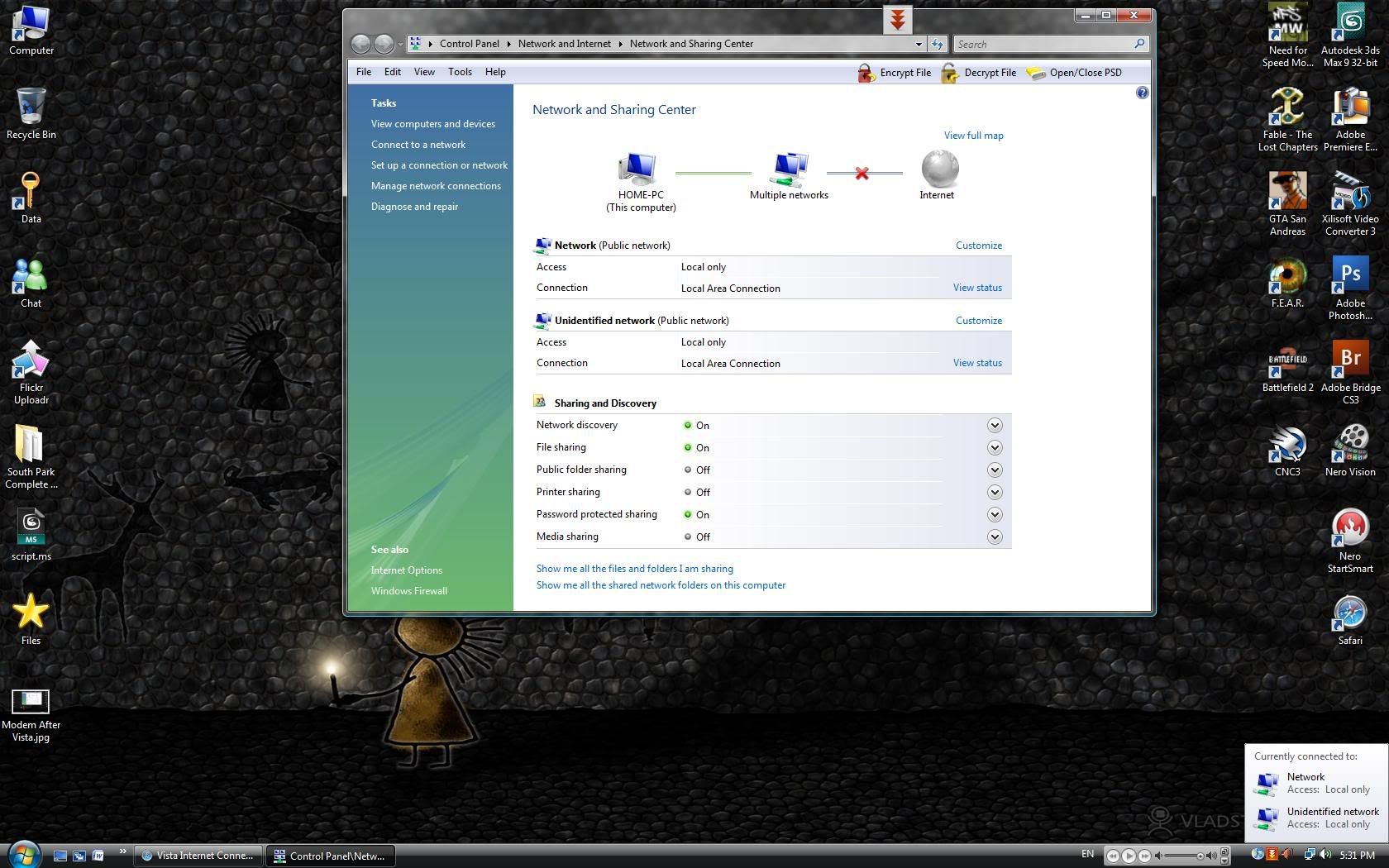
Tried it, whatever i switch on after Vista is loaded, i will get thisOriginally posted by ndmmxiaomayi:How about removing the Linksys router and just connecting with the modem only?
Try these 2:
1. Switch on modem first before turning on PC
2. Switch on PC before turning on modem
Then repeat with just the Linksys router.
http://i11.photobucket.com/albums/a178/aaecharry/ModemAfterVista.jpg
And funny thing, after I restart my Vista (on router beforehand) and on my laptop, a sharing folder between the two machines just appeared in my Networks as if its there all along. But i don't remember creating 1. -
Do you use Internet Connection Sharing (ICS) ?
-
Nope? All my machines are connected directly wired or wireless to the router if thats what you meant.Originally posted by ndmmxiaomayi:Do you use Internet Connection Sharing (ICS) ? -
Looks like something is not read correctly.Originally posted by chenc:Nope? All my machines are connected directly wired or wireless to the router if thats what you meant.
Can you download the latest Vista drivers for both your modem and router, then uninstall the old drivers. Restart the computer then install the drivers you've downloaded earlier.
Switch off the PC and leave it there for a while. Then repeat this experiment in this post: http://www.sgforums.com/?action=post_display&post_id=7109284 -
I have no problem with my vista, guess it's configuration
-
Configuration? In what sense?
Talk about that, my Vista book is about to come. Perhaps I could learn and start posting tweaks liao.
-
yay finally mayi getting vista !Originally posted by ndmmxiaomayi:Configuration? In what sense?
Talk about that, my Vista book is about to come. Perhaps I could learn and start posting tweaks liao.
anyway i oso using vista
i got some sort of a similar problem like ts
my CPU is connected to a router only (thomsom speedtouch 536v6)
i can switch on the router anytime and it'll connect
but if i switch it off after it has been connected and my com is also on, i cannot reconnect back by switching on the router again, i need to restart com then can connect
this isnt much of a problem since my singnet doesn't dc at all
-
Eh. Try waiting for 7 minutes, don't need to restart com. I face similar probs whereby if I restart my router, it wouldn't connect to the Internet within the next 5 minutes.Originally posted by wishboy:yay finally mayi getting vista !
anyway i oso using vista
i got some sort of a similar problem like ts
my CPU is connected to a router only (thomsom speedtouch 536v6)
i can switch on the router anytime and it'll connect
but if i switch it off after it has been connected and my com is also on, i cannot reconnect back by switching on the router again, i need to restart com then can connect
this isnt much of a problem since my singnet doesn't dc at all -
In a sense that it should be the configuration that caused the connection problem.Originally posted by ndmmxiaomayi:Configuration? In what sense?
Talk about that, my Vista book is about to come. Perhaps I could learn and start posting tweaks liao.
Anyways, what type of book did u get?